[CURRENT ISSUE] Sims 4 Problem With Your Game's Setup
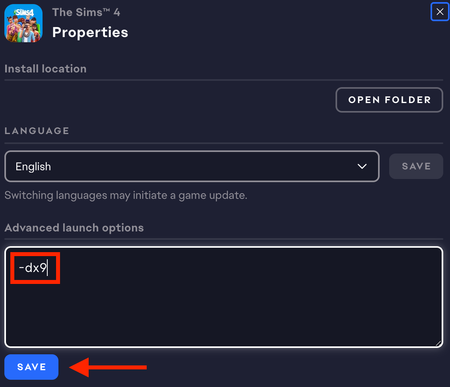

devoteddgfan Try forcing DirectX 9 mode. Open the EA App game library, click Sims 4 > Manage > View properties, and add -dx9 in the command line box.
If that doesn't help, or you'd like to see whether there's a way to use DirectX 11 mode, please provide a dxdiag. Hit Windows key-R, enter dxdiag in the run box, wait for the scan to finish, click "Save all information," and save the file to your desktop. From there, you can attach it to a reply using the camera (Insert Media) icon included with the other formatting buttons.

Thank you for your info. It worked great. I only play that game once a week on a different computer. I have the Sims four on two computers and X-Box One. I was so happy to play it yesterday even though I didn't get to play it for very long.


