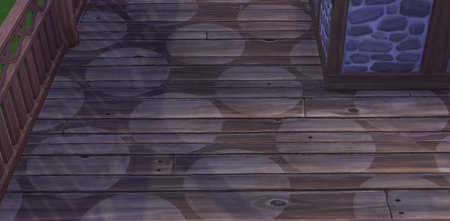
please help, translucent white circles that move with the camera

7Flower7Child7 Please remove that mod anyway, and start a new save just to make sure there aren't any lingering effects.
And make sure you're not using any shaders or other utilities included with your graphics driver. For example, Nvidia Freestyle allows players to impose filters in real time.
If that doesn't help, please close the EA App and kill the EABackgroundService in the Task Manager's background processes list. If you use Steam to play Sims 4, close it as well and make sure it's not running in the background. Open [install location]\The Sims 4\Game, here by default:
C:\Program Files\EA Games\The Sims 4\Game
or
C:\Program Files (x86)\Steam\steamapps\common\The Sims 4\Game
and delete the Bin folder. Then repair the game (EA App > Sims 4 > Manage > Repair OR Steam > Sims 4 > Properties > Installed Files > Verify integrity of game files), and try another new save.
puzzlezaddict removed the plumbob maps, i deleted the bin, repaired the game, and the circle moon pattern is still there :(



