Forum Discussion

Re: TS4_x64.exe application error

@JSoriano16  Those weren't searches, they were scans to verify the integrity of certain Windows files.  It's helpful that they didn't detect any violations, but the question is why the game still won't open.  Are you getting the same error as before?  If so, please post a new dxdiag.

If you're not getting that error, please move the entire Sims 4 folder out of Documents > Electronic Arts and onto your desktop.  If the folder copies instead of moving, or you get an error when trying to move it, stop here and let me know.

Otherwise, try again to play, and if the game still doesn't start, please post a new dxdiag.

13 Replies

  • JSoriano16's avatar
    JSoriano16
    Not applicable
    2 years ago

    @puzzlezaddict i dont get an error when i open it up it starts a loading process nothing pops up then it just reverts to the original state of pressing the play button again. So it starts to launch then it stops launching. When i look in the documents - electronic arts folder i dont see sims 

    also i have the game on steam if that matters

  • puzzlezaddict's avatar
    puzzlezaddict
    Hero+
    2 years ago

    @JSoriano16  Please check all the Documents folders in case Sims 4 has been using a different location than you're expecting.  Open a File Explorer window, click This PC in the left panel, then double-click the C drive.  Open Users > your username, and check Documents as well as OneDrive > Documents.  Check Users > Public > Documents too.  If you find a "The Sims 4" folder anywhere in one of these, take note of where, then move the folder to the desktop.

    Your dxdiag shows that a component of the Nvidia graphics driver is crashing as well, so it's best to install a fresh driver.  In your case, that just means updating.  You can get the newest driver here:

    https://www.nvidia.com/Download/driverResults.aspx/211637/en-us/

    Run the installer as an admin: right-click the download and select "Run as administrator."  Choose the Custom (not Express) install method and check the box to perform a clean install.  Restart your computer when you're done.

  • JSoriano16's avatar
    JSoriano16
    Not applicable
    2 years ago

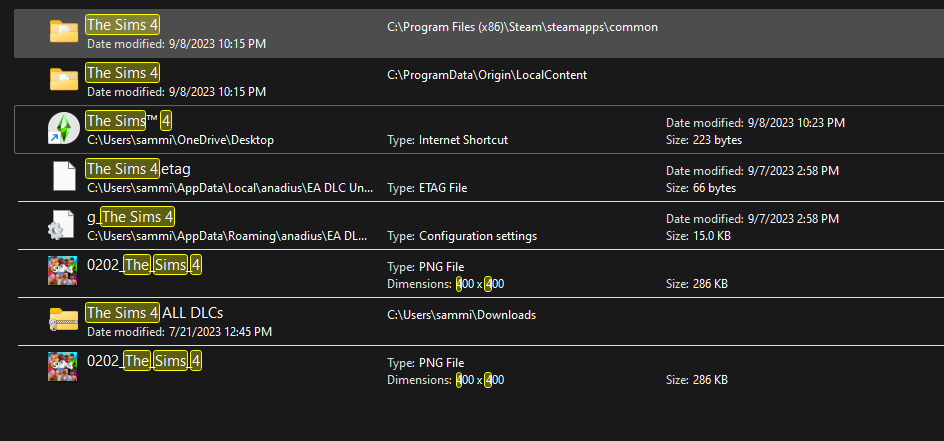
    @puzzlezaddict attached new dxdiag and when i search up the sims 4 folder this is all im getting im not seeing any location for sims in a document folder for some reason

  • puzzlezaddict's avatar
    puzzlezaddict
    Hero+
    2 years ago

    @JSoriano16  If you haven't been able to launch Sims 4 yet, or you haven't since you deleted the user folder, you wouldn't have a new user folder yet.  If you play in Spanish, French, German, or Dutch, the folder would be named differently, ("Los/Les/Die/De Sims 4"), so you'd need to use that instead, or just search for "Sims 4."

    However, your screenshot brings up another potential cause.  Did you download packs from a third-party source rather than from Steam or the EA App?  That might be the reason the game isn't working.

  • JSoriano16's avatar
    JSoriano16
    Not applicable
    2 years ago

    @puzzlezaddict those are mods my girlfriend downloaded she’s had them for awhile idk if it would really effect anything this just randomly happened 

  • puzzlezaddict's avatar
    puzzlezaddict
    Hero+
    2 years ago

    @JSoriano16  Please do a clean uninstall and reinstall of Sims 4:

    • Download Revo Uninstaller (the free version is fine) from here.
    • Launch Revo, select Sims 4 from the list, and click Uninstall.
    • Once the game is uninstalled, select "Moderate" under "scanning modes," and click Scan.
    • Review the list, in case there's something you want to save; otherwise, click Select All, and then Delete.
    • Close Revo, and restart your computer.

    Uninstall the EA App with Revo as well.  I don't have instructions for that at the moment, but the process should be straightforward.  Restart again when you're done.

    Install the EA App, then Sims 4 (through Steam), and don't add any content to it; just see whether it works.  If not, let me know whether you get the same error or a different one.

  • JSoriano16's avatar
    JSoriano16
    Not applicable
    2 years ago

    @puzzlezaddict now the old message is popping up again. i deleted everything. its all fresh 

  • puzzlezaddict's avatar
    puzzlezaddict
    Hero+
    2 years ago

    @JSoriano16  Please try a Windows repair install, as described here:

    https://www.elevenforum.com/t/repair-install-windows-11-with-an-in-place-upgrade.418/

    This shouldn't delete any of your data, but if you get to step 14 and are NOT asked whether you want to keep personal files and apps, back out and start over.

    If this doesn't help, please look for new errors in the Reliability Monitor.  Hit Windows key-R and enter "perfmon /rel" without quotes, and you'll see a chart of errors and updates with a column for each day.  Today is on the right.

    Look for an error that happened at exactly the time of your most recent attempt to launch Sims 4, specifically after the repair install.  If you find one, double-click it to see more details, then copy that info and paste it into a reply here.  If you don't see a new error, check back in an hour or so—the Reliability Monitor doesn't always update right away.

  • JSoriano16's avatar
    JSoriano16
    Not applicable
    2 years ago

    @puzzlezaddict did everything you said,still having the same issue and i do not see any error on reliability monitor at the times i launch sims.... is the last resort resetting entire PC?

  • puzzlezaddict's avatar
    puzzlezaddict
    Hero+
    2 years ago

    @JSoriano16  I think a PC reset, or a clean install of Windows, might be the only move here.  You've already tried everything else that I can think of, and when I asked for a second opinion, that person also thought the reset/clean install was probably the best option at this point.  Let me know if you need help with the process.

  • TumBear's avatar
    TumBear
    Not applicable
    2 years ago

    its not a you issue or a your PC issue, its an EA App issue. I have done all but reinstall windows, and am having the same issues, but am getting the missing files error. Worked fine before an update last month, now sims 4 is bricked. Its so great to know that there are very knowledgable folks like @puzzlezaddict trying to help out, but unfortunately some things are beyond fixable...

  • puzzlezaddict's avatar
    puzzlezaddict
    Hero+
    2 years ago

    @TumBear  What error are you seeing?  There's nothing about missing files in the original poster's error, which is a Windows error that, at this point, suggests that a clean reinstall of Windows is the only good option.  But that doesn't apply to most of the Sims 4 errors players see.

    If you'd like help with your issue, please post a screenshot of the error you actually get.  Please also run a dxdiag and attach it to a post.

    https://help.ea.com/en-us/help/pc/how-to-gather-dxdiag-information/