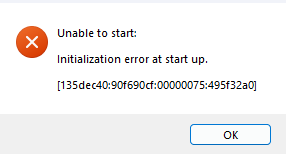
Fairy_Maie This is the master thread for the initialization error, and you haven't tried everything listed. So it's possible one of the steps may help.
[CURRENT ISSUE] Sims 4 Unable to Start, Initialization Error | EA Forums - 12542607
However, the fact that you can't uninstall the game is concerning. I would suspect your antivirus first. Did you try uninstalling and reinstalling (or deleting the files and reinstalling) with the AV removed? If not, that's the next step.
I have other suggestions for uninstalling here too:
📓[GUIDE] [PC] How to Clean-uninstall Sims 4 | EA Forums - 12636503
Whatever approach you use, you will need to clean your computer's registry of Sims 4 data, either by letting Revo Uninstaller do so automatically or by using Piriform's CCleaner or a similar tool. I would also strongly recommend removing the EA App with Revo and installing a fresh copy.