Problem with Anti-Cheat (code 115)
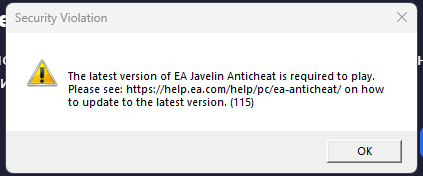
When I start the game, firstly it takes a very long time to start, this has never happened before. Secondly it does not start and gives an error. It says that the error code is 115, and they ask to update the anti-cheat, the address is given where to do it. I did exactly that, downloaded the anti-cheat, into the game folder, updated it and installed it, but nothing helped, I also completely cleared the possible cache on my PC, updated all the drivers, including the BIOS, reinstalled the driver for the video card, but the game does not work, and I am asking you for helping me. I am very angry because the game was released 3 months ago, and it has constant problems, either with performance, or with starting it at all, and I wonder why I paid so much money for it, when the game does not even start, and this is not even my problem. Why do other games work without problems, and yours has constant problems. YOU NEED TO FIX THIS **bleep** ISSUE BECAUSE I PAID MONEY FOR THIS GAME!!!!!!