
Just updated the sims 4 on my pc/laptop and now it’s displaying the controls on the left side. I have not messed with any settings at all, I even double checked to make sure I didn’t accidentally cha...
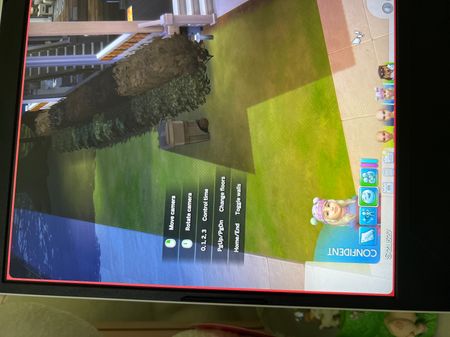

Since last update I have shortcut keys listed on my play screen. They show different shortcut keys from live play to build mode
Same! Idk how to remove it, I tried to disable tutorials in settings but it doesn't work…

I'm having the same issues. I can't cook anything. I have the skill level.
I can do everything I want to do with my sims but I have this list showing on my screen at all times

I merged your post with the main thread. This isn't a bug.
Please see first post on how to get rid of it.

 The Sims Team