[PS/XB] [CD] Can't enter dog breed name
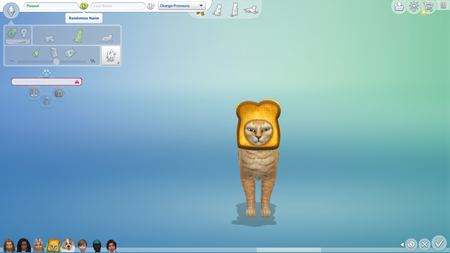

Edit - 08/24/2025
In cas by the check mark and X is a little dice button and to the left of the dice button is a little arrow button. Click the little arrow button and make it so that it will not randomize anything except pet clothes. Then click the dice button. it will put some outfit or whatever on your pet but that is ok for now. It should also set the pet breed as mixed or allow you to select one, but I think it will just set it as mixed. Then you can remove the clothes or select the clothes you want on your pet and save. So far this method has worked for me with no worry as to changing the look of my pet.

old thread but this fixed the issue for me thank you!
You are very welcome and I am glad that it worked. I just posted an update to the method that works and doesn't risk changing the look of your pet. Only slightly different but you will remember it once you read it. Use it next time you run into the problem so that you don't risk the looks of your pet changing. I thought I had already posted the update but I was mistaken. So I am really happy that the former method I listed was successful for you.

 The Sims Team