Purchase/Order Menu missing
Platform: Mac
OS Version: macOS Sonoma 14.6.1
Game Version: 1.124.63.1220
Mods/CC: None (Mods folder contains only Resource.cfg)
---
SUMMARY
The Purchase Books interaction is completely missing from bookcases, and the entire Order… menu is missing from computers. This affects all saves, all lots, and a completely fresh game with no mods or CC.
---
SYMPTOMS
Bookcases
When clicking any bookcase, the only options available are:
- Read…
- Read Something
- Read to Children
- Open
Purchase Books is completely absent. When selecting Open, only Children's Books and Novels are listed — no skill books. The problem started with being able to purchase books just no skill books. Now that option has totally disappeared.
Computers
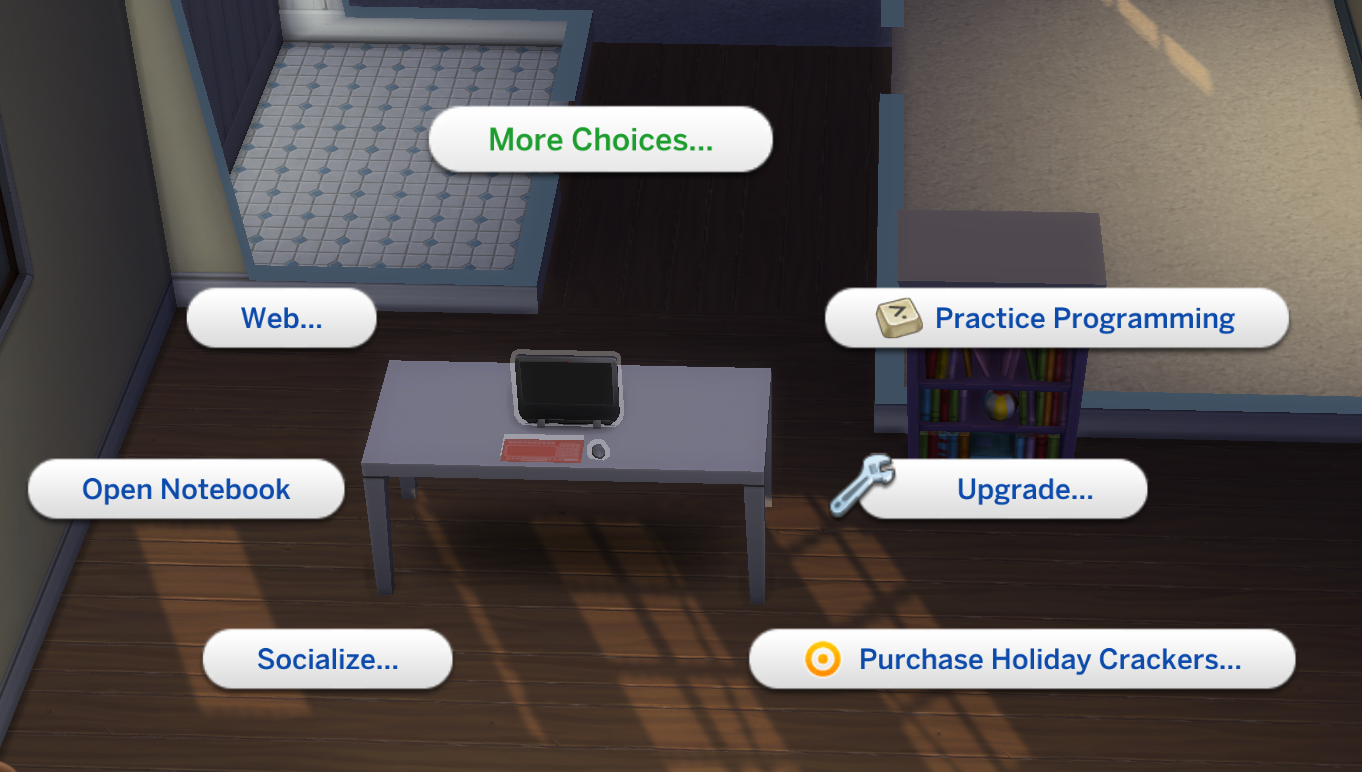
When clicking any computer, the available options are:
- Write Jokes
- Donate to Online Charity
- Write
- Social Networking
- Computer Security Settings
- Play Game
- Career
- Household
- Web
- Open Notebook
- Socialize
- Purchase Holiday Crackers
- Upgrade
- Practice Programming
The Order… menu is completely absent. As a result, the following are inaccessible:
- Purchase Books
- Purchase Seeds
- Purchase Upgrade Parts
- Purchase Crystals
- Purchase Oversized Crop Seeds
- All other Order menu functions
Note: Purchase Holiday Crackers remains available as a standalone option.
Appliance Upgrades
Upgrading appliances is not possible despite having the correct upgrade parts in the Sim's inventory and the required Handiness skill level.
---
TROUBLESHOOTING ALREADY PERFORMED
Save File Testing
- Tested in multiple existing saves
- Created a brand-new save
- Created a brand-new Sim
- Issue occurs in all saves without exception
Mods
- Removed all mods and CC
- Mods folder contains only Resource.cfg
- Issue persists with no mods installed
Sims 4 Folder Reset
- Renamed original Sims 4 folder as backup
- Allowed game to generate a completely fresh Sims 4 folder
- Tested with fresh folder only
- Issue persisted
Game Reinstall
- Uninstalled and reinstalled The Sims 4
- Uninstalled and reinstalled the EA App
- Cleared EA App cache
- Restarted Mac multiple times
- Allowed game to generate a completely fresh Sims 4 folder
- Issue persisted
Manual Cache Clearing
- Manually deleted all EA-related folders from ~/Library/Caches (EA App, EACrashReporter, EALaunchHelper)
- Deleted all EA-related .plist files from ~/Library/Preferences
- Deleted the EA App folder from ~/Library/Application Support/Electronic Arts
- Relaunched EA App and allowed full rebuild
- Repaired game installation via EA App
- Issue persisted
Game Settings
- Online features are enabled
- Tested with a completely fresh game configuration
- Script Mods disabled; Custom Content enabled
Objects Tested
- Multiple different bookcases across multiple lots
- Multiple computers across multiple lots
- Same result every time
---
KEY COMPARISON: SAME EA ACCOUNT ON ANOTHER MAC
This is the most significant finding. I logged into the exact same EA account on my partner's Mac (macOS Sequoia 15.7.7) and tested the same interactions.
On my partner's Mac:
- Bookcases show Purchase Books normally, including skill books
- Computers show the full Order… menu with Books, Seeds, Upgrade Parts, Crystals, Oversized Crop Seeds, and Holiday Crackers
On my Mac:
- Purchase Books is missing
- Skill books are missing
- The entire Order… menu is missing
This confirms the issue is:
- Not tied to the EA account
- Not tied to save files
- Not caused by mods or CC
- Not resolved by reinstalling the game or EA App
- Specific to my Mac
Both Macs are located in South Africa on the same network.
---
ADDITIONAL NOTES
I have been playing The Sims 4 on this Mac successfully for years. This issue appeared suddenly with no clear trigger — possibly coinciding with a macOS update, though this is unconfirmed.
All owned packs show as installed. No packs are showing a Download or Install prompt. Only Windows-exclusive Bonus Content is unavailable, which is expected on Mac.
The selective survival of Purchase Holiday Crackers as a standalone option (while the rest of the Order… menu is absent) may be a useful diagnostic detail, as it suggests the issue lies specifically with the Order… interaction menu loading rather than a blanket loss of all purchase functionality.
Please can someone help me? I have exhausted everything on my side to try to solve this and spent over two days trying to find a solution. Feeling incredibly frustrated...
Edit By crinrict: Adjusted Title, corrected tags. Please use either never mods or cc/mods removed. Both contradicts each other.
[CM edit - formatting]