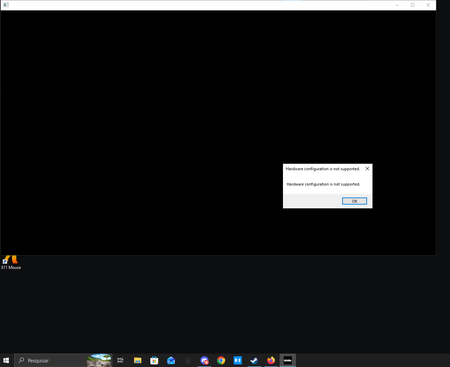
EA Refund Tool & Contact Us Option Not Working
Yesterday, 12/4/2025, my sister wanted to get almost all the Sims 4 expansion packs/content packs/etc. We bought them (totaling almost $500) but they unfortunately aren't compatible with her laptop. I've tried every single route recommended to try and get a refund for these, but the refund tool won't work now, and when I go to the "Contact Us" form, it says "this issue isn't supported by our advisors". I'm refusing to let this go for purchases that are unusable and totaling over $500!!! Someone please help me here.Solved366Views0likes5CommentsHelp please- hacked account
Hi I am actually in tears as I write this because I have been trying to solve this for hours and I'm still no further forward. My autistic son has been without his account for well over a week now, and is very stressed and upset. He has learning disabilities so can't understand what's going on in detail. His Steam account - which is linked to his EA account - was hacked, but Steam have recovered it thankfully. When he tried to play his game we realised his EA account is also compromised. The email on the account is now the same one as was on the Steam account whilst it was compromised. I can't see the entire address but it starts the same way and is definitely not something we recognise. I have read every help page, but they all come back to the same place and a chatbot that cannot help. When I ask for support it says you have sent me a code. But you've sent it to the hackers address which I obviously don't have access to - or I wouldn't be in this situation!!! This cannot just go on like this. My son is panicking because he thinks the hackers will mess up his game. Please can someone just help me, I'm begging you. Thank you, Rachel4Views0likes0CommentsPlaying EA games on PC is the worst user experience.
Console players get a game; PC players get DRM, double launchers, and corporate mismanagement. When is this going to change? (Console players get the corporate mismanagement aswell) As someone who plays predominantly on PC, I am beyond exhausted by the absolute worst-in-industry user experience that EA forces us to deal with. It honestly feels like EA views PC players as second-class citizens—or worse, just an afterthought to be monetized through hoops and hurdles. Buying and playing EA games on PC has become a miserable experience, the entire ecosystem needs a massive wake-up call: 1. The Forced Launcher Nonsense (Steam / Third-Party Duplication) When I buy a game on Steam, I expect to launch it through Steam. Simple. Seamless. Instead, EA forces PC players to run the EA App on top of Steam. Why am I opening a storefront just to open another storefront just to play a game I already paid for? It creates unnecessary background bloat, fails to link accounts half the time, and acts as glorified DRM that actively punishes legitimate, paying customers while pirates bypass it entirely. Console players don't have to deal with this multi-launcher gatekeeping BS. You put a disc in or click an icon, and you play. Why are PC players treated like hostages to your proprietary app metrics? If you do not want me using steam and want me to use your launcher make a BETTER launcher/distribution platform than Steam. If you give the consumer a better product they will use it. 2. Corporate Studio Necromancy (RIP BioWare) Look at what EA does to legendary development studios. You buy up brilliant companies with decades of goodwill, micromanage their vision, force them onto inappropriate engines (Frostbite, anyone?), bleed them dry, and then let them rot when they inevitably stumble under the weight of corporate interference. BioWare is the prime, tragic example of this cycle, turning from an industry titan into a cautionary tale. 3. Forcing Mandated Trends, Failing, and Blaming the Developers EA pours hundreds of millions of dollars into focus-grouped, executive-dictated trends (live-service chasing, forced multiplayer, microtransaction-heavy sandboxes) that nobody asked for. When these hyper-managed corporate projects inevitably bomb, EA management acts shocked—as if they weren't the ones standing over the developers' shoulders forcing them to make games EA's way instead of letting creative studios make the games they are actually good at making. 4. Zero Optimization or Respect for PC Hardware PC ports often feel neglected, arriving with locked framerates, poor keyboard/mouse mapping, stuttering asset streaming, and broken overlay integration. It's clear that PC optimization is an afterthought checked off a bare-minimum list, while console optimization gets the primary spotlight. The ultimate irony is ALL games are made on a computer. and it shows how out of touch AAA development has become. ALL EA games are built, coded, compiled and rendered on PC's using dev kits on PC architecture. So the game works great on pc, they just wont optimize it. The Result? Broken games on launch. 5. Abandoning Games Almost Immediately After Launch & Complete Bug Neglect Look at annual franchises like Madden NFL or other sports titles. EA drops a full-price game, slaps a roster update on it, and then effectively abandons meaningful support, patches, and community engagement almost immediately after launch to pivot entirely toward hyping next year's identical release. Critical bugs, desyncs, and game-breaking glitches linger for months or are ignored entirely, and the product is treated as a disposable cash cow. At least when companies like Bethesda drop a notoriously buggy game on PC, they leave the ecosystem open enough that modders can step in, patch the engine, and fix the garbage themselves. EA won't fix their broken games, but they lock down their software so tight that the community can't even fix them either. Console gamers don't have to jump through burning hoops just to boot up a title they purchased. Stop treating PC users like a captive audience for your launcher metrics and corporate restructuring experiments. Respect our time, respect our hardware, and let us play our games directly through the storefronts we choose. Fix your app, fix your studio management, and start respecting your player base.48Views0likes0Comments
Lost access to original email. EA Support has been no help.
Lost access to a compromised email some months back and recently found out that it's tied to the EA account that I use with my Xbox. Should be a simple fix if I still have all my account data tied to the linked Xbox account, right? Wrong. Because I can't access the original email address and have no way of recovering it, I have to rely on EA's atrocious "game verification" method that has never worked once. Contacted customer support agents about this and haven't received any sort of help on how to reset things manually. Only the same, tired game verification which CUSTOMERS CAN DO THEMSELVES WITHOUT CONTACTING SUPPORT. Why would I contact customer support for something I can easily attempt myself? Tried this for days without any success, contacting supprt to be met with the same copy + pasted dialogue that doesn't help. I can't even delete the account if I want to since that'll require full access which I do not have. At this point, I'm seriously considering never touching a product from EA again if this is the kind of customer support waiting for me.16Views0likes0CommentsTransfer market locked after 7 days
Subject: FC 27 Web App Transfer Market Still Locked After 5 Days Hello EA Support Team, I am contacting you regarding an issue with the Transfer Market on the FC 27 Web App. My account has been active and I have been playing the game for 5 days, but the Transfer Market on the Web App is still locked. I can access my account and play the game normally, but I still cannot access the market through the Web App. I have already been playing the game and completing matches, but the issue has not been resolved. Could you please review my account and explain why the Transfer Market is still locked on the Web App? I would appreciate your help in resolving this issue as soon as possible. Thank you for your time and support. Best regards3Views0likes0CommentsWear and tear and customisation
We need to have wear and tear on boards, be able to break boards og the boards snap if you have been using the same deck for a while, even if it’s high impact. we need to be able to have different board sizes and shapes. we need to be able to put the stickers on the board where we want them. It can’t be hard to add, they have it with the tattoos. And speaking of tattoos, it don’t make sense you only can have one on each body part. come on ea! Reskate is making the game so much better and so much faster. get your finger out of your **bleep** devs!