Launching ItTakesTwo using EA or Steam.
Im having the same problem again, if I use Steam to open the game, it will use EA app to open the game, which it will not open, it either stuck in launching game screen or it will just close the launching screen without opening the game, I can only launch the game using epic game launcher but i will not be able to use a controller if i do that, and i want to use 2 controller for us to be able to play how can i do that? im using 2 nitendo switch pro controller and a pc31Views0likes1Comment
It Takes Two – Error 104-20004 when joining crossplay
Hello EA Support, My friend and I are trying to play It Takes Two together using the newly introduced crossplay feature, but we keep getting error code 104-20004. Here is our situation: I am playing on PlayStation 5 and own the full game. My friend is playing on PC through Steam using Friend’s Pass. My friend has just downloaded and installed the game. The error appears when we try to join each other through an invitation. We cannot start an online co-op session. We know that cross-platform play was introduced on October 15, 2026. Could you please clarify: Is error 104-20004 a known issue with the new crossplay update? Are there any special settings required to enable crossplay between PS5 and Steam? Does Friend’s Pass on Steam fully support crossplay with PS5? Is there a workaround or upcoming fix for this issue? We would really appreciate your assistance. Thank you!130Views0likes1CommentA Way Out infinite loading screen
Neither me nor my partner is able to join each other - it's just an infinite loading screen. Is there any real reason why this has been a persistent issue over the years? Why hasn't it been fixed? This is one of my favourite games, and I'm bummed out that it hasn't been working for... around half a year. Yes, we've both reinstalled the game multiple times.101Views2likes3Comments
HELP 103-3f0001 AT IT TAKES TWO
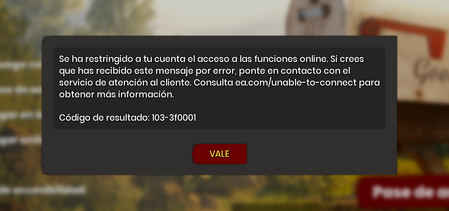
Hi! I'm a PC/Steam user I'm unable to play It takes two (I'm using the friends pass from Steam). Two weeks ago, before the crossplay got launched, it was everything okay. Now, I'm trying to play with my partner and I get the result code: 103-3f0001 which says I'm restricted from accessing any online features. I've followed the page to it gives for more information but I'm unable to actually speak to an online agent to help, It keeps looping me back to the EA Help articles but I can't see any options to live chat with anyone? Why have they made it so difficult to contact them or submit a ticket?? It doesn't even appear the game on the list!! I already tried everything. My account has no restrictions or bans. I'm not underage, not in my EA account or Steam account. I tryied with 2 different networks I even created a new EA account and tryied but it appears the SAME error Please help!Solved297Views0likes8Comments
A way Out Friend Invite EA App Not Available
Hello i Have Problem With EA App On A Way out Game When i Search For it in App Not Showing And When Friend Invite Me To Give Me Access it's Say Game Not Available Friend Have Steam Verison i Owned The Game On PS4 And i Don't Want To Buy it Again i Have Reinstall The EA App And Clear Cache Same Issue Maybe You Can Try To Search For The Game in App it's Not Showing How i Can Fix The Problem?214Views0likes2Comments
Improve reconnection system in It Takes Two
Hello EA Support / Hazelight Team, There is a frustrating issue with the online co-op system. When one player experiences a brief internet dip, the entire session closes automatically for both players. To resume, we have to send and accept a new invitation every single time, which ruins the immersion. My Suggestion: Instead of kicking the player out instantly, please consider adding a "Retry / Reconnect" button. While a player is disconnecting, their character should just freeze in place until the connection is restored, allowing them to resume seamlessly without restarting the session or needing a new invite. This feature would vastly improve the experience for players with unstable connections. Thank you!T72Views0likes0Comments
Kingdom of Amalur: Reckoning no DLC playable
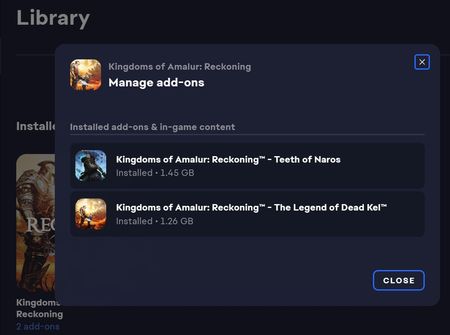
I also published this question in the German EA Forum, but since I expect the audience here to be larger, I am also posting my problem here. After many years I reinstalled KoA:R from my EA account including both DLCs as the following screenshot from the EA App (PC, Windows 11 64-bit) shows: I know that THQ later acquired the rights to the game but, the installation worked, and I can play the main game even though it won't connect to the EA servers. Unfortunately neither DLC is playable/startable so I was wondering if anyone knows a way to start them since, for example, there is no Commordire Garrick in the Seaform Tavern. I appreciate any help and thank the helpers in advance.454Views0likes4CommentsOnline play isn’t working
I just played split fiction 5 days ago online with my sister and now it won’t even let me get to the page. It keeps saying result code 102-8000d0000. I am playing on ps5. I did all the trouble shooting tips give seen. I cleared the cache in safe mode, changed wi-fi settings, confirmed my ea account is linked, bought the ea play subscription thing, and fully restarted the system twice. What else can I do to get this to work?320Views2likes2Comments
HELP. Unable to connect to game lobby (Split Fiction)
My friend bought the full game and I had the friend pass, but then this screen appeared after accepting my friend invite. I thought this was a friend pass problem so I bought the full game from steam. And yet still appeared the same screen either my friend host or me, we both bought the game from steam. I realized that in my EA Launcher with steam linked EA account it doesn't detect split fiction, but maybe its because the game doesn't need the EA account to play in same platform and I didn't even start playing the game yet so maybe it somehow doesn't detect it? Search everywhere but no one really ever had the same problem with us, does anyone have any idea what to do?1.6KViews0likes5Comments