Trying to access old account
Hi, I’m trying to recover an old EA account I used for Apex Legends on Xbox.I believe I know the email linked to the account, but I can’t access it because 2FA is linked to an old mobile number, so I can’t receive the verification code.I can provide my old Xbox Gamertag(s), possible EA IDs/usernames, email addresses, old mobile number and other account details to verify ownership.I also have old bank statements showing payments to Microsoft during the period I played Apex. They don’t specify Apex, but these relate to Xbox purchases I made. I spent hundreds of pounds on the account and had an Apex heirloom.I played over 1,000 hours and reached Master rank multiple times. I’d really like to recover my original account, including my stats, progression, cosmetics and heirloom.I’m happy to provide any further information needed to verify ownership. Thank you. please email mailto:[edit: email address removed] mailto:[edit: email address removed]28Views0likes5CommentsPlayStation level 300 progress missing on PC – Same EA account
Hi everyone, I need help with an Apex Legends Cross Progression issue that I have not been able to solve through EA Support. I played Apex Legends on PlayStation for several years and reached approximately level 300. I had many skins, legends and other cosmetics on that account. Around 2-3 years ago, I started playing on PC. When I tried to access my PlayStation Apex progress on PC, it did not appear. Instead, Apex started me with a new level 1 profile and none of my PlayStation cosmetics were available. I have checked my EA account and my old PlayStation Network account is linked to my EA account. My Steam account is also linked to the same EA account. When I log into EA using my old PlayStation Network account, it takes me to the same EA account. I still have access to my PlayStation Network account, but I currently do not have access to the physical PlayStation console because it is far away from me. I recently contacted EA Support and explained the entire situation. They collected my information and said they would investigate, but I have not received a solution. My main question is: Is there any way to identify where my original PlayStation Apex profile and progress are associated, or determine why my level 300 account and cosmetics did not appear on PC even though both PlayStation and Steam are now linked to the same EA account? I am not interested in keeping the level 1 PC progress. I only want to recover the original PlayStation progress and use it on PC. PSN ID: Mi_Pana_Daniel I would really appreciate any advice from someone who has experienced a similar Cross Progression issue, especially if you managed to recover your old PlayStation progress. Thank you!9Views0likes0CommentsSeason 13 returner, levels seems intact, cosmetic inventory completely missing
I am a returning Xbox player who recently logged back into Apex Legends after a long hiatus. The last time I actively played on this Xbox profile was during Season 13 (mid 2022). Upon loading into the lobby today, my lifetime account level and coin/token balances seemed to sync properly, but my entire legacy cosmetic locker and character unlock inventory are completely gone/locked.Because I haven't played since 2022, my account completely missed the automated server-side Cross-Progression migration window from late 2023 and has something to do with it I assume. I had made an account at the time for PC which was at level zero under the same email through running through steam. I didn't make much of any progress with it and is definitely not whatever the current save I have now is. I have never manually unlinked this Xbox profile from my master EA account prior to this error occurring today (I briefly toggled it just now to test the server handshake, but the issue was present immediately upon my very first login). Platform: Xbox Series X and PC Gamertag: Spongy Gamers Status: Level and currencies seem accurate, only cosmetics/legends are missing.12Views0likes0CommentsCode:Tap
The new split is here, and we were told that the issues were being investigated/fixed, but the exact same problem is still happening. I played ONE Ranked match and immediately got Code:Tap again. This has been happening repeatedly, and I’ve already reported it numerous times. At this point, restarting the game, checking files, changing data centers, etc. clearly isn’t solving the problem. The issue keeps coming back in Ranked. Please acknowledge this as an ongoing issue and provide an actual update on what is being done to fix it. It’s extremely frustrating to lose access to ranked after just one match because of Code:Tap.16Views0likes0Comments
Unlinking a Playstation account from a deactivated email
My old Playstation account was linked to another email email that use to belong to a family member who passed. The email is deactivated. Is it possible to unlink it so i can link the Playststion account to my current ea account?30Views0likes1Comment
Conduit locked and cannot be unlocked
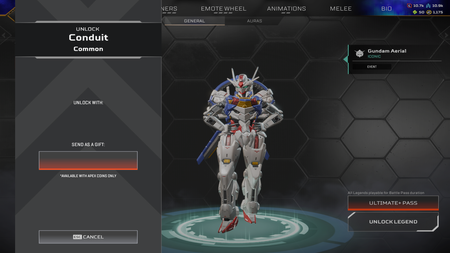
Hello, EA_Mako , sorry for bothering you. I know there are some posts about Conduit being re-locked, but I haven't seen any resolved cases, so I decided to create a new post to explain my situation in detail. If possible, please help me fix this bug. I unlocked Conduit when the legend was released in 2023. The third attachment is a screenshot I retrieved from my gameplay recording from a few months ago. You can see the Conduit was properly unlocked at that time. On Sept 3 2026, I used EA app on a new PC to launch Apex Legends and played normally. However, on Sept 4, I logged into Apex via Steam client on my old PC and found my Conduit had become locked. I tried to unlock the legend, but the unlock button had disappeared. Details can be seen in the first two screenshots. I have tried all troubleshooting methods: re-logging in, restarting the game, rebooting my PC, and verifying the integrity of game files. I also unlinked my Steam account from my EA account, yet Conduit remained locked. Afterwards, I re-linked the two accounts. I submitted a support ticket through EA Help, but I have not received any reply to this day. I noticed that the bug I encountered is very similar to the earlier issue where Ash was unexpectedly re-locked, and seems you have already fixed that bug. I hope you can resolve my current issue so I can use Conduit normally. Thank you. Please leave a message if you need any additional information. Thank you again.69Views1like6Comments