How can I find a specific Sim on Gallery using an image?
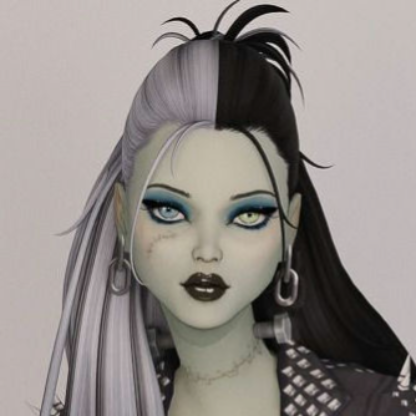
Does anyone know how I can find a specific Sim from the Gallery using just a picture? I have one image of her, and she might have been a popular upload. Any tips or tools I could use? A while ago, I downloaded a Sim from the Gallery and created a story for her, but I forgot to save her to my library. I haven't been able to find her again, and I can't replicate her facial features. I did manage to recreate her outfits and style, and I even ran an image search, I found one single picture of her, but no clue about her name to look her up on the Gallery. I'm not sure if the creator removed her, but I'd really like to have her back with her original face. Here's the image I found of her, in case anyone has seen her before.11Views0likes0Comments
Game Crashes When I Use the Coffee or Tea Makers and Kettles
Hello! I wanted to transfer a post I made under the Mods and Custom Content section to see if it makes more sense here based on what I've found. My game keeps crashing when my controlled sim uses a beverage maker. I'm not getting anywhere doing the typically prescribed CC and mods checks (50/50 method, starting on a new save, placing mods and CC back in Mods folder one-by-one by creator, etc.), and the Mods and Custom Content pages don't have any other suggestions. My ultimate question is: Does this appear to be a CC issue or an issue with Mac? I've copied and pasted the responses here for more details: My game crashes every time my sims use a coffee or tea maker small appliance. This has been an issue for a while in my game and I can't seem to figure out the cause. I have done the 50/50 method three separate times now, and just when I think I've dwindled it down to the CC culprit, as soon as I put back all my mods, it continues to crash. With the 50/50 method, I identified a Pandasama mod and BuildBuy items as "allegedly" causing the crashing. I removed those items, tested in the save again, and it didn't crash. But when I put back all my mods, it crashes again, even though while doing the 50/50 method the game did not crash while I'm testing each of the items separately. I don't know how else to troubleshoot for the crashing. Any feedback would be greatly appreciated! For the record, I play on a Mac with an Apple M2 Pro Chip, and it's on the macOS Tahoe Version 26.6.1. If you need any more information on my computer, I'd be happy to provide. Hello! So I've finished testing all my BuildBuy CC and with all my BuildBuy CC in my game, it does not crash. However, when I added my CAS CC folder back as well as the BuildBuy, it crashed. That would indicate that there must be some bad CC in the CAS folder, right? However, when I tested the game with just my CAS CC folder in there, and NOT my BuildBuy CC folder, it did not crash. To clarify, the control test I'm using is my sim getting hot cocoa from using a kettle that came with For Rent. The crashing happens while my sim is drinking the drink. Also, another control is that my Mods, which I also tested separated, are all in the game at the time of testing--I'm only swapping out the CC items at this point because my game did not crash with any of just my mods. Just a quick update on this because I don't know how much longer this will take me to keep going through, but now I'm testing with all my mods and CAS CC installed, and bit by bit I'm adding back my BuildBuy CC. I got about halfway through testing without it crashing, then all of a sudden it starts crashing again. I removed the cluster of sub-folders I tested when it crashed and isolated it thinking that was the culprit and put another cluster of BuildBuy sub-folders in, and it crashed again. I removed those folders, and removed the sub-folders I put in last before the crashing started to essentially go back to before the crashing began again, and it crashed again. This save file is only 6 months old, and I've only been playing in Live mode in it for about 6 weeks (prior to that I was just placing lots and creating sims). Could it possibly be corrupted already? Literally everything else in the game works fine except this singular feature, and all this testing is not bringing me any closer to any solutions. Has there ever been a bug report on small appliances? Could Sims 4 Studio help? Hi there! I have the same problem, and I play on mac as well (apple m3). When a sim drinks tea/coffee/hot chocolate game can crash, but not everytime! For example, it does not crash when my sim goes to his open career lot and drinks coffee there. Also, some kind of tea does not crash game as well. It appeared in 3 different saves with 3 different combinations of mods. I tried 50/50 but got absolutely random results. It seems to me, that there is no particular mod which cause it, but some mac-specific mod issue in general, because in generated report there is a KERN_PROTECTION_FAILURE which probably might mean that game tries to get access to some protected or invalid part of memory. I'm trying to analyze it with llm, but to no avail yet. Confirming, that for me this bug does not appear on vanilla game as well. Thank you in advance!
Can't see through cc windows/doors
I just recently started playing the sims again after being away for 6ish months and all of my cc windows and doors are broken. I can see the frames but the part of the winodw that would be glass or the actual door part of the door are just the same as whatever the wall is that I put them on. Im running on Windows 11 with the most updated version of the sims - does anyone know how to fix this issue?
Spandrel and Frieze issue
I have a wall of spandrels that have a frieze so it is pushing them down. I added a flat platform next to it and on one side it is making the spandrel ignore the frieze while its working fine on the other side. I've tried replacing it and copy and pasting one side and the other. Any idea why its doing this and how to fix it?Solved
"Cannot start because game data is missing or damaged" Error Code
So i redownloaded the Sims 4 yesterday and was downloading some mods, however when I launched the game I kept getting the same error message and the game wouldn't load. This morning I started testing and it's definitely some sort of mod issue (the game loads fine when mods are gone) however the game is also fine with the loading the script mods I had installed (modguard and better exceptions) and they were working perfectly fine. The issue seems to be with just regular package files, however I haven't been able to determine which piece of cc could be broken using the 50/50 method. I've checked through the list of broken/obsolete cc and I have none of it is my current mod folder. I also generated a new mods folder and that did not resolve the issue either. If there are any other tests or advice that could me help determine what would be causing this message to pop up that would be appreciated.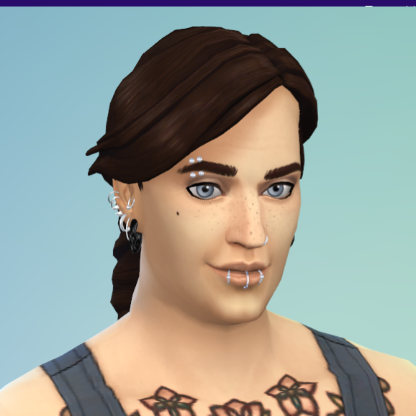
Advice for editing CC tattoos with cut off placement
I'm culling CC using s4s and a specific maker I like seems to have made dozens of tattoos that weren't finished well leading to the art cutting off some placements like the inner thigh lead to the cut off showing up on another part Any advice on how to adjust the placement in the file to fix this? some cut off on both edges, its most common on the outer or inner thigh line I have checked in game and it's not related to the s4s renderSolvedGame crashes when I load a lot ;^;
Hello! So I’m facing an issue where a certain household won’t load and it will just crash out into my home laptop screen with no error message. I play with mods and CC. I was able to play with this household just fine. But when I went to play again today, it just started crashing like that. I thought it was the save file that crashed but when I played a different household using that save file, it worked fine. So I moved out the household to an empty lot and played it. It worked. But I really wanna play that old lot cos I worked hard to build stuff on it. How can I fix it? Or do I just take the L and redo it? Thanks again!
Missing mods / script mods
I downloaded a bunch of mods and script mods to build a house with, put them in the correct folder in my files and went into the game turned on custom content and mods and of course script mods, left the game so it can update that to be in the game. I then went back into the game, it told me that the mods and script mods are all in my game and enabled but when I go to build, they are not there and I can't find them anywhere. I have no idea what to do or how to find them, I searched the game up and down and have no idea what to do because I just want to build a house with my cc but it's not showing in my game, and I am really confused. Someone please help me figure this out.
Any idea on keeping family tree working well?
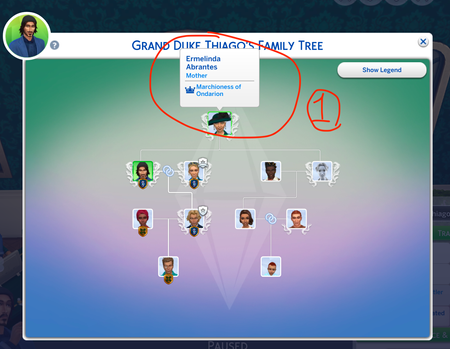
I do not use any mods/cc in Sims 4 however lately start to think if I should. The family tree status is always a bug in my game no matter how many time the repairs - it just doesn't work. Anyone know which mods/cc is effective for managing family tree and relationship status? I tried to make her die by anger and didn't work so went inside CAS and turned her dead. when the "going back to netherworld" option on the urn is clicked, the family tree doesn't show the death type. Wonder if mods/cc can solve this? When both married couple died, sometimes family tree shows them as greyed out, sometimes still shown in color. And the marriage symbol is gone when one or both passed away. This has always been the issue in my game (I just cannot be bothered to report as bug no more). When couple divorced, my family tree, again, the divorce sign goes missing.