CANT RENEW!!
i want to renew my ea play pro subscription but when i pay it says "this Credit Card Number is already saved to the account. Please select the credit card from the Saved Payment Method section to continue". but i cannot select it in method of payment!! only method i get is to add new card. please i want to fix it ASAP37Views0likes2CommentsCannot purchase EA Play Pro
I've been trying to buy EA play pro but every time I try to I get this error message "That didn't work, let's try again. If the problem persists you may want to use a different payment method or try again later." I called the bank to see if it was them declining the transaction. However they said that they didnt decline and transactionSolved20Views0likes1CommentNo recibo el código de verificación para cambiar mi contraseña.
Hola, estoy teniendo un problema para entrar a mi cuenta principal de EA. Me olvidé la contraseña de inicio de sesión y cuando le doy a la opción de que la olvidé para restablecerla, supuestamente me mandan un código al mail, pero no me llega nunca nada. Ya revisé la carpeta de spam y correo no deseado por las dudas y tampoco hay nada. Tuve que crearme esta cuenta nueva solo para poder entrar al foro y publicar esto a ver si me pueden dar una mano. ¿Alguien me puede ayudar a solucionar esto o ver cómo puedo recuperar el acceso a mi cuenta principal? Gracias.Solved13Views0likes1CommentKann seit einer Woche EA-Play Pro nicht kaufen. EA findet keine Lösung?
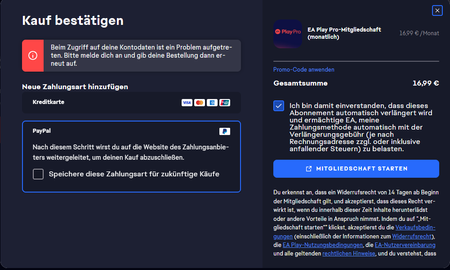
Hallo zusammen Ich probiere seit einer Woche ein EA-Play Pro Abo abzuschliessen aber es funktioniert einfach nicht. Egal ob PayPal, Revolut, meine Bankkarte, ich kann die Zahlung nicht ausführen und es kommt immer wieder folgende Fehlermeldung: Und bitte kommt nicht wie EA Support und fragt mich: "Bitte probieren Sie andere Zahlungsmittel"... Dieser Fehler besteht seit einer Woche, also, seit dem Release von EA 27 und ich habe gerade über 1 Stunde damit verbracht im Chat mit dem Support zu schreiben. Sie konnten keine Fehler finden und bis Sie endlich mal mein Problem verstanden haben musste ich mit 3 Supporter schreiben... Der letzte Supporter meinte, ich muss warten da Sie dies mit dem Team analysieren werden und das Sie mir keine Rückmeldung geben können.. Ich solle einfach die Socialmedias abchecken und Twitter und sehen ob Sie was posten... ehm? Als könnte man nicht kurz eine Mail senden wenn das Problem gelöst wäre? Ja nun auf jeden Fall haben Sie nicht Angebotem mir das Abo als Entschuldigung zu schenken oder irgendetwas, schon nur eine Rückmeldung per Mail hätte mir gereicht, ich muss jetzt einfach warten und irgendwann wieder probieren ob es funktioniert.. bisschen traurig für einen Spieler der seit über 10 Jahren immer wieder mehrere Spiele von Ihnen kauft. Hat sonst jemand dieses Problem??49Views0likes3CommentsEA Pro bezahlt aber nicht bekommen
Sehr geehrtes EA-Support-Team, ich wollte ein EA Play Pro Abonnement abschließen und habe den Bestellvorgang vollständig durchgeführt. Die Zahlung wurde erfolgreich über PayPal am 21.09.2026 gegen 23 Uhr abgewickelt und mir dort auch als bezahlt angezeigt. Trotzdem wurde mir das EA Play Pro Abonnement nicht freigeschaltet. Stattdessen erhalte ich den Fehlercode 50001. Ich bitte um Prüfung meiner Zahlung und um Freischaltung des Abonnements, beziehungsweise um Rückerstattung, falls eine Freischaltung nicht möglich ist. Für eine schnelle Bearbeitung stehe ich gerne mit weiteren Informationen zur Verfügung. Vielen Dank und freundliche Grüße.Solved52Views0likes2Comments
Refund EA play Pro Subscription
I woke up to a text message from my bank stating that my EA Play subscription had renewed automatically. I did not receive any email from EA notifying me that my subscription would renew automatically on October 2, 2026. I have canceled my membership because I had not used it for more than six months, and I now need a refund for this new subscription charge. I cannot find an email address to contact support about this issue, and I cannot find a refund request form on the EA Play website. Could you please advise me on how to request a refund or connect me with the appropriate support channel?Solved47Views0likes1Comment
I’m a victim of EA Play Pro
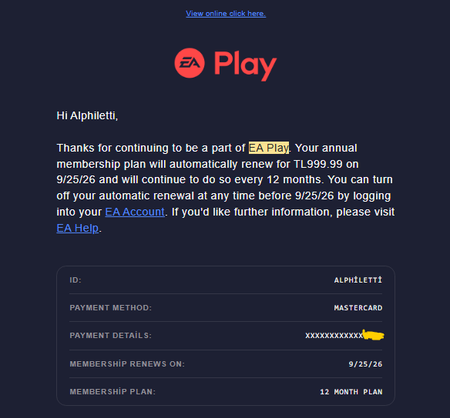
I've been an EA Play Pro annual subscriber since 2023. Locked at TL999.99/year Last week @EAHelp cancelled my membership over a payment they never retried, and now want ~TL5,800 (+480%) for me to come back 25 Aug 2026. EA emails me: "Your annual membership plan will automatically renew for TL999.99 on 9/25/26 and will continue to do so every 12 months." 25 Sep 2026: the charge doesn't go through. EA emails me to update my payment method. Fine. 27 Sep 2026: I add a different card. EA confirms back to me, "Your EA Play payment method has been updated." Then nothing. No retry notice. No "we tried again and it failed." And nowhere in the EA app or my EA Account is there a " Pay Now " or " Retry Payment " button. I could not hand EA the money even if I wanted to. There is no mechanism. 2 Oct 2026, 17:07. "Your EA Play membership has been cancelled." That is the very next email after they told me my payment method was successfully updated. Five days of silence, then termination. This isn't a pause. Cancellation destroys the legacy price. Old: TL999.99/year, locked since 2023. New: ~TL5,800/year ($119.99). A 480% increase. 5.8x. Same product, same account, same card. I opened a live chat with EA support. I was told the failure was "on your bank's end" and that my only option was to purchase again. So I bought EA Play Pro Monthly, with the exact same card EA said was failing. It charged instantly. First try. No error. So the card works. It worked on 27 Sep when I added it. It worked today. The payment didn't fail because of my bank. It failed because EA's system never re-attempted it, and never told me. A $10/month VPS emails me on every failed charge. EA, a company worth billions, emailed me nothing. Four years of membership gone over a payment nobody told me had failed. There are records of me paying TL999.99 for this subscription for three years running, and I can show every charge on my card statement. Terminating my membership like this is simply unfair. I want my membership rights back.31Views0likes0CommentsEA Play Pro Subscription – Payment Error for Over a Week
Hi everyone, I’ve been trying to subscribe to EA Play Pro for the past week, but it simply doesn’t work. No matter whether I try PayPal, Revolut, or my bank card, I’m unable to complete the payment and I keep getting the same error message. And please don’t come at me with the usual EA Support response of: “Please try a different payment method…” 😅 This issue has been happening for an entire week now, basically since the release of EA 27. I’ve just spent over an hour chatting with EA Support, and they couldn’t find any issue on their end. It took three different support agents before someone finally understood what my actual problem was. The last support agent told me that I simply have to wait because they’re going to investigate the issue with their team. Apparently, they can’t provide me with any updates and I should just keep checking EA’s social media and Twitter to see if they post anything about it. Uhm… what? 😅 Would it really be that difficult to send an email once the issue has been resolved? Anyway, they didn’t offer the subscription as compensation or anything else. Honestly, even just a follow-up email once the problem is fixed would have been enough for me. Instead, I’m basically just supposed to wait and randomly try again at some point to see if it works. It’s honestly a bit disappointing, especially as someone who has been playing EA games and buying several of their games for over 10 years. Has anyone else been experiencing the same issue?98Views2likes2Comments