Battlefield 6 Tips to Improve Aim and Overall Skill
I’ll start by saying that I don’t feel discouraged or anything that I’m not having a lot of good matches, because I’ve gotten fairly good at various games, including first-person shooters, through practice and hard work. However, I will note that I have high functioning autism, which impacts my fine motor skills and reaction time (though it also gives me plenty of strengths). I’ve been practicing my aim and trying to improve my reaction time based on the specific movement speed of the game and other factors, but I feel like there are also other things I’m probably missing when it comes to Battlefield 6 specifically. Does anyone have any tips or tricks on how to improve my skill level in my case? (cm edit updated title for vis)264Views4likes11Comments
Vehicle Loadouts Should Not Carry Over From the Previous Driver
Hello EA Team, I would like to report a frustrating issue regarding vehicle loadouts. Whenever I enter a vehicle that was previously used by a teammate, I am forced to use that player's vehicle loadout instead of my own selected setup. This includes vehicle equipment such as smoke launchers, radar, active protection systems, weapon choices, and other customization options. As a result, I often find myself using a loadout that I did not choose and that does not fit my playstyle. Players spend time creating and saving their preferred vehicle setups, so those loadouts should automatically be applied whenever they take control of a vehicle, regardless of who was driving it before. The current system creates unnecessary frustration and can negatively impact gameplay, especially when quickly taking over a vehicle during combat. Please consider changing this behavior so that each player's personal vehicle loadout is applied when they become the driver of a vehicle. Thank you.54Views0likes8Comments
Help! Sims 3 won't start
This is my first time posting, I'm desperate and hoping someone here has faced this before or knows a workaround. I've been locked out of my Sims 3 base game and expansions (which I've owned for 9 years) The Situation: The Tech Glitch: My game used to work fine on my old laptop and worked around 4 times on my new laptop. Now, when I click "Play" in the EA App, a sign-in pop-up appears, but there is NO place to type my password. Just a grey screen asking me to sign into an EA account even though I'm signed in at the start of the game, in the EA app, online into EA. Missing Expansions: Before it froze, only 3/5 of my packs showed up in "Expansions and Stuff," even though the EA App said they were downloaded in Add ons. Origin instruction: When I uninstalled the EA App to try running it directly, the launcher asked me to open via Origin, not EA. This feels like a migration error. The Support Nightmare: After spending 8 hours with 9 different agents, they finally told me a payment from May 25, 2017 is "not validated," so my whole game is locked. They wouldn't tell me WHAT item the payment was for. They refused to let me play just the base game even after I said I didn't care about the missing packs. Confusing Advice: One agent kicked me out of the chat and said "Go ask Steam support." BUT I don't own the game on Steam! I never linked my accounts. The game is clearly on the EA App/Origin. Impossible Demand: They told me to go find a bank statement/receipt from 10 years ago to prove I paid. (PayPal and banks don't keep those easily accessible!). Why I think this is a BUG, not fraud: I found a receipt from June 2017 for the University Life Pack, but the packs failing are Pets and Seasons. Blocking the base game over a dispute for a different DLC seems wrong. Plus, the "Login window with no text box" looks like a known software glitch. If anyone can help it be greatly appreciated, thank you. I've attached the sign in page that opens.85Views0likes3Comments
Broken and Updated Sims 4 Mods and CC: patch 1.124, May 12 and 21, 2026
About This Thread This thread tracks Sims 4 mods and CC that have been "broken" or made obsolete by game update 1.124, May 12, 2026, and the May 21 hotfix, or declared unsupported by their creators. It also tracks updated game mods, important updates to custom content, general news from/about creators, and new bugfix mods. SORT THE THREAD FOR WHAT YOU NEED: For the COMPILED LISTS, sort by Oldest For the MOST RECENT INFO, sort by Newest … or FOLLOW to receive notifications of new posts! Click on the bell symbol 🔔, top right. Notifications can even be sent right to your email! Some things are NOT covered here: Early-access content and anything else behind a paywall Content outside the T (for Teen) game rating (no adult mods! including alcohol, violence) Creators/mods outside the EA and EA Answers HQ rules (especially trademark or copyright infringement and having permanently paywalled “exclusives”), and the Maxis guidelines for Sims 4 content creators. NOTE: The Marketplace is not a paywall: it’s items published by EA. The paywall rule is about content that creators self-publish. Creators who update active creators' CC/mods without permission, who upload folders of other people's mods and CC, who copy other modders' code without permission, or who make tools that will break your mods Separate translation files Loading screens, CAS backdrops, main menu backgrounds, and poses unless the creator says an error is fixed Sims 4 Multiplayer Mod updates that don’t change the version number CAS and Build/Buy CC unless the creator says they're fixing an error or catching up pack content Mods and CC hosted on sites that are mostly adult content or that require joining an 18+ site NEW: Updates to complex mods and tools from new creators will not be reported here unless I’m satisfied they know what they’re doing as Sims modders, not just AI-coding. In addition, news for mods/CC hosted only on Mod the Sims may be selective and/or delayed due to recent security incidents. In the end, YOU are responsible for your mod use. Because not all content and creators are covered on this official forum, many of you should be following creators directly for news. The pinned topic How to Use Mods and CC includes advice about game updates, mod management, finding broken mods, and how to avoid downloading broken and malicious content. And remember… Back up your Saves folder! Index for This Topic Newly Broken/Obsolete Game Mods and Tools Updated Game Mods and Tools, sorted by creator Newly Broken CAS and Build/Buy Updated CAS and Build/Buy Creators Clearing Mods for This Patch - gameplay mods reported by the creator or their testers to be compatible with the game update Core, Injector, Testing and Protection Mods Status: what you should be on for mods like ModGuard, Better Exceptions, venue lists, Lot51 Core, XML Injector, and MC Command Center Creator News New Bugfix Mods Start of Ongoing Reports - scroll down or sort replies by NEWEST Other Resources Previously Broken/Obsolete Mods and CC: up to patch 1.123 [MASTER POST] Common Symptoms of Mod/CC Issues, with Known Causes, including links to earlier Broken/Updated Mods threads. The previous Broken/Updated Mods thread, for patch 1.123 and its mini-patches. Patch Notes for this game update. How to use Mods and CC: including how to test for broken mods/CC ("vanilla" testing and the "50-50" method) Malicious Scripts and Malware57KViews18likes56CommentsMoving my Sims 4 Folder From OneDrive to Local Downloads
I want to move my Sims 4 folder from onedrive to my computer's local downloads folder because my onedrive is running out of space. I have many mods and I don't want to lose them or the progress that I have made. I know that moving them to somewhere else does not work directly because the game will not update to its new location; however, I do not know how to bypass that without ruining all of my data. Please let me know some options I can use. I also want to preface that I use Steam to run the Sims 4 game, just in case that may interfere with moving my folder.[Current Issue] Sims 3 Store world can't register/install
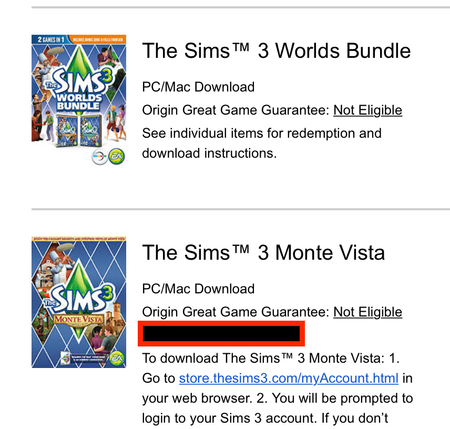
Overview This guide is for registering and installing standalone worlds from the Sims 3 Store, specifically those bought with money. That list includes Dragon Valley, Hidden Springs, Monte Vista, Roaring Heights, and sometimes Barnacle Bay. If you bought a Store world with SimPoints and it's not appearing in your purchase history on the Store site, please contact EA customer support and request that the SimPoints from the failed purchase be added back to your account. How to register a Store world jump to: My code doesn't work jump to: I can't install the world When you purchase a standalone Sims 3 world from Origin or the EA App, you should receive an email confirmation from EA. If you don't see this, check your spam filter. This email should include one product code per item, as shown here in the blacked-out red box: IMPORTANT: Some players have reported finding their product codes on ea.com, under Account Settings > Order History, so please look there as well. If you never received this email and it's not in your spam folder, please contact EA customer support. https://help.ea.com/en/customer-care/ You'll want the live chat option, not email, so you can explain the issue to a real person in real time. If you don't see the live chat option, try again in a private browsing window (or another browser), and continue as a guest rather than signing in. Otherwise, go to this site: https://store.thesims3.com/ Sign in with the same email address and password that you use for other EA sites, scroll to the bottom of the page, and click "Redeem a Code." Enter the code you've received, and the world should appear in your account. You can then download it from your purchase history (Store > My Store Account > Purchase History) or its product page. https://store.thesims3.com/worldProductDetail.html?categoryId=12642 ↑ My code doesn't work If you are sure you've never used this code, but the Store site tells you it's invalid or already been redeemed, you'll need to contact EA customer support to ask for a refund. https://help.ea.com/en/customer-care/ I strongly recommend using live chat rather than email. If you don't see the option, change the location in your browser window to U.S. or U.K., or choose a slightly different category of issue. Or use a private browsing window, or a different browser, and continue as a guest rather than signing in. If EA support doesn't help, please say so in this thread. If support does help, please post anyway letting me know what world(s) caused the issue so we can look for patterns. ↑ I can't install the world If you're getting the "there are no packages to install" error, please see this post: Re: Sims 3 Launcher "There are no packages to install" | EA Forums - 11190163 The standard way to download a world is to go to its product page or open your purchase history (Store > My Store Account > Purchase History), then click the Download button. If this isn't working for you, try a different browser. Firefox generally works best with the Store site. It is generally unnecessary to sign into the launcher before attempting to download or install Store content. However, this has helped some players, so it's worth trying. Mac users only: if you see an Error Downloading Content {0}, please repair the game in Origin, restart your computer, and try again. If the world still won't download properly, try a clean Sims 3 user folder. Rename the existing "The Sims 3" folder in Documents > Electronic Arts, open the launcher to create a new folder, and try to download only that world. If it works, you can move the downloaded world from the new Sims 3 folder to the old one you renamed, trash the new folder, and change the old one's name back to "The Sims 3." Downloaded Store items are found in the Downloads subfolder and have the extension .Sims3Pack. Be sure to delete any older downloads of the world before moving over the fresh copy. If the world downloads properly but doesn't install, please try a clean Sims 3 user folder as well. Rename the existing "The Sims 3" folder in Documents > Electronic Arts, open the launcher to create a new folder, download only that world, and try to install it. If this works, you can install the rest of your Store content into that folder, then move over your saves and any other files you'd like to keep. Please see this guide for a list. If reinstalling all of your Store content would be a burden, or you're confused about another part of this process, please ask for further help in this thread. ↑22KViews10likes776Comments[Current Issue] Sims 3 "serious error" when loading save
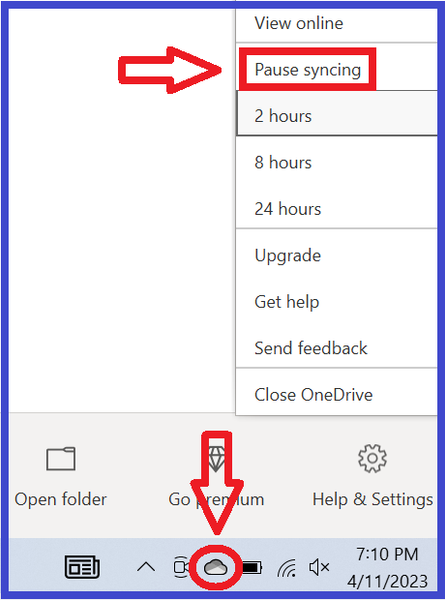
Overview "A serious error has occurred while loading [world name]. It is strongly recommended that you restart the application." This error happens when the game is unable to load the save. There are three known causes, the first more common than the others. The game can't write to the user folder The world the save takes place in isn't installed properly The save is too corrupt to load properly To distinguish among these types of errors, try to load a new save in the same world as the save that threw the error. If it works, you likely have the third issue. If the new save doesn't load, try starting a new save in Sunset Valley. If it works, you likely have the second issue. If it doesn't work, you likely have the first issue. The short version At the moment, this error is usually OneDrive-related, and pausing syncing doesn't help most players. So you may need to stop OneDrive from touching your files at all. Please see this section of the guide for further information, under the spoiler: How to get rid of OneDrive Workarounds 1. The game can't write to the user folder jump to: OneDrive-related issues jump to: antivirus-related issues jump to: other causes When loading a save, the game needs to copy the save data into Documents > Electronic Arts > The Sims 3 > CurrentGame. If it cannot, it typically throws the "serious error." Common causes of this block are OneDrive, an overly protective antivirus, and other assorted permissions issues. OneDrive Currently, the most common cause of the "serious error" is OneDrive blocking access to Documents and therefore preventing Sims 3 from writing to the user folder inside. This is only possible if your Windows account's Documents directory is inside the OneDrive folder. (Your computer will have several Documents folders, but only one is the directory.) To find the location, search in Windows for Command Prompt, open it, and enter this command: reg query "HKCU\Software\Microsoft\Windows\CurrentVersion\Explorer\Shell Folders" /v "Personal" If the file path includes OneDrive, that may be the problem. (Otherwise, see the Antivirus and Other sections below.) For possible OneDrive issues, try pausing syncing. This is not a proper fix, but it's a useful test and interim workaround. To see the option, right-click the cloud icon in the lower-right corner of the screen, or it may be hidden in the Tray (^ icon). If this doesn't help, or you'd like a permanent fix, you may need to move your Documents folder out of OneDrive. If you don't want to do this, or you'd rather test first, an alternative is to create a new admin Windows account and try playing there. Make it local—don't link it to your Microsoft account or any email address—and OneDrive will not be in the picture. If you can load a new save in the new account, it's fine to keep playing there. Or you can get rid of OneDrive entirely: If getting rid of OneDrive doesn't help, please create a new admin Windows account and try playing there, as described immediately above the spoiler. Antivirus An overly protective antivirus can block a program's access to Documents and everything inside. To find out whether this is the cause of the error, try disabling the antivirus, temporarily of course. If it fixes the issue, set an exception for TS3.exe (for an EA App install) or TS3W.exe (with the W, for a Steam install or a disc install that doesn't require the EA App). You may not see the .exe extension, but that's fine, it's the same file. The default location is one of these, depending on the install type: C:\Program Files\EA Games\The Sims 3\Game\Bin C:\Program Files (x86)\Steam\steamapps\common\The Sims 3\Game\Bin C:\Program Files (x86)\Electronic Arts\The Sims 3\Game\Bin If you don't know how to set an exception, google "set exception [antivirus name]" to find a guide. Or see this article for a few examples: https://crinrict.com/blog/2020/10/add-exceptions-to-anti-virus-programs.html Other Causes The Documents directory could be in an unusable location. Or permissions could be broken on the Documents directory, or a folder inside. For more information, expand the relevant spoiler below. Move Documents to a new location: Broken permissions: ↑ 2. The world the save uses isn't installed properly If you can load a new save in a different world, but not in the world in which your main save takes place, that world is probably not properly installed. For Sunset Valley or a world that comes with an expansion (e.g. Twinbrook, Bridgeport), please clear the EA App's cache: https://help.ea.com/en/help/faq/clear-cache-to-fix-problems-with-your-games/ and repair the game: open the EA App game library, and select Sims 3 > Manage > Repair. For a Store (e.g. Riverview, Dragon Valley) or custom (player-created) world, first uninstall it through the launcher's Installed Content tab. Then open Documents > Electronic Arts > The Sims 3 > InstalledWorlds and make sure the .world file for the world you removed is no longer present. If it is, delete it. Open Downloads, in the same Sims 3 folder, and delete the .Sims3Pack file for the world. You can reuse it if necessary, but installing with a new copy is more reliable. Finally, download a fresh copy of the world, install it, and try to start a new save in that world. If it works, the world is now installed correctly, and you can test your main save again. ↑ 3. The save is too corrupt to load properly If you can load a new save in the same world, but your main save throws the "serious error," that save may be too broken to use, but there are a couple of steps you can try. First, open Documents > Electronic Arts > The Sims 3 > Saves, and you'll see a folder with your save name plus another folder with the same name and a .backup extension. For example, you might see SunsetValley.sims3 and SunsetValley.sims3.backup. Rename the save and delete the .backup extension (e.g. SunsetValley1.sims3), and the save will be available to load from the Main Menu. If you can load the backup save, it could still be corrupt enough to be unusable later. So as soon as it loads, use "save as" to rename the save so that your backup is preserved in case you need it later. I would also strongly recommend seeking out mods, specifically NRaas ErrorTrap, Overwatch, and MasterController, to try to repair any corruption. ET and OW do their work in the background, with no need for player input; MC does nothing unless you use it to issue a command. Once the save loads, let the game clock run for a few sim-minutes, then click City Hall and select NRaas > MasterController > Town Options > Reset Everything. This may take a few minutes, depending on the speed of your computer and the complexity of the save. When it's done, wait a few more sim-minutes, then "save as," quit, reload the game, and continue playing. If you cannot load the backup save, start a new save in the same world, pick a premade household, play for a few sim-minutes, save your progress, and quit. Open the folder for your backup save, right-click the .nhd file for the world the save takes place in, and select Copy. Open the folder for the new save you just created and delete the .nhd file for that world. Right-click and Paste the .nhd file from your backup save. Then try to load the "new" save. The thumbnail at the Main Menu won't update, but if you can load the save, you'll see your previous save, not the new one. If your sims have traveled to other worlds in the previous save, and you would like to preserve that progress, you'll need to copy over the .nhd files from those worlds as well, and the TravelDB.package file. But please test first with only the homeworld's .nhd file. I would recommend the same mods as above in this case as well. Saves that are almost too corrupt to load won't last much longer without help. ↑ If you need further help with this issue, please post in this thread. State which of the three problems you have, from the list at the beginning of this guide, and what troubleshooting steps you've tried already. ↑22KViews8likes469Comments
How will the recoil system in Battlefield 6 be modified?
Will adjustments to recoil make it more manageable? The recoil in Battlefield 6 is extremely frustrating when I use traditional burst-fire techniques; I can’t even predict where the second shot will drift. How will the recoil system in Battlefield 6 be revised to improve its controllability? Will the devs revert to the classic recoil mechanics seen in BF4 and BF1, or will they iterate upon the current recoil system? I’d like to know the potential improvement directions.