Looking for friends
hello everyone! I'm writing this hoping to find people who still plays ts3! i play The Sims since I was a kid and most of the time it was ts3 but I've never had any friends on my profile, so I decided to check on here if anyone is interested in becoming friends in the game :) thank youuu763Views4likes31Comments
64 - bit version
The sims 3 is still one of the most beloved games in the franchise, but the 32-bit limitation makes it extremely difficult to run large saves and lots of custom content. EA already created 64-bit version for Mac, so why can't windows players have the same treatment??? Please gives the sims 3 a 64 - bit version for windows!!35Views0likes0CommentsThe Sims 3 CPU multiplier experiment and help needed
Hello! I’ve been experimenting with the adjustedCPU calculation in The Sims 3’s GraphicsRules.sgr, and I noticed an unexpected change in how quickly textures loaded with all graphic settings turned up to their maximum (except edge smoothing). I am interested to see if anyone has tested the same in The Sims 3, have any tips for object rendering, or would be interested if EA would create 64bit windows version of the Sims 3 ——/—— The Test: My DeviceConfig showed a CPU Speed of 3072, an Adjusted CPU of 3696, and a CPU rating of 4/Uber (I had to force this cpu class tier, as it was originally marked as a 3). By “default” the graphicsrules file multiplies my CPU Speed by 1.3334 then subtracts 400. Editing the graphicsrules file, I first removed the old 400-point Windows penalty, bringing the Adjusted CPU value to 4096. Once live gameplay was tested and visually unaffected in terms of negative performance, with the adjustedcpu value of 4096 being reported in deviceconfig, I then began increasing the multiplier. At a multiplier of 2, the game remained smooth and texture pop-in seemed slightly faster. At 4, texture loading seemed progressively faster, yet still yielding very minor improvements to the speeds of object rendering of mold/models, then each of their textures. Increasing it to 8 produced little to no additional improvement over 4. I also tested a ridiculous multiplier of 20,000,000,000, which caused the value to overflow and appear as -2147483648. For my reported CPU Speed of 3072, the largest whole-number multiplier that kept the calculated result below the signed 32-bit integer limit was 699,050. That produced an Adjusted CPU value of approximately 2,147,481,600, and texture pop-in again appeared noticeably fast during testing. I am not claiming that an enormous number magically gives the game more processing power to communicate with. My system was already classified as Uber, so increasing the value had no effect on the basic CPU tiered ratings of 1-4. Another part of the engine may reference adjustedCPU speed, but the difference could also come from cached textures, repeatedly loading the same save, or ordinary testing variance/phenomenon from the higher adjustedcpu speed. Nonetheless, tests were conducted on an existing game save, with objects loading faster regardless of caches being cleared through Regul save cleaner or not. Would be interested to see if anyone else notices similar improvements. ——/—— My current specs: I am playing The Sims 3 on a Lenovo Legion Pro 5i with an Intel® Core™ Ultra 9 275HX Processor (E-cores up to 4.60 GHz P-cores up to 5.40 GHz), 32 GB DDR5-6400MT/s (CSODIMM) - (2 x 16 GB), Solid State Drive 1 TB SSD M.2 2242 PCIe Gen4 TLC, NVIDIA® GeForce RTX™ 5070 Ti Laptop GPU 12GB GDDR7. All graphic settings found in the game’s options menu are turned all the way up. Edge smoothing is off. Object hiding is off. Advanced Rendering and Animation Smoothing is on. ——/—— Other quality vs performance tweaks and mods: Before this test, I have played around with various values in graphicsrules and downloaded every notable mod to increase the performance and quality of The Sims 3, yet i still experience lag when it comes to lots being triggered to load with their active level of detail (LOD), objects loading on their lots (grey object molds/models then textures popping in), the camera panning faster than distant objects loading, and slight hitching with camera movement. The biggest annoyance is the objects loading slowly… I hate having to wait for the gray furniture to finish being upholstered, regardless if it only takes a few seconds. In graphicsrules, I have… 1.) tweaked graphicsrules texturememory to both 4096 and 8192, finding that 8192 tends to be more stable with objects loading fairly decent and no visual glitches. 2.) tweaked graphicsrules high texture quality, changing texturesizethreshold 2048 to both 1024 and 4092. No major performance changes between 1024 and the default 2048. Objects seemed to load slightly slower with the default 2048 changed to 4192, but loaded more objects at one time. Texturesizethreshold was reverted to 2048. 3.) tweaked graphicsrules high texture quality, changing rttsizesmall and rttsizelarge from their default values of 256 and 512. Rttsizesmall and its default value of 256 increased to 512 showed some negative impact on objects rendering. Rttsizelarge and its default value of 512 increased to 1024 showed little to no negative impact. Rttsizesmall was reverted to 256, rttsizelarge reverted to 512. 4.) Tweaked graphicsrules high texture quality, changing TrilinearEnabled and AnisoEnabled to false. I use the settings through my nvidia control panel for gpu optimization. 5.) tweaked graphicsrules very high simquality, changing CASLightMapWidth from default 1024 to 2048. No performance changes. CASlightmapwidth was reverted to 1024. 6.) tweaked graphicsrules very high simquality, changing CASRenderTargetSize from default 2048 to 4096. Not sure if due to existing save file or high quality default replacement cc, but default 2048 caused visual glitching primarily of default hair replacements. 7.) tweaked graphicsrules very high simquality, changing the RenderSimTextureSizes from default 2048, 2048, 512, 12 to 2560, 2048, 512, 12 and 2560, 2560, 512, 12 and 2560, 2048, 1024, 512, and etc., for increased rendering of sim level of detail during live gameplay. Major visual glitching occurred with all changed values, resulting in clay-like poor resolution sims being shown in the world and sim portrait seen in the UI click-bubble popup. RenderSimTextureSizes were reverted to default 2048, 2048, 512, 12. However changes to the RenderSimLODDistances are still viable in exchange for negative performance impacts and possible large memory crashes. 8.) tweaked graphicsrules resourcegroup resources memCacheBudgetValue, increasing default value to 3900000000. I saw this somewhere during one late night of game research, noticed performance improvements. 9.) tweaked graphicsrules high lighting quality, changing shadowmapsize default value to 4096. No performance impact noticed. 10.) tweaked graphicsrules high lighting quality, changing interiorlightprobecount default value to 20. Lighting takes a longer to fully load into a room but does make visual quality improvement. 11.) tweaked graphicsrules high general reflections, changing WaterReflectionAreaThreshold from its default value to 50. No major performance impact but does makes visual quality improvement. In terms of notable performance mods, I have downloaded… 1.) NRAAS master controller, overwatch, errortrap, relativity, etc., pretty much very mod they have. One major performance impact other than overwatch and errortrap is the relativity mod! Slowing down the world time to 1/2 - 2/3 allows slightly more headroom for gaming simulations to take place. Think slower time, slower tasks, less to do actions, less possibilities for multiple sims to find something to do at once and so quick. 2.) The Sims 3 Setting Setter (S3SS) and Smooth Patch Package file. I normally set my ticks per second (TPS) to 960, and my frames per second to 60. I have nearly every performance setting on, including the experimental ones like the GC’s. I turned off the uncompressed compositor textures since using TurboTravel again… not sure there is much point and might cause computing bloat. 3.) DXVK. People swear by it so I tried it again. I put my maxavailablememory to 8192 and texturememory to 512. Yes, I know texturememory is recommended at 100 but noticed improvements with 256 and 512 since using TurboTravel. 4.) TurboTravel. This is less well known but made major improvements on my old laptop with a dual pentium 1.8 processor and integrated hd gpu. This application essentially decompresses all of the games core package files found in each of the EP folders. The idea behind this, from what I gathered, is by decompressing all the world assets and objects, your cpu does most of the major processing when first loading your save files. 5.) OhRudi’s less space routing mods. Your sims get less stuck, causing less back up on the game simulation. ——/—— Personal Rant: Please add your own comments into the mix, but EA seriously needs to release a 64bit version of The Sims 3 for windows. While I know the Mac 64 version has its own problems, the 32bit architecture is the games biggest hindrance. The common crashing from the memory load of default uber settings is not just a bug, it’s indicative that the game needed to be optimized before even being sold and needs it so much more now that high quality cc and gaming rigs are more than capable than the actual game itself. Considering the only reason why The Sims 3 exists as a 64bit for mac is because of sales and profit vs technology compatibility, I am surprised that EA is still able to sell The Sims 3 for Windows PC devices. Other than the minuscule headroom of default uber settings against memory load crashing, the game was never updated to include new CPU and GPU’s, or even a better way to classify future ones. The consumers who purchase The Sims 3 must rely on third-party, gaming community sponsored, aftermarket, and outside the means of original manufacturers/developers intended modifications in order for the game to launch, properly recognize computer components for normal gameplay not outside the consumers respective technology, and optimize its ability towards memory reading/writing and/or caching to prevent memory load crashing. Not only did EA abandon its manufacturing/developer duty to ensure a properly functioning product unless otherwise noted long before technology outpaced sims 3 and EA fully switched over to ts4, most of their current expansions are simply piecemeal concepts of The Sims 3, featured 1 and 2 objects every so often, just available for much less stuff and more money… With the craze behind inzoi and paralives, I really just think their gaming success is where EA fell flat between The Sims 3 and The Sims 4. Each game has their pro’s and con’s. Sims 3 was the peak of crazy fun real life gaming placed into an open world, never tapping into a 64bit architecture that could’ve led it to become even more iconic than a few years. The Sims 4 closed gamers back to their neighborhoods, going against the whole original release behind its prequel that people leave their house to live life, tapping into 64bit technology to make visually better textures and animations; the exchange also being that consumers are ripped off to everything the community was once offered for their money, making their gamer experience extremely pay-to-play with more transactions with less stuff offered. Seems to be more geared towards Create-a-sim and Build/Buy rather than live gameplay… Inzoi is really what the sims 3 could’ve been with an open world experience, just hyper realistic and with the oversimplification of life gaming seen with the Sims 4. Once you get to live gameplay, it’s not uncommon to get bored after so long. Also, why do we have an AI texture creator? Regardless of local or not, let’s really think about the rise of AI dependency within the gaming industry on both the creators and gamers side of things. Paralives is giving the immersion that the sims 3 offered in live gameplay, but doesn’t feature much craziness. It picks up better on the diverse wants of gamers when it comes to building. In versus to Inzoi, it’s a more wholesome life game rather than hyper real. ——/—— ANYWAYS lol I would love to hear the opinions, advice, and other things people have done to make the sims 3 so much better, especially anything towards object rendering! Feel free to ask questions also.Im looking for friends, I got MY FIRST COPY EVER of THE SIMS 3
Hi, im 26 years old and since I was 9 im a big fan of the sims. This is the first time i get to access all content of the game and im excited to connect with other players. Talk to me!! i wanna make friends. I love modding the game and experiencing deep stories with dynamic worlds and character development. I really enjoy roleplay with the life simulation style.
Has anyone played in the Woeford world?
I usually play in Lucky Palms, in a lot that I add at the end of a dirt road, and placed a run down shack. I love rags to riches, grunge, and apocalypse type stories. I just discovered Woeford. This is my first time seriously playing in a custom world. https://modthesims.info/showthread.php?t=631613 I am not sure what has been added for lighting, but my game has never looked this good. The strawberry chocolate UI is a pretty good match. Not quite the match that it was in Lucky Palms with the Perfect Day lighting mod, but still quite good. https://www.tumblr.com/house-of-mous/164601699787/ui-recolor-strawberry-chocklate-by-houseofmous I think it is interesting that trend is still to mod Sim 3 to look more like Sims 4, when the trend in Sims 4 is to mod it to look warmer and darker. It all comes back full circle. LOL. So I am skipping anything cartoony or bright, and trying to excentuate the default asthetics of Sime 3. I wish there were a peach chocolate UI, similar to the Strawberry Chocolate UI, but I love pink, so I actually do love the Strawberry Chocolate even if it is not a perfect match. The starter homes in Woeford are quite nice, but I have gradually perfect the Hermit Cabin over the years, so I added it to my game. https://modthesims.info/d/639104/hermit-s-cabin-no-cc.html I am still figuring out what is happening with population. There is no population, but there are Sime working on the community lots? Are they randomly generated? What is up with the Alpha and the Beta? I see houses set aside for them. But the game is unpopulated? Is there a set of residents to download somewhere. Can we buy books? I need to refresh myself in how rugs work, and then decide if I should add a bookstore. Maybe there is not supposed to be a way to buy books? I think it was at the food depot that I saw a bookcase with skill books that I can just read there. I cannot order books on the tablet. I can see a lot of work and thought went into this game, but I don't know where to find out more information about it. I feel like I am playing blind. But I can adapt to that, if I add that feeling into my gameplay. I guess it adds things to discover over time or just remains a mystery. LOL.136Views0likes2Comments
That 90's thread
Hey everyone. 😊 Since this year marks my 40th birthday ( 🤯 ) I've been feeling rather nostalgic...missing my younger days in what I would call the greatest decade ever: the 1990's. 💙💚💛 Some of the best years of my life were in the 90's (apart from meeting the love of my life in 2006) and I wanna keep some of the best of the 1990's (as well as early 2000's - I'll allow it 👍🏻) alive in our Sims 3 games. So that's why I've created this thread. A place where we can share any kind of cc out there that screams 1990's (early 2000's)! 😁 Now some of you might be thinking, "Emorrill, there's already 1990's styles in the Sims 3." True... But NOT ENOUGH! 😜 I know there's plenty of y'all on here that share my love of the 90's, so if you have or happen upon any kind of cc out there that's 1990's (early 2000's) related - hairstyles, clothing, furniture, make-up styles (outlined lips anyone? 😛) - please share it on here. And bookmark this thread! Cause I wanna feel more nostalgia and have a 90's cc collection! ⭐ *I only ask a couple of things when sharing: Please provide a photo of the cc that you found as well as a working download link for it. (It's no fun if we can't download it... 😥) I certainly welcome anyone who can provide links to cc found online that is no longer available on the internets anymore, 💗👏🏻 but the pictures are still out there to taunt us. 😐 #annoying! ^That's still a pound sign to me, btw. 😂^ **Please remember: While some of the cc I share on here has been play-tested in my game, others have not. As is the case with all cc, you download at your own risk. Always back up your current cc, and save folders, before adding in any new cc just in case. 👍🏻 Anyway! 🎵 Let's get ready to rumble! 🎵 Now y'all, my memory ain't what it used to be so there's only so many styles from the 90's that I actually remember. 😵 Let me start the cc sharing off with this one: "The Rachel Cut" Hairstyle from the hit TV show F*R*I*E*N*D*S. 😊 Y'all remember the beautiful Jennifer Aniston sporting the iconic hairstyle, right? Over the years I've found a couple of cc hairstyles that resemble it quite nicely (and now they are lost to the internet), but I think this is the best one still available so far that I've found. And it was created by none other than the incredible Peggy! This hairstyle is available for download in this MEGA collection of PeggyZone hairs: https://mega.nz/folder/0QsmVTIY#rfaSJG-WVIZIDPUMD10R8w/folder/ZN9wUZ7I (You'll have to copy and paste this link into a new tab due to the forum dubbing it an "invalid HTML" 🙄 That drives me nuts!) Here's how it looks in game to those who are curious. 😉 If any of y'all have another (or better) version of The Rachel Cut, please feel free to share. 😊👍🏻 There's some other late 90's hairstyle gems in that MEGA folder like this one: (Which apparently Jennifer Aniston also sported. 👍🏻 I just remember many girls in my high school doing their hair like this. 😊) Edit to add: When testing ^this hair^ in my game it was not showing up in CAS. 🙁 So I found a nice retexture of it which I hope works. 👍🏻 Here's the link: https://anubis360.blogspot.com/2011/12/peggy-hair-826-fixed-and-pookletd-for.html Here's how the retextured hair by anubis looks like in my game, with color variations. ⭐ Anyhoo! Now share all the 90's cc you can find with me (us) y'all! 😁 Let's have a bunch of fun reminiscing with this thread. 🥰 Thanks y'all! ~~~Please remember that I edit posts often to add more cc items I find that fit the theme of that particular post. So don't forget to refer back to the older posts to see what's new and decide if you want more! 😁👍🏻~~~ *FORUM TIP*: Click on the "Oldest" tab below to see all the posts in their proper order if you are not a regular follower.3.3KViews8likes93Comments
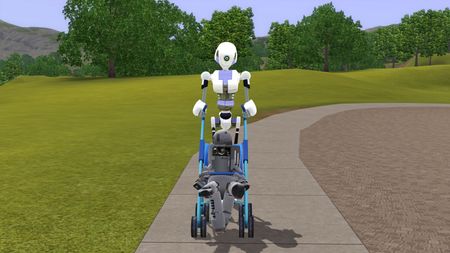
(NRAAS HACKS) simbot Children and toddlers
with the nraas master controller it is possible to have a simbot child or toddler by simply going into master controller then selecting "change occult" to a simbot on any child or toddler sim notes: this also works on mummies too warning: do not set a simbot to a baby as it will stretch and crash the game