Forum Discussion

EA_QueenBee Community Manager
2 months agoCommunity ManagerHey zooaunzoo1,
So just to confirm, you redeemed your code on Xbox, and then unlinked your Xbox and linked it to a different EA acccount?
If so, then that's why you don't have your coins. Your data is stored at the EA account level, so by redeeming your code and then disconnecting your Xbox, that doesn't transfer any of the progress or currency you had. You'd need to have linked your Xbox first and then redeemed your code.
Unfortunately it's not possible to transfer progress or currency between EA accounts.

zooaunzoo1
2 months agoSeasoned Novice
Hello,
That’s not what happened. I think there may be a misunderstanding.
Here is exactly what I did:
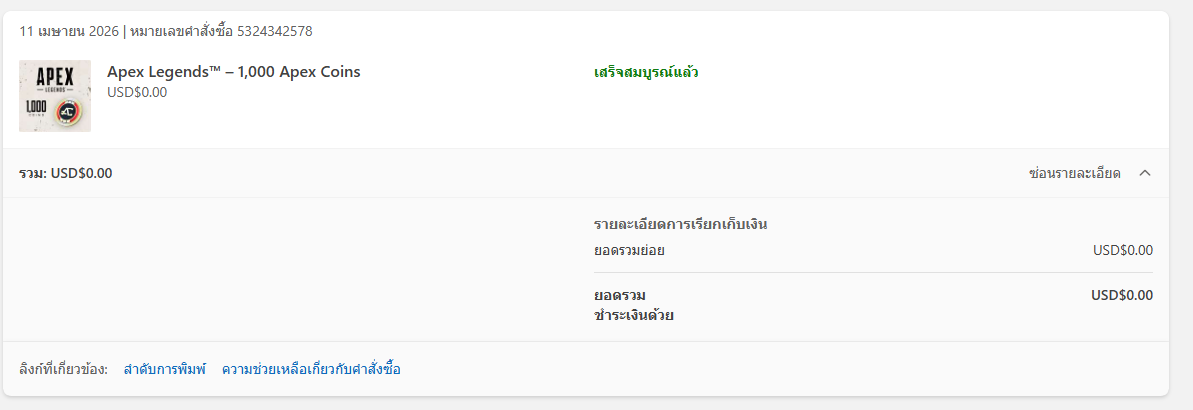
I redeemed a 1000 Apex Coins code on my Xbox ID.
At that time, I forgot that this Xbox ID was NOT linked to my EA account (the one that has my Apex Legends progress).
The code was successfully redeemed already.
After that, I linked my Xbox account to my EA account, but I did not receive the Apex Coins.
So I did NOT unlink and relink to another EA account as mentioned.
The issue is that I redeemed the code before linking the correct EA account.
Could you please help check if the coins can still be restored or granted to my EA account?
Thank you.
- EA_QueenBee1 month ago
In that case, could you try launching the game from your Xbox? It could be that it needs to "catch" the coins added to your account by having you start it there.
- zooaunzoo11 month agoSeasoned Novice
I already tried launching the game from both the EA App and Steam, but the coins still haven’t appeared in my account.
- EA_QueenBee1 month ago
Right, but if you redeemed the coins on your XBox you'll need to start the game there to see if they come through. Often players playing on Steam redeeming coins on the EA app will need to start the game from there too so it properly updates the wallet.
Featured Places