Forum Discussion


7 years ago
Hey There,
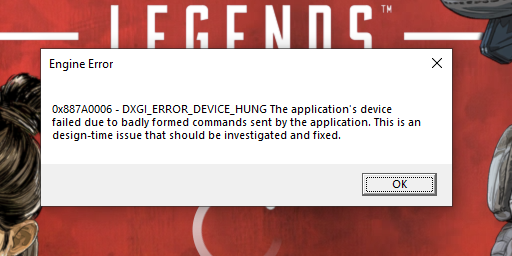
Been enjoying the game so far alot but as per a few other posts I am getting random crashes which cause the game to completely freeze to a black screen, I am able to open task manager and see that I get the below error and it is always the same.
I have included my DxDiag report as an attachment as well.
I thought this maybe card or driver related so I tried updating the Nvidia drivers but no luck and I just done a complete format of my PC and still no luck sadly.
7 years ago
Temporary Fix (For Myself & Hopefully Others)
For those that are still getting the error:
0x887A0006 DXGI_ERROR_DEVICE_HUNG
or
Instant crashing to desktop
The best way to fix this is to uninstall you current Nvidia drivers, which should be version (418.81) and the roll back your drivers to a previous version (15 January drivers, 417.71)
I personally use DDU (Display Driver Uninstall) to fully remove all traces of a display driver and once restarted then install Nvidia driver version 417.71. DDU can be found below, feel free to read up on it if you wish as great bit of software.
https://www.wagnardsoft.com/forums/viewtopic.php?f=5&t=1465
Drivers are still listed on the official Nvidia site and can be found here:
https://www.nvidia.com/Download/driverResults.aspx/141906/en-us
I done this and managed to play Apex Legends all night (6 hours plus) without a single crash or error appearing. Previously I was crashing with DXGI_ERROR_DEVICE_HUNG every 30 minutes or so.
This is only a temporary fix until the new Nvidia drivers are out and correct.
After speaking to a chap from Nvidia he mentioned that they have managed to replicate the error we are having and are working on a fix asap.
Hope this helps.
Cheers
Glacious

Featured Places