Solved
Forum Discussion


5 years ago
I had this problem also
I followed the steps of:
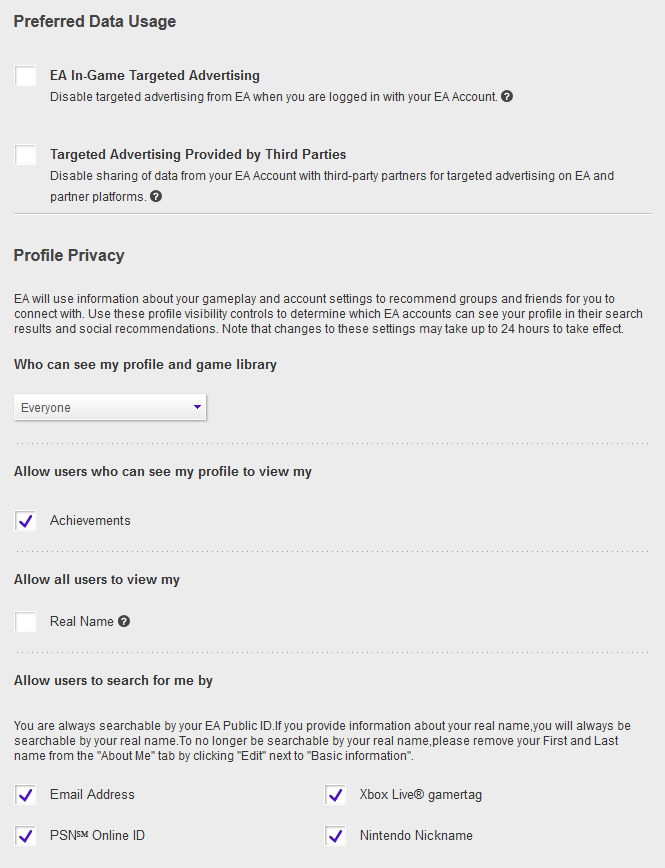
1) logging into your EA Account via web browser and then going to your profile (your Avatar icon top right of page) then clicking on "Account Settings")
2) Privacy Settings:
- Choose "Everyone"
- Allow other to see "Achievements"
- Allow all users to view my "Real Name"
NOTE: I followed all step prior and on Xbox still had warning. When I clicked to allow "Real Name" restarted Xbox APEX and logged in again, warning was gone and friends were visible.
- Allow users to search for me: (Check all devices)
Click on " Update" bottom right of screen
3) Email Preferences:
- Manage your email preferences
I click the "Yes, email me about EA products....."
- Frequency: I choose "Anytime"
Click on "Update" bottom right of screen.
P.S. Remember after saving to log out or quit your APEX game on your console and log back/load it up again.
P.P.S. For the "Real Name" in "About Me" I left that blank but I still allowed people to see it as it is blank.
Hope this helps someone.

4 years ago
The warning is still there and Idk what to do
 4 years ago
Same mine won’t go away and me and my brother can only play if I join my other PlayStation account and quickly join then join from my pc.
Featured Places

Apex Legends Technical Issues
Having issues with Apex Legends? Join here to find help with connectivity, performance issues, crashes and more.Latest Activity: 16 minutes agoCommunity Highlights
- EA_Blueberry7 years ago
Community Manager