EA_David Community Admin
Community AdminCommunity AdminHey guys, we just wanted to create this thread to gather info and feedback on any patching issues you may experience with the transition into Season 13.
If you do have issues:

@DRAKE593try using a cable controller or a cable with your wireless controller. fixes it for me but it's a massive hassle. who has a 3-5m long usb c cable at home? i hope you got the "fully kitted" achievement before may 10th. guys fix this please.
Steps I've taken to try and rectify this issue:
- Powercycled Router
- Port Forwarding setup on Router
- Changed Ethernet Cable and Ethernet Port used from PC to Router
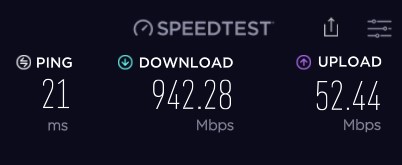
- Speedtest complete and showing no issues on connectivity on my end (attached)
Setup:
Windows 11 PC hardwired directly to router (distance less than 3m)
Tested on both Origin and Steam but issues continue on each system
Windows 11 Build: 22000.708
GeForce Driver: 516.40
I've only just managed to get around the HUNG error by removing the shadowing from my settings. Is there any other workaround that can nullify these errors. They make the game unplayable.
I have problem with my movement in apex legends only. It looks like the keyboard just need some time to give the information to the game. I am playing in 120 fps 70ping and 0 pocket loss also this is happening to me only in battle royal mode and not in arena and in firing range. I tested my keybord in other games and in an online keyboard tester and it is fine. Moreover i am plaing the game in windows 11 and thats can be a reason why this is happening to me. For me the game is right now uplayable and i am thanking of quitting the game even i want to play it so bad. Pls fix this issue with the new patches.
Hello all, I am having a bit of an issue that I don’t believe is directly related to APEX but this issue arrived when doing some stream setup after switching from SLOBS to OBS. So, this may be un-necessarily lengthy but I’d rather be as thorough as possible to help expedite the process of trying to figure this out.
So, the issue I am having relates to lag on background applications when in Apex Legends. This happens when live streaming or just watching the preview in OBS. If I am in the menus (or tabbed out) of Apex there is no lag. But, in the lobby screen and playing the match everything but the game drops in FPS. This wasn’t really an issue that I super noticed until I started using the SnapCamera app as a webcam so viewers can use channel points to make filters appear. The stream is essentially capturing the SnapCamera window and thus derives the issue. When the background applications drop FPS (to around 5 or 6) OBS is now recording the App in said frame rate. On stream everything looks normal except for the webcam – Game capture, overlays, files playing from local, and browser sources all good. Visually I can see the 2 secondary monitors running at a lower FPS (5-6). But other than that everything is fine.
As for the setup and hardware I don’t believe any of these are the culprit I strongly feel this is a software setting somewhere but I’ll list them out to be thorough.
- Setup is triple monitor – 2x 1080p 144Hz native set to 60Hz as I’m not gaming on these. And 1x 1440p 240Hz
- OS is windows 11 pro
- GPU is an Asus RTX 3080 and seems to max at about 85-90% utilization with a temp of about 55C
- CPU is an Intel I9 12900K and seems to max at about 75-85% utilization with a temp of about 60C
- RAM is 2x 16GB strips of DDR5 Corsair Dominator 5400Mhz and runs at around 65% utilization
- MOBO is an ASUS Z690
- There is also 2x 2TB Samsung 980pro M.2 SSDs 1 that has the game and 1 that has the system files and streaming software.
So far I have tried a few different diagnostic steps and still have had the same or worse results.
- Verified all Nvidia/Intel/windows Drivers and versions are up to date and on a stable version.
- Tried the game in windowed and borderless modes with the same results.
- Tried to lower the games graphics to minimum settings with the same results.
- Tired disabling NVidia reflex with the same results.
- Tried disabling hardware acceleration in windows with worse results.
- Tried running OBS and SnapCamera in administrator mode with the same results.
- Tried enabling the “ignore full screen application” protocol for OBS, Snapcamera, and APEX with the same results.
- Tried testing the screen capture feature in Discord(with only discord running) with same results.
- Tried Removing the Target FPS for the monitor in NVidia from "Maximum" to "Let application decide" with same results.
- Tried Removing the "Background FPS Limit" In NVidia with same results.
- Tried Limiting Primary monitor to 144Hz vs 240Hz with same results.
- Tried going into graphics settings an setting all required background applications to "High Priority" with same results.
- Tried this same setup with a few other games (warzone, R6 Siege, and CS:GO) and this "LAG" issue is not present.
- Tried disabling Windows "game mode" with same results.
So, to reiterate, my primary issue isn’t necessarily “LAG” it’s more like APEX is setting a maximum FPS to all other applications when it’s focused. I’m not sure if this is an APEX issue, a SnapCamera issue, or an OBS issue so I’m posting this in all respectively to see what anyone thinks. I’ve spent a lot of time trying to tinker and think of a solution and I’m officially stumped. Any advice or input would be greatly appreciated.
please fix the audio. I cannot hear people right behind me.
Having serious micro lag on xbox series s.
FPS going up and down. There have not been a single day lately its been a stable 60fps.
Every fast movement, jump, shooting is affecting the gameplay.

Platform: Xbox Series X
Issue: Game Chat volume too loud
Details: Since the game chat was fixed last week with the patch, the volume for game chat is literally so loud that I have to mute my teammates. This includes the text-to-speech. Prior to the patch I had no issues with the volume of in-game chat or TTS.
I got banned because I called someone a * because the kid had the mic down his throat moaning so damn loud. When I asked him to shut up he started cursing and calling me racial slurs and what not. And he repeatedly threatened me that he'd ban me if I even dared muted him. I typed in game chat 'I muted you *' just once which by the way gets censored in chat and the person can't see what I sent. And guess what I open Apex today and it says I've been banned for 7 days. I am missing on the event because of EA's irrational suspension. EA WHAT IS YOUR MONITORING SYSTEM THAT YOU CAN SEE WHAT I TYPED BUT YOU IGNORE WHAT THE KID WAS YAPPING ABOUT. The kid's username is ZWITSEL btw. He was an American playing on the UK servers and was the most foul mouth kid I had ever encountered.
platfrom pc steam
ryzen 7 3700x
nvidia 2070super tried old and newer driver version: 516.59
corsair 3200 ddr4 32GB
m.2 1tb samsung 720pro installed on mobo
never had issues running the game until now played game since s3 on this pc.
new icons on screen since lastest event came active, ucmd delay always active and lagg compensation intermittent
latency icon very rare.
my own data shows time frame spikes up to 19ms when occuring fps drops below 80. my average is 150 normally. i litterally freeze then continue is extreem on Br slightly on arenas.
things tried: restart pc, set gpu power to max, removed overclocks, set priority for game and anti cheat on diff settings, removed autoexec, capped fps from unlimited to 190 and 144, i had the internet cable from router to pc changed this to service provider modem directly into pc, tried using wifi, installed all windows updates even the optionals, reinstalled gpu driver clean install, unplugged all devices only used mnk.
what else can i try?????? for me its the game itself and i dont think the solution is on my end......