No option to Link XBOX account to EA
Product: EA Desktop
Platform:PC
Error Report ID (learn how to create an Error Report ID in the sticky post)
Which client functionality are you experiencing this bug with? Subscription Purchase
When did this happen? (dd.mm.yy hh:mm) 29/12/2021
Summarize your bug No option to link Xbox to EA
How often does the bug occur? Every time (100%)
Steps: How can we find the bug ourselves? Follow EAs own guide to linking accounts by clicking the Xbox Icon under the login fields, sign into a Microsoft account via the pop up.
What happens when the bug occurs? I have no option to link Xbox to EA
What do you expect to see? No options to link Xbox to EA
Initially, I wanted to link my Xbox account to my EA account to have EA Play via owning Game Pass. When I took the steps that EA provides, it does not even prompt an option to link any account. It only gave me the option to Create a New Account.
Before doing that, I followed the steps again and again. After clicking the Xbox icon underneath the login fields and signing it the appropriate Xbox login that has Game pass, it kept coming back to "Create a new account" so I did hoping that "Oh, it must prompt the "Link Account" option after hitting this button." Nope.
I then had a brand new EA account linked to my Game Pass. Next step was to go ahead and Unlink my Xbox account and call EA Support to have it deleted. Wow what a mess that was.
I was informed by EA Support that they will send me a link which will guide me through linking my account, I told them "Okay, but I have already been following one and it has not helped whatsoever" and they told me "it is not the same thing and thank you for contacting EA Support" .....Exact same link that I explained did not work multiple times. Already hung up on me. I was then informed by EA Support on the 2nd call that I "should be able to just link it." and once I explain that I followed their guide and never had the option to link it and ended up creating a new account, they tell me its because I linked it to a new account, (something I did after this problem arose)
The problem was and still is that I have never been given an option to link my account at all. This was happening well before I accidentally made a new account and linked it. And every time I try to explain that this was all happening before I:
- Ever made a new account
- Linked my Xbox account
- Unlinked the account
- Had EA delete the new account
It never ever at all, once, gave me the option that said "Link your Xbox account." But they tell me its a synchronization issue because I linked and unlinked it then deleted it and that it should link after I wait some time. But the problem has never been that it doesn't link, The problem is that there was never an option to link it in the first place. I don't know how many times I said it.
After I explained this all to the 3rd representative, they first suggested I launch an EA game on my console but I tell him this is PC, then I'm asked "Well how are you having problems if you don't have an EA game?" I then explain "I can't play EA games because I don't have EA Play, because I can't link my account, because I have no option to do that". Then they suggested I submit it on the Forums.
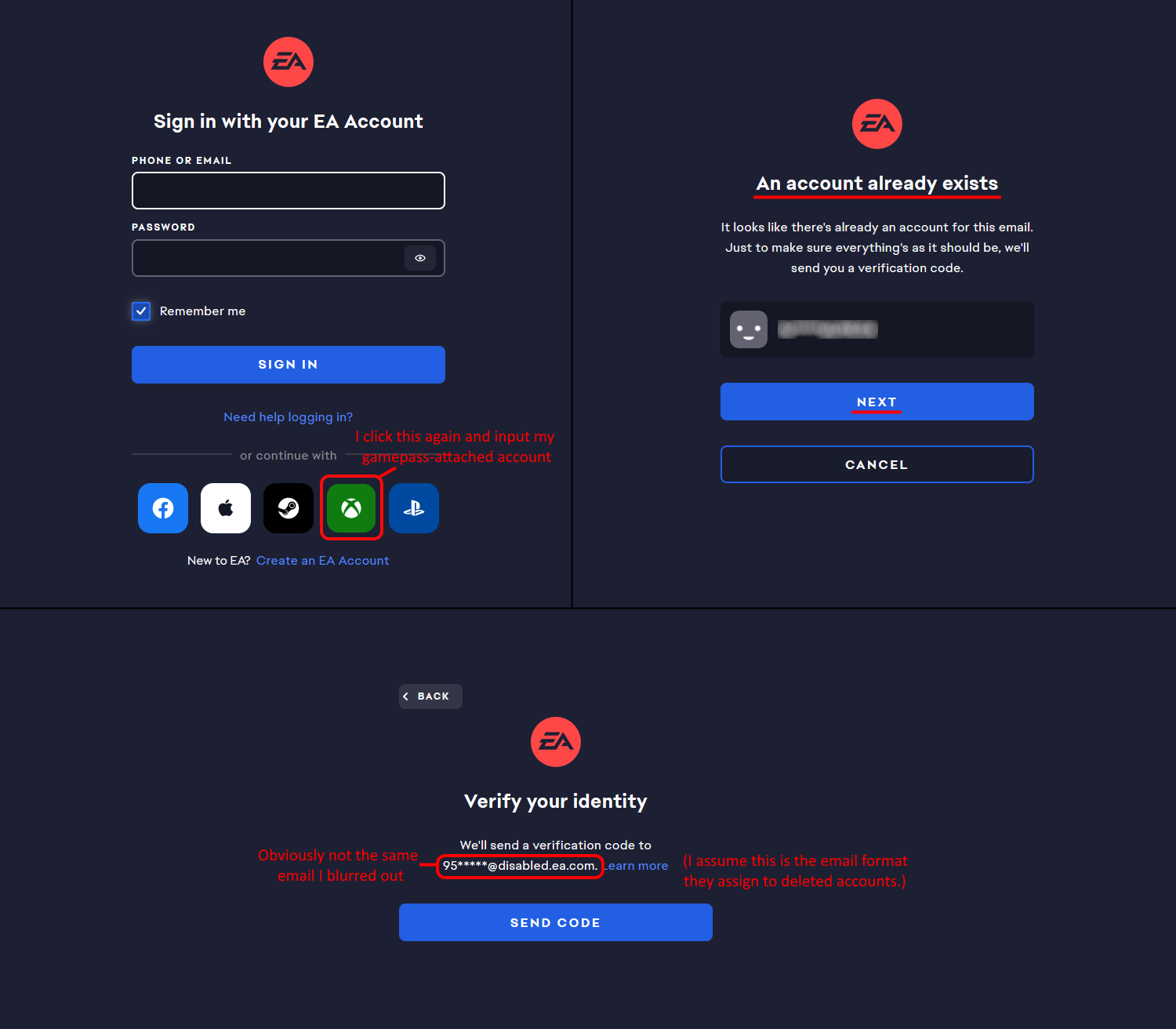
Attached are screenshots of:
- Before I ever made a new account while following EAs guide
- After having my brand new account deleted and further trying to link my Xbox to my main EA account.