Forum Discussion

ArchAngelBK's avatar
3 years ago

Some of purchased games are listed as N/A in EA app's collection.

Product: The EA app
Platform:PC
Error Report ID (learn how to create an Error Report ID in the sticky post) 2573a54c-89cc-48d4-aab4-e98e4404a0a0
Which client functionality are you experiencing this bug with? Browse Games
When did this happen? (dd.mm.yy hh:mm) 02.12.22 21:00
Summarize your bug Some of purchased games are listed as N/A in EA app's collection.
How often does the bug occur? Every time (100%)
Steps: How can we find the bug ourselves? Below games are listed as N/A in EA app's collections. Purchase those games in one account, and go to 'COLLECTION' to find out if it's listed as N/A or not. 1) Bulletstorm 2) Need for Speed Undercover 3) Command and Conquer Generals 4) Command and Conquer Red Alert 5) Command and Conquer Tiberian Sun Firestorm
What happens when the bug occurs? Some of purchased games are listed as N/A in EA app's collection.
What do you expect to see? Game's name listed correctly, not 'N/A'

Some of purchased games are listed as N/A in EA app's collection.

Below games are listed as N/A in EA app's collections.

1) Bulletstorm
2) Need for Speed Undercover
3) Command and Conquer Generals
4) Command and Conquer Red Alert
5) Command and Conquer Tiberian Sun Firestorm


7 Replies

  • EA_Illium's avatar
    EA_Illium
    Icon for EA Staff (Retired) rankEA Staff (Retired)
    3 years ago
    @ArchAngelBK Would it be possible to get a screenshot of your collection? Also to check which region are you in?
  • Hello, @EA_Illium 

    I'm attaching EA app screen capture as requested.

    Below you can see

    1) Bulletstorm game - No Picture, game listed as N/A

    2) C&C Generals - Picture, game listed as N/A

    3) C&C Red Alert - Picture, game listed as N/A

    4) C&C Renegrade - Picture, game listed as N/A

    5) C&C Tiberium Sun Firestorm - Picture, game listed as N/A

    6) Need for Speed Undercover - Picture, game listed as N/A

    I'm live in South Korea, so I guess I'm in ASIA region.

    Thanks.

  • EA_Illium's avatar
    EA_Illium
    Icon for EA Staff (Retired) rankEA Staff (Retired)
    3 years ago
    @ArchAngelBK Thanks for this, to check are you able to still hit the download button on the games?
  • Hello @EA_Illium 

    I've installed a few of them

    1) BulletStorm - installs but won't start - GFWL isssue

    2) NFS Undercover - installs, starts, but won't run after the intro - more than 4 physical core issue

    3) C&C Red Alert - installs, runs fine

    But, those N/A won't go away.

    So, I guess it's cosmetic issue on EA app?

  • EA_Illium's avatar
    EA_Illium
    Icon for EA Staff (Retired) rankEA Staff (Retired)
    3 years ago

    Hi @ArchAngelBK It's possible we're running into a unique visual issue, can you check the following?

    • Allow EA App through your Anti-virus and firewall, and disable any Proxy server or VPN. 
    • Make sure your system data/time and account region are all correct. 
    • Run the System File Checker tool then Check for Windows and GPU updates  
    • EA App's Cache (Top Left Menu > Help > App Recovery) 
    • Run the client as admin
    • Put your device in a Clean Boot then launch the client 
  • Hello @EA_Illium ,

    I've run some tests after your recommendation, and found below

    1) When I change language to English, all games' names displayed correctly in English

    2) But, BulletStorm's Icon (thumbnail picture) still missing

    3) When I change language back to Korean, some games' names displayed incorrectly as 'N/A'

    So, I guess EA app or your server has 2 problems

    1) Some games' Korean title name's not entered correctly - either blank or N/A

    2) BulletStorm game does NOT have thumbnail (icon picture)

    Please see below screen captures.

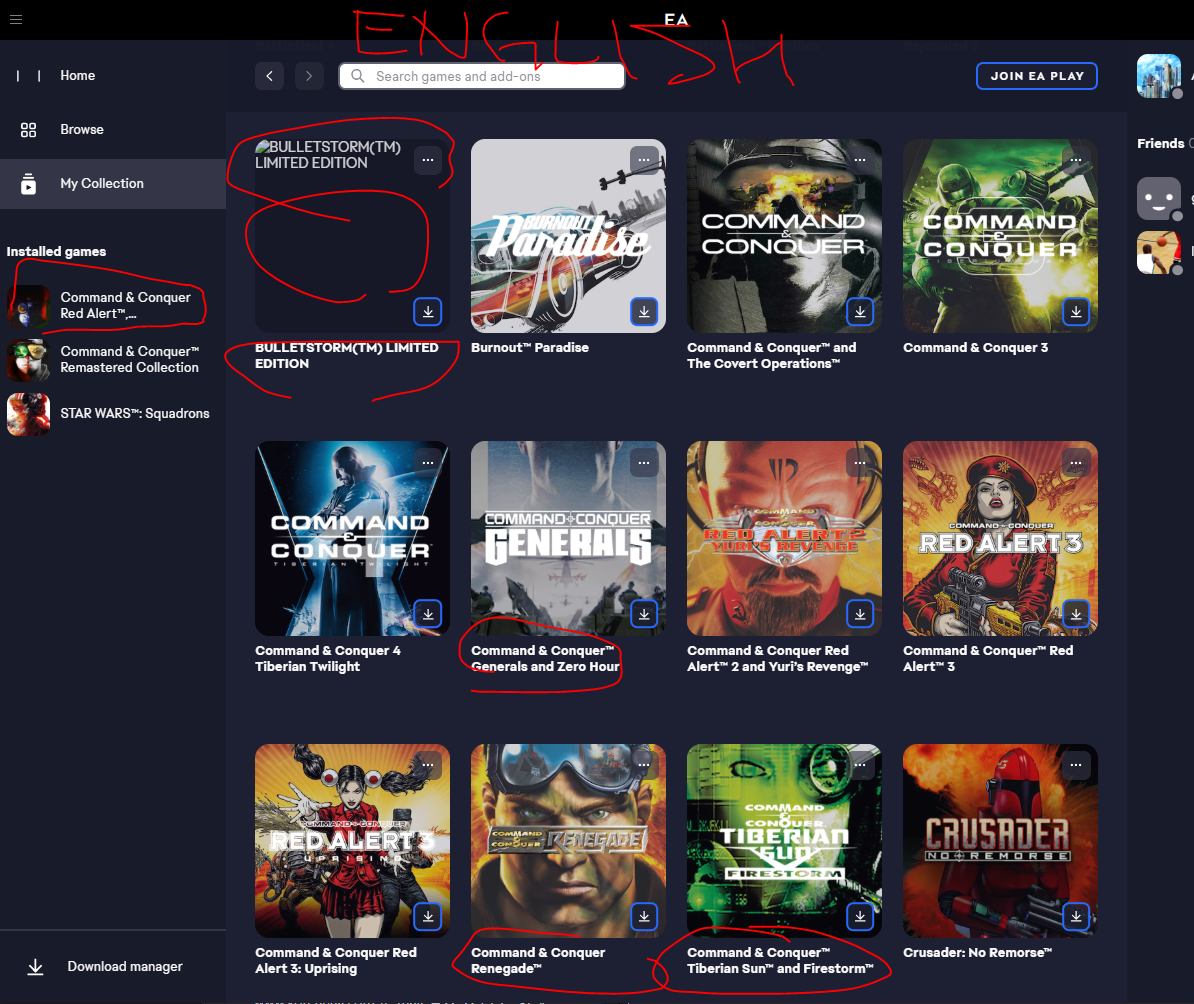
    First - Korean Language, games in question's name are displayed as N/A, and BulletStorm picture missing

    Second - Changed EA app to English.

                   Game names are correctly displayed, but BulletStorm's game PIC still missing (no thumbnail)

    I've already tried clean booting, cache clear, up-to-date everything etc.

    Thank you!

  • Hexaae's avatar
    Hexaae
    3 years ago

    Same here for games Bulletstorm ("N/A", no cover, unclickable won't open its page) and NFS Undercover ("N/A", unclickable won't open its page).

    EA app 12.115.0-5372-92c549332, Win 11 22H2

    image

Featured Places

Node avatar for EA app Technical Issues & Bugs

EA app Technical Issues & Bugs

Having issues with the EA app? Join us to report bugs, and find help with downloads, DLCs, purchases, and login errors.Latest Activity: 3 hours ago
8,805 Posts