Forum Discussion

EA_Pulsar's avatar
EA_Pulsar
Icon for Community Manager rankCommunity Manager
2 years ago

Re: Ea FC 24 When Playing Online there is huge delay when i press the controller

I consolidated your posts into this main thread for better tracking.

Here are some steps that helped others, posted in this thread.: 


RipeakeD

After hours of trying and reinstalling, I have now found my solution. I always had sound stuttering and image lag.

I don't know if this existed in Windows 10, but one of the following worked for me:


-Energy setting (maximum performance)
- Disable variable refresh rate (Windows 11)
- Optimization for window games (disable)
Both found under the following item in Windows:
System > Screen > Graphics > Default Graphics Settings.

-FC24.exe (Properties, open as administrator)


I hope it works for you. I don't have a single lagg anymore and the framerate is constant at 120 FPS.


xJoeyFreshwaterx

I have fixed this issue for myself and am posting what I did in case anyone else runs into this issue.  Further diagnosis showed that my Xbox controller was showing up as Player 3 in the kick-off menu and remapping settings.  I use Windows 10 and found an "extra" USB composite device connected in the Bluetooth device settings menu.  Deleting that and restarting the game has my controller function correctly and have no input delay.


4yrt0n732

SOLUTION!!! (At least for me and another user)
The same thing happened to me, it turns out that I had put the hz at 144 to use them on my monitor and the unlimited fps. When I did, I started noticing input lag/delay. I thought it was the game, two days went by and it was still the same, so I set the hz as they were before to 120 and the  FPS at 90 and there is no longer that input lag. I commented on a forum and a user was able to solve the problem by doing the same thing I said. Try that and let me know if it works for you! (What I do notice is input lag in the corners or when you have to move the trajectory of the ball)


19 Replies

  • fetahundenyoda's avatar
    fetahundenyoda
    New Rookie
    2 years ago

    I have the same problem, but only while playing online, all my other friends have the same problem. It's like running in mud, your commands are super delayed. Why would changing alot of setting (hz, refresh rate etc) have any impact when the offline games are totally fine? It's obviously a connection/server issue. The EA servers are trash, and have been for a long time, but this year it's totally unplayable.

  • Anyone is facing issues on preparing download on EA App? I bought the game today and the screen is stuck at preparing download for the past 2 hours.
  • Berlusto's avatar
    Berlusto
    2 years ago

    Yesterday during primetime the game was again delayed, muddy....just unplayable.

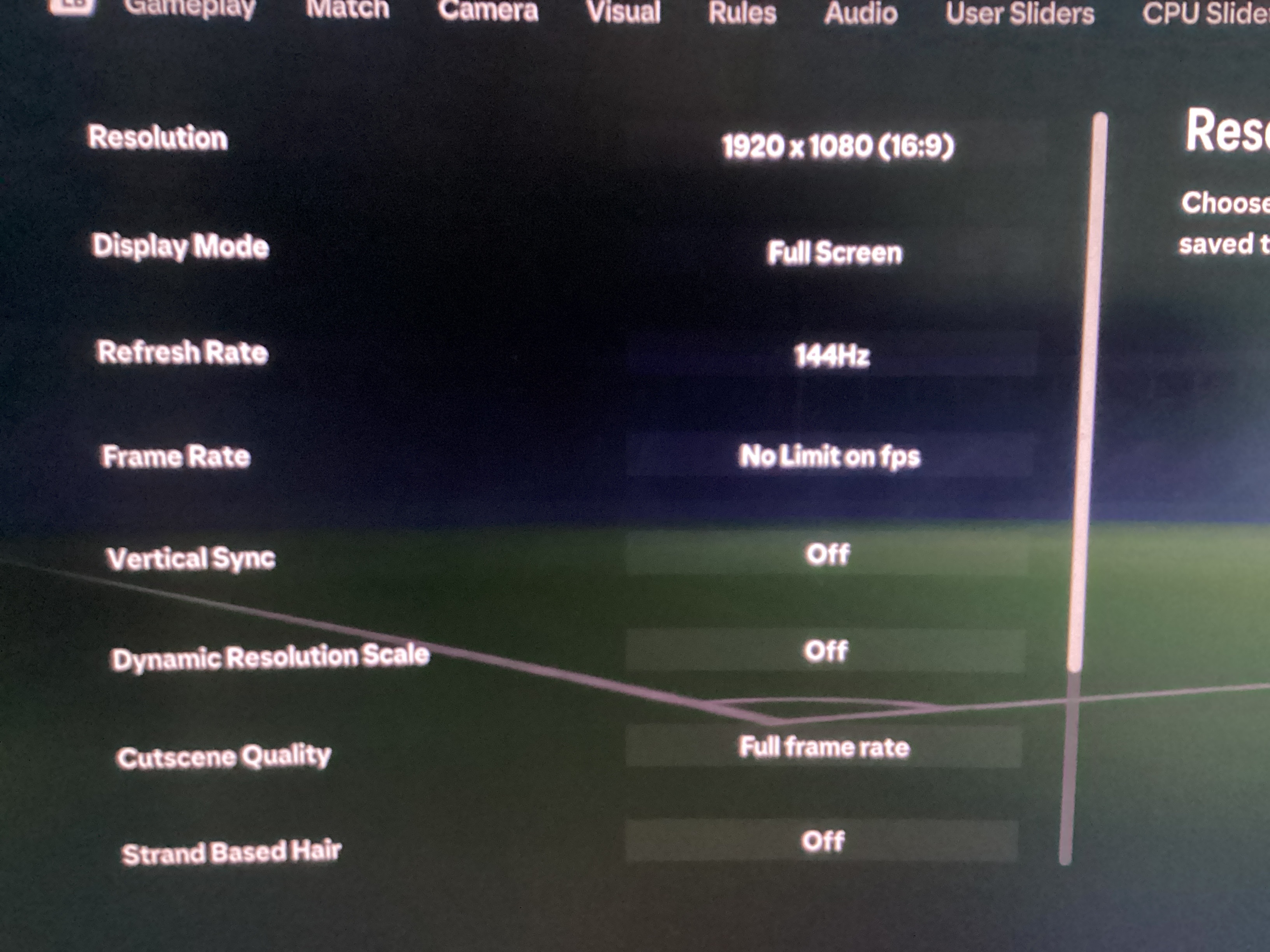
  • Possible fix guys. Has worked for me although still got input delay in corners and after a hyper motion(which I can turn off). Anyways, only thing I have changed is go to settings > game settings > Display configuration then a few settings has fixed it for me. Frame rate : No limit on fps. The big one is Vertical Sync : Off. I believe that’s the biggest changer. Next, Dynamic Resolution scale: off. Cutscene Quality: Full frame rate. Strand Based Hair: Off. Then the last three either on low - ultimate. For me all of them are on low because of my specs being pretty much the minimum. First game with these settings I didn’t have any of the slow mode which turned into input delay. If yk yk. Please other people try this just because it may be the fix we were all looking for. Again I still have input delay on corners but I can actually defend now! I really hope this fixes your issue and it’s the only thing I have changed since the last time I played.

    Pictures of the settings I use. (That have fingers crossed fixed this issue.)

  • fetahundenyoda's avatar
    fetahundenyoda
    New Rookie
    2 years ago

    I've tried changing all the settings, it doesn't help. Me and most of the other people in this thread are way over min specs. There are even people on console complaining about input lag, both here, on reddit and on the steam forums. For me, it gets worse during peak hours, which indicates that it is a netcode/server issue, and if that is the case, ea probably won't do anything about it. Players (including many content creators) have been complaining about this for years without any change, but this year it's the worst by far.

  • 4Drodi's avatar
    4Drodi
    2 years ago
    @r164vfnlmhr9 That helped a lot ty man, the input lag is still very much there but It's better now, still can't compete against other players in ut or clubs but can have fun at least
  • r164vfnlmhr9's avatar
    r164vfnlmhr9
    2 years ago

    @hansolotalland28 Unsure as I play on PC. May work may not. I also use an Xbox controller. Additionally for other people saying it’s been there for many fifas, we are mainly talking about a bug that wasn’t present in fifa 23 and is now there for a lot of us. Wasn’t directed to those who have been impacted for many years.

  • @4Drodi Your very welcome. Working for me now which is sweet. Still unfortunate that you can’t play online however I still hope you find a solution 🙂

  • r164vfnlmhr9's avatar
    r164vfnlmhr9
    2 years ago

    “Possible fix guys. Has worked for me although still got input delay in corners and after a hyper motion(which I can turn off). Anyways, only thing I have changed is go to settings > game settings > Display configuration then a few settings has fixed it for me. Frame rate : No limit on fps. The big one is Vertical Sync : Off. I believe that’s the biggest changer. Next, Dynamic Resolution scale: off. Cutscene Quality: Full frame rate. Strand Based Hair: Off. Then the last three either on low - ultimate. For me all of them are on low because of my specs being pretty much the minimum. First game with these settings I didn’t have any of the slow mode which turned into input delay. If yk yk. Please other people try this just because it may be the fix we were all looking for. Again I still have input delay on corners but I can actually defend now! I really hope this fixes your issue and it’s the only thing I have changed since the last time I played.”

    EDIT: In addition this is a fix/ improvement for people with input delay who have only experienced this on fc 24 and not previous fifas. Also bug was never effected by the time of day I played it was consistent throughout all of the day at all hrs. Hope you all find a solution!

  • IsIandBoi's avatar
    IsIandBoi
    2 years ago
    @r164vfnlmhr9
    Thanks man, it worked for me, u just saved my life 🙂

    I recommend u guys that if u still have the same problem, u guys should lower your graphic setting or u guys should turn off the v sync setting and stranded base hair. bc the resources is really heavy to load especially when we play online matches, so we need a faster network connection for that.
  • B11_DeStroyer's avatar
    B11_DeStroyer
    2 years ago
    @r164vfnlmhr9 Oh my god!!! I CANT THANK YOU ENOUGH FOR THIS, i manage to reach sub 10ms latency because of this. Even the menus are noticeably more responsive.
    Additional steps:
    - I went to Nvidia Control Panel, cap the frame rate to 120 (because i have 240hz monitor, if you have 60hz monitor cap it at 60)
    -Changed display mode to "Windowed Borderless"
    -I changed the playstyles indicator to "OFF" (it may help for some people with lower specs.)
  • xXEliteWPlayerXx's avatar
    xXEliteWPlayerXx
    Rising Veteran
    1 year ago

    Hello my game is not good and it is very delayed, iam preorded Eafc bit could not play it correct, it is slow and unresponsive for me in gameplay, also menus is very slow, the game behave diffrent in every new match that i start, i test mostly but nothing works, then i saw a post that i could report here and there is a chans that i maybe can play the game also.

    Iam playing on a ps5, iam from Sweden//Gothenburg, my connection is 1000/1000 fibre wire, iam connected with cat9 cables and dont use wifi, my ping in rivals is between 16 - 25 and Champions is 16 - 1000, my game is super unstable and Ai aint working at all, the game behave diffrent every time iam opening it, my players are slow and its very hard to turn them around and the game dont let me dribble, dont take the ball and the gameplay is not good at all, i send a video and if you need more information just tell me please and i provide you with what i can.

    Ps: maybie need to say that it feels like the game not connecting to the servers and the whole gameplay for me is terrible, its less terrible at early morning but at evenings it really really bad, the game is diffrent every time i start it up and it makes it very diffucult to enjoy it.

    Best regaards

    https://youtu.be/IRkJZKP4zVM?si=OD87fzSjrFpQbceH

  • xXEliteWPlayerXx's avatar
    xXEliteWPlayerXx
    Rising Veteran
    1 year ago

    I posted for a couple of days ago and my game and mostly players in Sweden is unplayble, it is slow, the players Ai dont work, my internet is superb with a 1000/1000 fibre wire still my ping is high and the game connects to the servers really slow, even players like Ronaldinho is slow to manage.

    Menus are very slow, to find games take very long time, I even play crossplay right now becouse its impossible to find other ps5 gamers, thats takes forever, as you can see in my short video my players is superslow, my gameplay is superslow, Ai dont work, defending is imossible, my passing is not working, the game is not connecting with the servers.

    Iam from Sweden and Iam playing on a ps5, my connection is 1000/1000 fibre wire, iam connected with cat9 cables and plays with wired controller, my English is very bad but i hope you understand what i meen.

    Best regards 

    https://youtu.be/FGl4EqTgXsk?si=0HS8DlBN3IFKAkjE

  • Jeski79's avatar
    Jeski79
    New Traveler
    1 year ago

    Try this! Jag testade det i en match och det kändes mycket bättre än tidigare! Måste pröva lite mera för att verkligen se om det hjälpte?

  • Jeski79's avatar
    Jeski79
    New Traveler
    1 year ago

    Mm samma här! Har nog samma problem fortfarande 

  • DragonRogue01's avatar
    DragonRogue01
    New Traveler
    1 year ago

    Do you notice good game play at the start of the game, then maybe if you score the first goal the controls sort of get out of wack?

Featured Places

Node avatar for FC 24 Technical Issues & Bugs

FC 24 Technical Issues & Bugs

Trouble with connectivity, performance or crashes? Join the EA SPORTS FC™ 24 community forum to discuss troubleshooting.Latest Activity: 2 months ago
20,870 Posts