Forum Discussion

352jbjgusvzj's avatar
352jbjgusvzj
New Novice
30 days ago
Solved

Mahjong Sanctuary

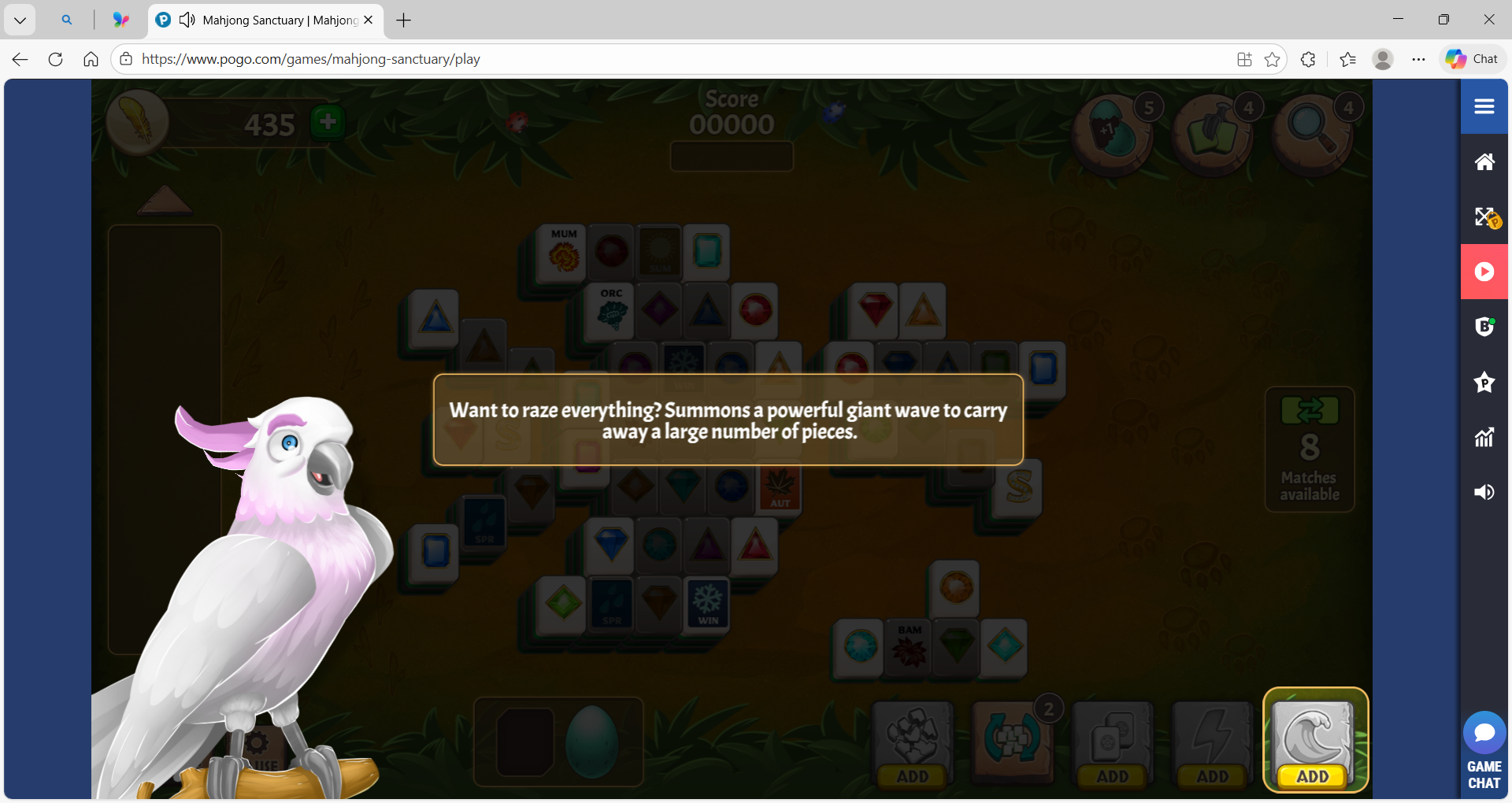
Level 13 on challenge wants you to buy wave but won't let you opt out and play the level. It is stuck 😐

  • 352jbjgusvzj​ Rivige​ mytiemo13​ 

    Hello and thanks for posting! There were new features added to Mahjong Sanctuary on February 11, 2026 → Discover the new Mahjong Sanctuary Update!

    What you are experiencing is called looping. Please try clearing your browser’s cache/cookies, turning off any ad blockers for the site, or try opening the game in a private/incognito window. That usually fixes it straight away. Here is the Pogo troubleshooting guide for guidance → Pogo Troubleshooting Guide | EA Forums - 10424297

    🌟Pogo is a browser‑based gaming site that relies heavily on our devices to be clean, configurated and have room to move. Over time, the data stored on our devices can build up or even become corrupted, and that can interfere with how games load or how new features behave. An outdated browser can cause similar problems because newer game features may not work correctly on outdated versions. Even regular system updates can change settings without us realizing it, which can affect how each individual game loads and operates.

    Please take a moment to view the troubleshooting guide. Currently the game is loading on the website itself, and the challenges are working as designed:

    If you continue to experience issues, please try all the troubleshooting steps. Here are the most common:

    • Outdated browser versions
    • Outdated operating system (OS)
    • Browser extensions or add‑ons that interfere with game scripts
    • Corrupted cache or cookies
    • Device performance limitations (older hardware, low memory, etc.)
    • Outdated graphics drivers (huge for gamers - this is loading & visuals)
    • Hardware acceleration settings (on or off can affect performance differently)
    • Security software or firewalls blocking game components (can change how cookies, permissions, connections work)
    • Multiple open tabs or heavy background usage
    • Power‑saving or battery‑saving modes reducing system performance
    • VPNs or proxy connections slowing or blocking game traffic
    • Router/Internet issues (modems and routers are like little computers and need maintenance)
    • Pop‑up blockers interfering with game windows or scripts
    • For Apple Users, please view this guide: Troubleshooting Guide for Apple Devices


    If you have any further questions or need any further help, please do not hesitate to reach out again. Together with other players and our EA Community Managers, we will be happy to offer you more support.


9 Replies

  • Says in my cases this had been fixed. NO it hasn't. All the challenges have been removed 🤪 I know who won't be buying any Pogo passes

  • Rivige's avatar
    Rivige
    Rising Newcomer
    26 days ago

    I am having the same issue......bought several waves.....gets to the same screen.

  • 352jbjgusvzj​ Rivige​ mytiemo13​ 

    Hello and thanks for posting! There were new features added to Mahjong Sanctuary on February 11, 2026 → Discover the new Mahjong Sanctuary Update!

    What you are experiencing is called looping. Please try clearing your browser’s cache/cookies, turning off any ad blockers for the site, or try opening the game in a private/incognito window. That usually fixes it straight away. Here is the Pogo troubleshooting guide for guidance → Pogo Troubleshooting Guide | EA Forums - 10424297

    🌟Pogo is a browser‑based gaming site that relies heavily on our devices to be clean, configurated and have room to move. Over time, the data stored on our devices can build up or even become corrupted, and that can interfere with how games load or how new features behave. An outdated browser can cause similar problems because newer game features may not work correctly on outdated versions. Even regular system updates can change settings without us realizing it, which can affect how each individual game loads and operates.

    Please take a moment to view the troubleshooting guide. Currently the game is loading on the website itself, and the challenges are working as designed:

    If you continue to experience issues, please try all the troubleshooting steps. Here are the most common:

    • Outdated browser versions
    • Outdated operating system (OS)
    • Browser extensions or add‑ons that interfere with game scripts
    • Corrupted cache or cookies
    • Device performance limitations (older hardware, low memory, etc.)
    • Outdated graphics drivers (huge for gamers - this is loading & visuals)
    • Hardware acceleration settings (on or off can affect performance differently)
    • Security software or firewalls blocking game components (can change how cookies, permissions, connections work)
    • Multiple open tabs or heavy background usage
    • Power‑saving or battery‑saving modes reducing system performance
    • VPNs or proxy connections slowing or blocking game traffic
    • Router/Internet issues (modems and routers are like little computers and need maintenance)
    • Pop‑up blockers interfering with game windows or scripts
    • For Apple Users, please view this guide: Troubleshooting Guide for Apple Devices


    If you have any further questions or need any further help, please do not hesitate to reach out again. Together with other players and our EA Community Managers, we will be happy to offer you more support.

  • So it keeps wanting me to use the tidal wave and it won't move off it. I have used ALL of them trying to just play the game and it just keeps asking me to use it. I am super annoyed as I have used 3 or 4 plus spent to get another and it still won't stop. And this is over a number of days so I don't know what the issue is but I can't finish this badge. Help?

  • I've had this same issue.  I have cleared cache and done all the "fixes" yet it still happens, I can't go to a lower level to replay to see if it "might have fixed it"  I too am at Level 13.  What is a complete fix for this game?

  • abbycattx's avatar
    abbycattx
    Hero+
    15 days ago

    f434b66209814b70​ 

    Hello. Sorry to hear Level 13 of Mahjong Sanctuary is giving you difficulties, plus you also cannot play the lower levels is indeed troublesome. 

     "I have cleared cache and done all the "fixes" yet it still happens, I can't go to a lower level to replay to see if it "might have fixed it"  I too am at Level 13.  What is a complete fix for this game?"

    I double checked Level 13 and replayed it today and it is currently working as designed. You mentioned that "I have cleared cache and done all the "fixes".  Could you please provide details about the fixes you implemented, as well as the type of device, operating system, and browser you are currently using?

  • f434b66209814b70's avatar
    f434b66209814b70
    New Novice
    14 days ago

    I have Windows 11 via Google and I play on my iPad (via Google since it won't allow play via Safari for Pogo) both with the same results after clearing cache and reinstalling the ap.

Featured Places

Node avatar for Pogo Technical Issues & Bugs

Pogo Technical Issues & Bugs

Join the Pogo community to talk about game issues, browser and HTML5 troubleshooting, and report bugs in the games.Latest Activity: 15 minutes ago
5,349 Posts