Forum Discussion

Haanbeii's avatar
6 years ago

0xc000007b Error

So a while ago, Origin randomly would not open with the 0xc00007b error. Miraculously, I got it to open. But now none of my games will work. I'd really like to play the Sims 3.


My computer, .net, and vc++'s are all up to date and have been reinstalled so they shouldn't be broken. I've done a system disk check, which didn't do anything. I've included a DxDiag report. Please, could someone help me?

14 Replies

  • puzzlezaddict's avatar
    puzzlezaddict
    Hero+
    6 years ago

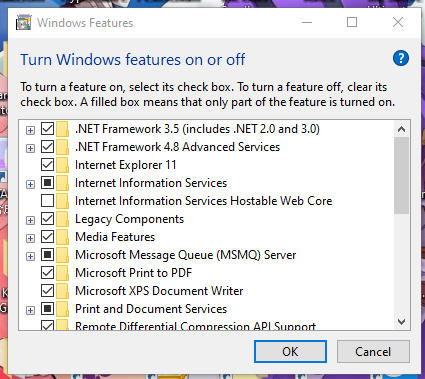
    @Haanbeii  Please check the status of the .NET Frameworks on your computer.  Hit Windows key-R and enter "appwiz.cpl" without quotes.  In the File Explorer window that opens, click "Turn Windows features on or off."  You should see something like this:

    Please screenshot the same section and upload it.  (You can use Windows key-shift-S and drag your cursor over the section of screen you want to capture.)


    @Haanbeii wrote:

    I tried a system refresh, but at some point it stopped with an error. I don't remember what it was, if it even said what the problem was in the first place, so I wonder if that might have a connection.


    I'm also curious what option you used, when it stopped, and what error it threw.  Even if you don't remember exactly, just list as many details as you can.  And yes, it could definitely have a connection.

  • Haanbeii's avatar
    Haanbeii
    6 years ago

    @puzzlezaddict If i could remember, I'd tell you ASAP. I did a 'keep personal files', which is all I can remember, since my memory is getting a little bit bad.

  • Updating DLL method of fixing this error is a bit complicated but it can resolve the issue caused by 0xc000007b error for sure. This method includes replacing a file called xinput1_3.dll inside the C drive. This file can be corrupted or overwritten with some other version which results in causing this error. To fix this issue, follow these instructions.

    • Download dll xinput1_3.dll from DLLME (Google it)
    • Extract these files using a compression tool called Winrar.
    • Copy the xinput1_3.dll file from the extracted folder and paste into C:\ Windows \ SysWOW64. When prompted for replace, click on Copy and Replace and that’s all.

    Fix step by step tutorial https://geeksadvice.com/fix-the-application-was-unable-to-start-correctly-0xc000007b-error/