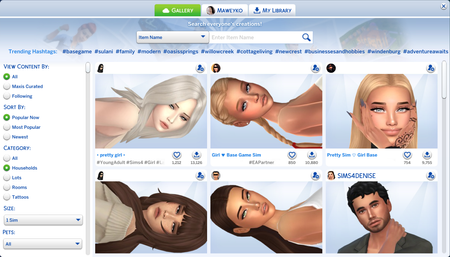
That’s not… how default replacements work. Once a replacer has its swatches with the wrench icon on top (i.e.: eye color, skin color), even if they are defaults, the Sim will be marked as modded. I even use replacers now to merely improve eye color but not completely change it (or add more). I also use a body mod, and default skinblend. Upon saving it, the blue wrench icon that indicate a household is modded still shows up. If not then, when the household is uploaded/published. And I don’t know what you want to say when you said, “It’s predictable that just lazily opening and looking at the Gallery by glance…” That is the problem, it shouldn’t be. It’s not supposed to be, it’s not intended that modded-looking Sims appear in the non-modded section of the Gallery. That’s why we have the “Include Custom Content” checkbox for. The regular is meant for no-CC vanilla Sims, but they’re being buried by catfish Sims. And even if you have to look for a specific thing, the search bar is still limited. Catfish Sims occupy a lot of hashtags even the normal ones despite claiming they’re “base game” which is already misleading when they have a pack requirement and wall of hashtags in the description mentioning pack names. So if we were to look for this “specific thing,” what is it? #Pretty? #Cute? Handsome? #Asian? #Male? #Female? They also have that covered and you’ll still see them there. If it’s someone or something really specific, then of course, that’s granted, but that’s not a solution nor relevant.