Forum Discussion

Ella22711's avatar
Ella22711
Seasoned Newcomer
2 days ago

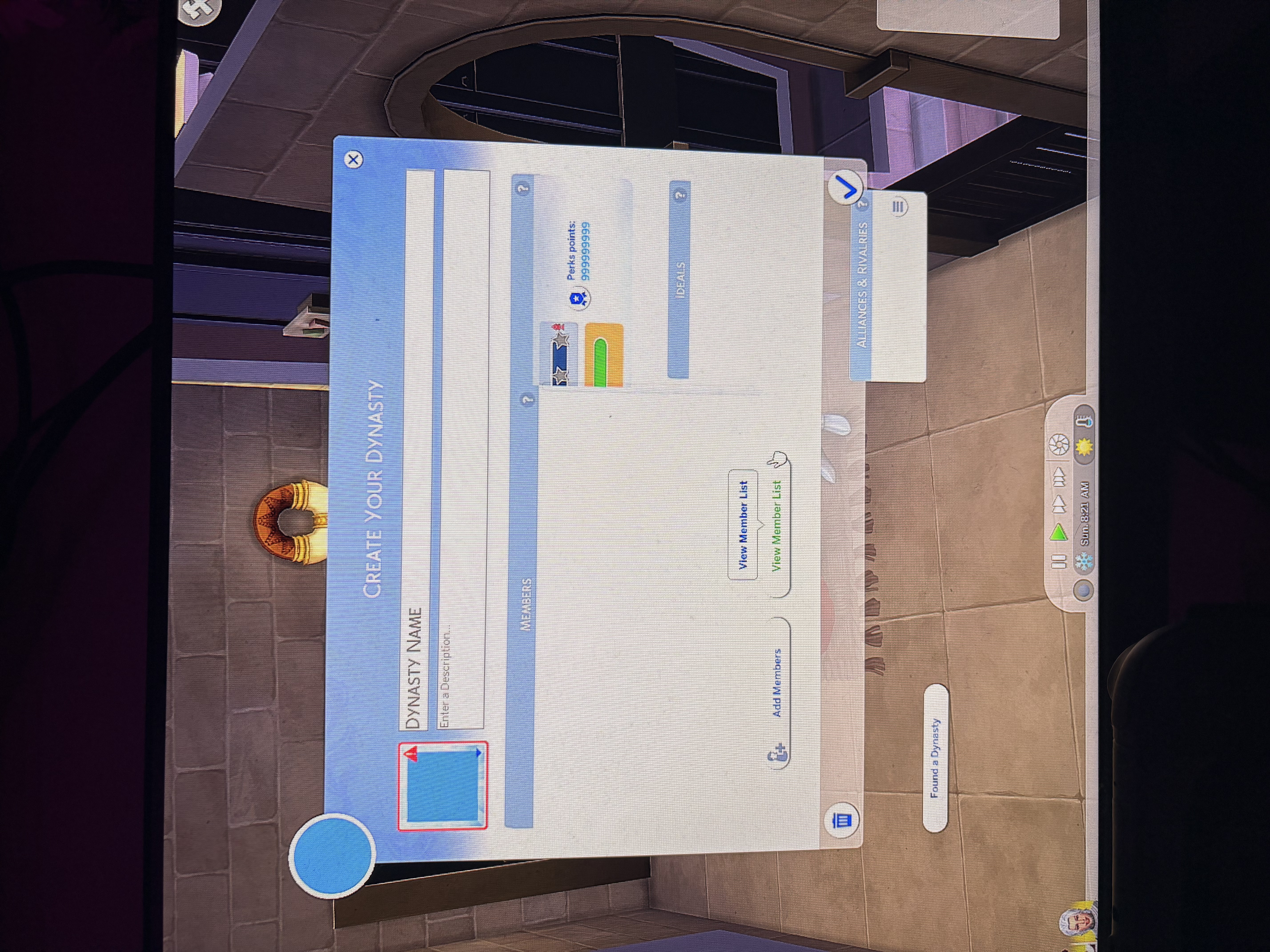
[RL] 9999999 Perk points and blue overlay in Dynasty GUI

Hi, I do not know if anyone is having the same issue as me, but when I load up a game, completely new save and new characters and all, when I click to make a new dynasty it lags out all weird? It’s almost like it’s buffering between the dynasty prestige? And when I click to make a new dynasty it also lags out and says I have 9999999 perk points.

I am on windows so naturally I have mods, however I did remove my mods to check wether it was a conflict or a broken mod, however it is still the same, and I have had no one report it as an issue, I have messages The Sims account on Instagram but they haven’t replied (only messaged like 10 mins ago) but this issue has been happening since Friday night (yesterday as I’m writing this)

I hope people are having the same issue so I can easily sort it out 🥲

I will put a photo of my issues below:
(had to repost this because I posted it in the wrong forum at first)

Edit By crinrict: Added Tag to Title, Adjusted Title

20 Replies

  • Ella22711's avatar
    Ella22711
    Seasoned Newcomer
    1 day ago

    im so happy its not just me, ive deleted all my save files and now im worried if its my sims folder as a whole thats corrupted 😅

  • crinrict's avatar
    crinrict
    Hero+
    1 day ago

    Hi Ella22711​ 

    Would you be willing to share your save with me ?

    If so, please zip your saves folder and upload it somewhere like dropbox, googledrive or OneDrive and PM me the link.

  • Ella22711's avatar
    Ella22711
    Seasoned Newcomer
    2 days ago

    Hi, yes I have already turned off OneDrive, however every now and then it does turn up to cause issues, however I know it’s not that as it isn’t in my game properties, I will show you where my files are located now:

    I hope these are all correct.. sorry if the quality is bad I took these on my phone loll 🥲

  • Ella22711's avatar
    Ella22711
    Seasoned Newcomer
    2 days ago

    Hi, ive tried this and it hasnt seemed to be working, well, ive tried the first tutorial and the issue is still happening, and i know it isnt my mods as ive previously stated, however i do not know how to go about with copying my folders, as they are in different locations as you have stated (because i have had issues with my sims game because of OneDrive, so they are in my Public Documents folder) and i do not want to delete something i am not meant to. Thanks

  • crinrict's avatar
    crinrict
    Hero+
    2 days ago

    Does it happen for you also on new save after renaming the user folder or just when putting your existing save back ?

  • 2atg1e35mnvo's avatar
    2atg1e35mnvo
    Rising Newcomer
    2 days ago

    I have the same issue but I’m on Mac. I cleared my folders, redownloaded all my mods, and ran it without mods and it’s still happening

Featured Places

Node avatar for The Sims 4 Mods & Custom Content

The Sims 4 Mods & Custom Content

Find tips, tutorials and troubleshooting for mods and custom content, and The Sims 4 patch files here.Latest Activity: 42 minutes ago
16,670 Posts