Game crashing or not loading especially after updating? Post here.


My issue is that my game keeps randomly crashing. There is no specific thing that triggers it that I can identify, it just randomly crashes when I'm playing in Live mode. My game is able to load just fine, and I can get maybe an hour or two of gameplay in before it crashes, so it is hard to duplicate the issue and find an exact trigger. Even when my game throws a Last Exception, that does not necessarily cause it to crash. The last time it crashed, for example, I was moving my camera around the neighborhood where I had a household living. Prior to that my game crashed while playing in a different household when the family was chatting with each other mid-conversation. I have played on a new save file without mods, and it did not crash, but like I said, the crashing is random and I don't know what to do to cause it to crash, it seems to crash whenever it wants to, so the testing on a new save file couldn't produce the same results.
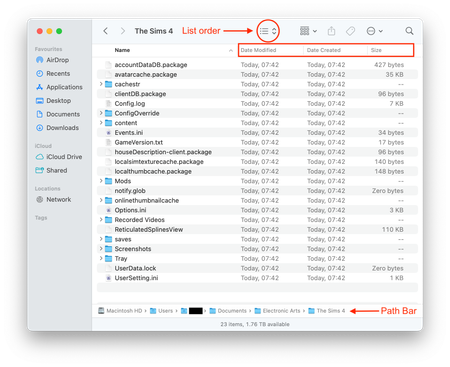
On my own I have repaired my game twice, generated the game with a new The Sims 4 folder and added back my Mods, Tray, and saves folder, and a few other .log and .ini files. I have done "Save As" on my save file. None of it seemed to stop the crashing. I've updated my Mods (I have Better exceptions and that confirms that all my Mods are in good standing), I've done the 50/50 method about a month back when the crashing first started, and although I ended up deleting some mods thinking they were the issue at the time, it has continued to crash since then, and even more so since the latest 4/29 patch update. Here are my computer specs and a photo of my The Sims 4 folder below (please let me know if you can't see it):
Thanks for all the info, always so helpful 🙂
The camera causing crashing has been reported a few times before although not enough info has ever been provided by users to try and find the common cause and it's never been hugely reported. Can you confirm:
And I really need you to test a fully clean, vanilla game for a few play sessions to properly test whether it's Mod related please as you say "I have played on a new save file without mods, and it did not crash...". Whilst it may not be a specific Mod, or combination of Mods, causing the crashing, it may be that the amount of Mods you have installed and what those Mods do in-game could be causing the crashing.
Hi Bluebellflora , thanks for the response!
Now that I think about it, on a previous save file I had, I remember having a huge issue with the camera causing crashing when rotated around on the 40x30 penthouse lot in the Fashion District of San Myshuno. The issue only ever occurred on that particular lot. I reported it, but couldn't get to the bottom of it. I've since started a whole new save file twice (due to corruption issues after the release of For Rent), but I'm wondering if that issue is surfacing again. Here are my answers to your questions:
I'll open a new save file without mods and play for a few hours to see what happens. If it helps, I have 120 script mods and 59344 package files in my Mods folder.
AkennArt wrote:If it helps, I have 120 script mods and 59344 package files in my Mods folder.
Good grief! That's a huge amount. How big is your Mods folder in GB?
Before testing a clean game (and I need you to test a clean Sims 4 folder again as per the instructions in the OP in this thread, not just a new save please) could you enable vsync in your in-game settings and see if the crashing still happens?
Yes, The apartment lots in San Myshuno are absolutely bug-ridden, especially the ZenView Apartments which have so many issues, including a camera crash 😒