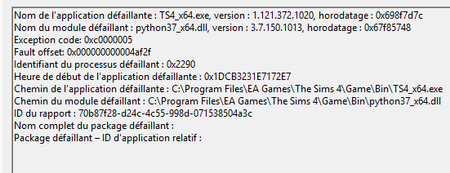
Crashes every hour, Code 0xc0000005 python37_x64.dll


Cissouryne You might already have the current BIOS version; that would be something to check internally and compare with what you see on the MSI download page. But if the changes you made within the BIOS settings have fixed the issue, then no, you don't need to update.
You also probably don't need to disable anything other than CPU Turbo Boost, so you can try reenabling the other settings now. XMP in particular was thought to be a culprit when this problem first emerged, but I haven't suggested anyone disable it in over a year. The only players who reported that disabling CPU Turbo Boost didn't help ended up needing to RMA their processor or computer overall. (That doesn't include people who never got back to me, of course.)
I'm not saying your computer is damaged, only that this particular issue is usually fixed with the one change. And disabling XMP can have performance implications, depending on what else you're using your computer for and how fast the RAM would run with overclocking enabled.
puzzlezaddict Since my last message :
- The game + record with obs was stable with no turbo boost, no xmp, no intel boost. So the cpu was capped at 3200mhz i think, but ofc a bit laggy. I could record during 2*3 hours without crash.
- I tried to add Intel Boost, 20 mins = crash
- I tried some fixes to let the Intel boost on, but without success.
- I did the last BIOS update but it didn't change anything.
- I'm actually testing 1/2 RAM to see if it's not a RAM problem... but I have no hope anymore. xD
I'm about to think my 14700k is just going to die and I have to replace it, what do you think ?


