Bought upgrade parts and dyes not recognized to upgrade/create something
Whenever I try to upgrade something, or create something (something from the fabrication station, candle station, robotic station, etc), it says I don't have the parts that are needed, even though they are in my sim's inventory. This only happens when I purchase the items, which is how I get most of my upgrade parts and all of my dyes. If my sim obtains the parts through actions like tinkering at the robotics station or receiving a part from repairing an object, then the game recognises that the sim has the part in their inventory. This has just started happening within the last two days Edit By crinrict: Adjusted Title104Views0likes14Comments
Skin details disappear when saving household
This happens with tattoos and skin details. After applying them and saving the household I will notice skin details and or tattoos have disappeared. It does not happen all the time, but sometimes. It happens with vanilla gameplay and cc. I remove all mods before an update and play a vanilla save file until the mods have updated, so it can’t be mod related. I’ve seen this complaint from others on X and Reddit but not on this forum. Hair and eye color will also change, usually to red orange hair and blue eyes.16Views0likes1Comment
Retail Stores from GTW don't work. I think it's because of the cash register.
My retail stores don't list their items as for sale unless my current household buys the store and set them for sale manually. I'm not able to click the cash register at all, but once i buy the store, I can sell the register for a new one and set my items for sale. But the glitch comes back when i sell the store right after. Removing my mods folder did not fix the issue.
game is corrupted?
Since updating my game I had to redownload a lot of cc (accidentally fumbled and deleted everything) and I just tried opening my game and it kept saying a bunch of cc was corrupted and wouldn't launch the game. So I kept taking things out and eventually took out folders one by one till I had no cc and then it would open so I'm just mad confused.
Changed hairstyle on premade sim does not apply to work clothes
As the topic suggests the hairstyle on premade sims does not apply to work clothes. When I go in to CAS and change the hairstyle of a premade sim to anything but the one it had from the start it still changes back to the original hairstyle when changing to workclothes. I had Tom Peeping join my household and remade him to look better but when I sent him of to work his usual bald head made a comeback and there is no way to change it. It is the same if I use a townie. In one save it happened to a child sim when I tried to give him a bath. I do use mods but it also happens when I play vanilla and across different saves. Is someone else experiencing the same issue and possibly also know of a way to fix it?SolvedPacks wont load
Every time I open my game recently, it says none of my packs are downloaded and tells me to restart the game. I've closed and reopened the game, repaired it, uninstalled and reinstalled the EA app, cleared my cache, and nothing has worked for me. Admittedly, I'm not the most tech-savvy, but I've looked at many similar problems online and haven't found a solution that works. I have no CC or Mods Thank you!Solved276Views3likes12Comments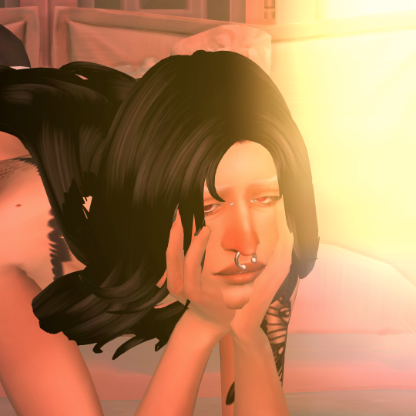
Acne on all ages
Hello! I've been having this issue where my infant, toddler and children sims get acne that will not go away... it's not mod nor cc related and I have acne switched off in the "Pack Settings" so I don't exactly understand why it's happening.... Even freshly made YA spawn in game with acne although I have mods that help remove it for them. I just really want a fix for this. I do use mods and cc. But I know this is not mod nor cc related because even when I take out my mods my sim appears with acne. The second image is the sim when I uninstall the High School Years pack from game. The acne goes away.55Views0likes6Comments
no 'swim in ocean' option
I just got the Island Living pack and have made a mermaid sim. But I can't get her to swim in the ocean. Or any sim. Even the NPCs don't seem to swim in the ocean. I am wondering if I accidently turned it off somehow, but I can't find a setting anywhere. I have tried diving from a ladder spot, and the sim walks up and just doe the 'can't path here' wave and bubble. I'm sadddddd I wanted to play with mermaidssssss221Views3likes15CommentsGame crashing after latest update
Every time I open the game after the march 20th update it crashes in the title screen. I've been able to get past the title screen a handful of times. Every time ive been able to load in, I instantly go into build mode and the second I place anything the game freezes and then crashes. This happened both when I had mods, and when I disabled all of my mods so I know its not an issue with my mods. I also dont have any DLC made after Werewolves.