Unable to launch game due to "not owning the game"
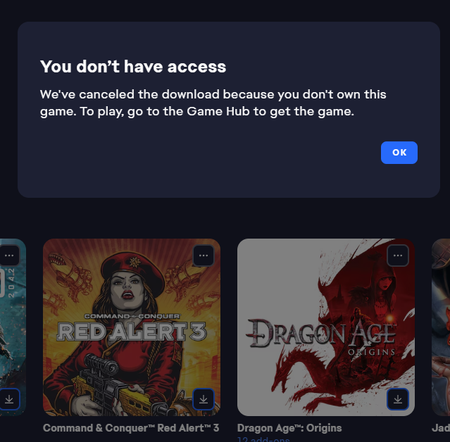
I've been working with the support to try and resolve this, but they directed me to the forums. I can't launch my Red Alert 3 from my library. I bought the game back when it came out on CD-Rom and added it on Origin as was required. After the update to the EA-app (and I think the launch of the C&C remastered collection). The game no longer is able to download as I get an error messages stating: Which is silly as I'm looking at the CD-Rom lying in front of me. The game doesn't have its own gamehub and the only option under the three dots is to download it, which gives this error. Having down the usual gamut of uninstalling, repairing, cache clearing, restarting etc. The service team couldn't help me further and directed me to post over here. Is there anyone who can help me out?487Views3likes13Comments
Screw your "EA App Needs To Restart" while playing
Seriously, what MONKEYS work on design and coding of this thing? If I started EA App that's because I want to PLAY A GAME. If I am playing a game I DON'T WANT TO STOP JUST SO YOUR APP CAN RESTART. If you need to check for updates DO IT BEFORE OPENING IT AND UPDATE IT BEFORE LAUNCH LIKE STEAM DOES FOR AT LEAST A DECADE. SHEESH.67Views2likes1CommentEA App closes immediately after launch / Cannot login
"I just installed the EA App, but it closes automatically 2 seconds after I open it. I can't even reach the login screen. Since the app won't stay open, I am unable to play any of my games. I need help fixing this launch issue."169Views2likes2Comments
EA App failure to launch
Hello, Yesterday the ea app was working perfectly normally. Today it's coming up with a message saying 'The app failed to launch' followed 30 seconds later by another window saying 'Failed to log in' and a error code reading EC:10005. I have tried repairing, uninstalling and doing a clean install and checked firewall and internet settings but nothing yet has worked.153Views2likes2CommentsNo Verification Codes
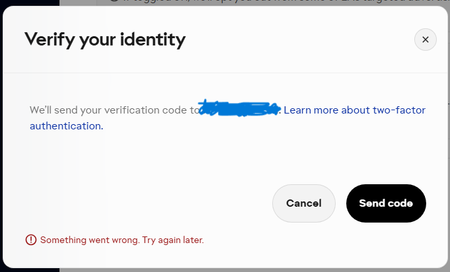
EA will not email me any verification codes (I checked spam folders) to be able to log into my account when I went to turn 2fa on (didn't know it was turned off because usually it sends me a code to be able to get into my account). It said 'Something went wrong' then when i tried to do it again it said it sent a code but I never received it.
Battlefield 6 purchased in Steam is not displayed in the EA App library.
I bought the game by pre-order on steam, everything works, I can log in to play, but there is no battlefield 6 app in the EA app, I cannot receive the veteran's award and other awards.Steam and EA app are linked to each other, I tried deleting the apps and installing them again, it doesn't help. There is no such problem with the EA 25 purchased on steam, and it is displayed correctly in the EA app. I did what the employee advised: reinstalled the EA app, Use the built-in EA app recovery tool , I see Star Wars purchased on steam and need fo speed also purchased on steam Only battlefield 6 purchased on steam is not displayed in the EA app. 5 EA employees with whom I chatted could not solve this problem and the only thing they could advise was to post it on the forum.Solved1.1KViews1like8Comments