xbox app ea extension error code:-2147221163
I am having trouble connectin xbox app to the ea extension it says were having trouble connecting to the ea app error code:-2147221163 to contact ea app support I have tired all of these- Restart and Update: Restart your PC. Make sure Windows is up to date with the latest updates installed. Check Internet and Security Software: Ensure your internet connection is stable. Temporarily disable any third-party antivirus or firewall to rule out interference. If this fixes it, add the EA app as an exception in your security software. Redownload and Reinstall EA App: Uninstall the EA app completely. Download the latest installer from the official EA website and reinstall it. Check Account Linking and Authentication: Visit the EA Account connection page: Log out from all EA-related sites, then back in using the 'Sign in with Xbox' option. If prompted, create or relink your EA ID. You may need to manually unlink and relink your Xbox and EA accounts by visiting the connections section in your EA account settings Clear DNS Cache: Open Command Prompt as Administrator and run: ipconfig /flushdns Check Xbox Services Are Running: Open Services app (Win+R, type services.msc). Find and make sure these are set to “Automatic” and running: Xbox Live Auth Manager Xbox Live Game Save Xbox Live Networking Service Gaming Services IP Helper still i can not figure it out and ea help 3 different people at ea support could not either ea really needs to look into this issue cause on ea forums there are alot of different post with alot of comments on each differnt post about this problem i mean ALOT of people have this issue if ea could look into and fix it I would be greatful or if anyone knows how to fix it I would greatly appreciate it so much Thanks!
Battlefield 6 purchased in Steam is not displayed in the EA App library.
I bought the game by pre-order on steam, everything works, I can log in to play, but there is no battlefield 6 app in the EA app, I cannot receive the veteran's award and other awards.Steam and EA app are linked to each other, I tried deleting the apps and installing them again, it doesn't help. There is no such problem with the EA 25 purchased on steam, and it is displayed correctly in the EA app. I did what the employee advised: reinstalled the EA app, Use the built-in EA app recovery tool , I see Star Wars purchased on steam and need fo speed also purchased on steam Only battlefield 6 purchased on steam is not displayed in the EA app. 5 EA employees with whom I chatted could not solve this problem and the only thing they could advise was to post it on the forum.Solved899Views1like8Comments
Is there a current offline installer availabl?
Here's a cleaner version of your text for better understanding and potential use: Is it possible to bring back Origin? At least it worked fine and had a quick installation. Another potential solution could be an offline installer for the EA App. I’ve tried all the websites and variations—feeling like a programmer, searching for the 101st solution to reinstall the EA App for almost a month now. Doesn’t the average user deserve a more user-friendly product? The installation process already starts with a warning in Microsoft Edge that the EA App file could harm the computer. Please provide alternative installation methods—many users online are asking for help and reporting installation issues. If you want to publish this anywhere, I can help with formatting, too. Let me know!831Views0likes0Comments
EA app needs to restart
I have problems to access and play Sims 4 on the EA app. Whenever I open the app I get a following message: “The EA app needs to restart.” When I click to restart, the app os being downloaded and when it’s done it’s closed. I reopen the app and have THE SAME MESSAGE AGAIN. Can anyone help me how to resolve this please!? I am so frustrated, this lasts for says!455Views0likes1CommentUnable to launch game due to "not owning the game"
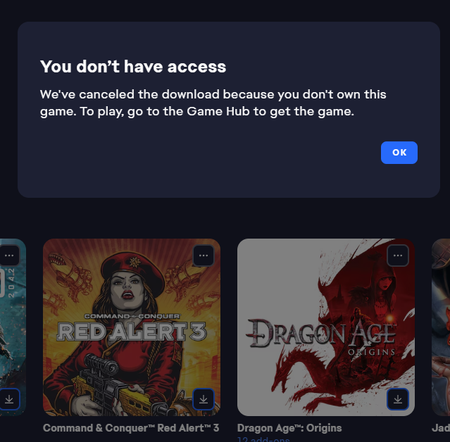
I've been working with the support to try and resolve this, but they directed me to the forums. I can't launch my Red Alert 3 from my library. I bought the game back when it came out on CD-Rom and added it on Origin as was required. After the update to the EA-app (and I think the launch of the C&C remastered collection). The game no longer is able to download as I get an error messages stating: Which is silly as I'm looking at the CD-Rom lying in front of me. The game doesn't have its own gamehub and the only option under the three dots is to download it, which gives this error. Having down the usual gamut of uninstalling, repairing, cache clearing, restarting etc. The service team couldn't help me further and directed me to post over here. Is there anyone who can help me out?432Views3likes13Comments
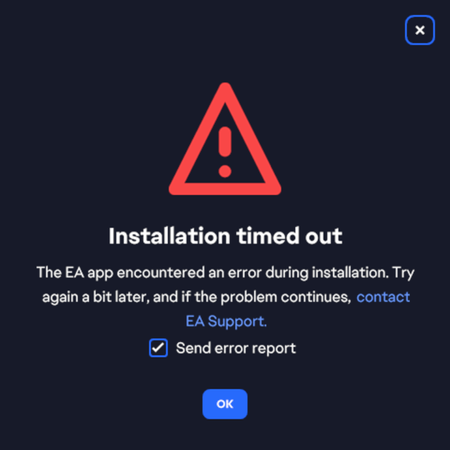
EA APP WONT INSTALL, TIMEOUT. ERROR INST-21-25000
EA App won't install, timeout. I won't give me the error report or code, i needed to dig for that to find a log file in a temp dir. What an utterly lousy user experience. Running out of patience. Tried everything. Just make something that works pls. Tried running from C:\ and as adminstrator, with and without virus scanner enabled. Only installer that gives me issues, congrats EA.Solved