removing games with no notification?
shutdown or not, you removed Anthem without notifying me. no compensation or credit for my purchase? with the heat surrounding games and digital ownership, you all thought this was the best time to pull this? won't buy another title through your app again.Solved17Views0likes1Comment
Dead Space 2 / You Don't Own This Game
I tried to submit a ticket but that's been deliberately made very difficult. The EA app does recognize that I have the relevant CD key activated for Dead Space 2, but in terms of downloading it and installing it it's just kicking out with 'we've canceled the download because you don't own this game'. Even though the library has it, the key is tied to it, etc. What's my next step?13Views0likes1CommentAdd option for closing app entirely when you hit the X
Please for the love of almost everything except money put in a switch that will let me close the EA app entirely when I hit "close" in the top right of the window, instead of "closing" to the system tray (effectively just minimizing the app.) I do NOT want ads popping up in the corner of my screen. I will Go Out Of My Way to not purchase anything that is advertised to me in this invasive manner. I do NOT want the app to be running in the background when I hit the "close"- CLOSE! button. Not Minimize! Close! General computer courtesy, in my opinion, is allowing the user to control their experience. EA is failing spectacularly at this by prioritizing their Ads over user experience, if what I suspect (that this wasn't a decision by the devs and was instead a decision by management) is true. I suspect this because almost every other app in existence that might have a reason to minimize to system tray (auto updates, etc.) gives the user the option to forego whatever niceties that minimizing to system tray does and close the app entirely, should they wish to. Even if it takes menu-diving to find. Another idea: Allow us to turn off pop up ads. We already pay money for your games, and I'm certain you already sell any data of ours that you can get your hands on to ad partners. At least give us the option to have a clean app experience (at the very least for those of us dedicated enough to find the settings to make it so.) Do better.36Views0likes1Comment
Win 11 - EA App opening itself
Sometimes, when I'm doing something entirely unrelated, the app will decide to open itself for no reason. Even when I have SPECIFICALLY right-clicked on the icon in the Notification Area and told it to Exit. It'll just decide to open itself a few minutes later, over the top of whatever I'm doing. This isn't it launching on startup (it's not even in the "startup apps" section of Task Manager, and Run On Startup is disabled in the options), this isn't it auto-updating games (there are no updates available, that's why I launched it the first time, and then closed it) (and also "continue updates when the app is closed" is disabled), it doesn't seem to be updating the app itself (again, it was open less than an hour ago with no indication of updates). It's not caused by me opening Ubisoft or Xbox app, and them subsequently opening the EA App because they're linked. It's not caused by me opening a game I own on the EA App. I'm testing a possible solution of disabling "Install updates automatically" in the Application settings tab. I've heard a possible solution of disabling EABackgroundServices in msconfig, but I'd really rather avoid touching anything in there, if possible. But why on earth is it launching itself, in front of everything, without me touching the icon?55Views0likes1CommentSimCity for MAC unavailable to download on EA app
Purchased the game from EA website as indicated to be only available via de EA app installed on MAC machine. When going to the library area to download the game, there is a statement on the bottom with the message "Available on Windows". Is that false advertising then? I can purchase the same game using the apple apps method but the price is 70% higher. What is the issue?Solved29Views0likes2CommentsEA App fails to play my Steam purchased games. All efforts have failed.
I'm getting so fed up with this BS with your app. I'm glad to see that the error message claim responsibility for what's happening, but fix the issue and get your sh*& together, EA. Jedi Survivor, Jedi Fallen Order, SW Battlefront 2, and NFS franchises. I've dumped a lot of money into your games over the past 3 decades, like many others. FIX YOUR SH*& and quick!!!Unable to launch game due to "not owning the game"
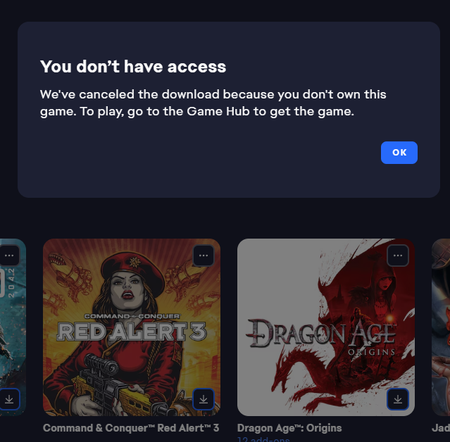
I've been working with the support to try and resolve this, but they directed me to the forums. I can't launch my Red Alert 3 from my library. I bought the game back when it came out on CD-Rom and added it on Origin as was required. After the update to the EA-app (and I think the launch of the C&C remastered collection). The game no longer is able to download as I get an error messages stating: Which is silly as I'm looking at the CD-Rom lying in front of me. The game doesn't have its own gamehub and the only option under the three dots is to download it, which gives this error. Having down the usual gamut of uninstalling, repairing, cache clearing, restarting etc. The service team couldn't help me further and directed me to post over here. Is there anyone who can help me out?465Views3likes13Comments
Unreasonable hashtags
I am receiving unreasonable amounts of hashtags during chats on the EA App. For example, telling my friend my dying Aunt wants me to come for Xmas is all hash tagged out. What part of that is dangerous, filthy, sex-oriented, drug-oriented, not age appropriate? I have also had strikes on asking what's for dinner? Please, get it together. If Xmas is sexual, look it up. It's a common abbreviation.
Screw your "EA App Needs To Restart" while playing
Seriously, what MONKEYS work on design and coding of this thing? If I started EA App that's because I want to PLAY A GAME. If I am playing a game I DON'T WANT TO STOP JUST SO YOUR APP CAN RESTART. If you need to check for updates DO IT BEFORE OPENING IT AND UPDATE IT BEFORE LAUNCH LIKE STEAM DOES FOR AT LEAST A DECADE. SHEESH.61Views2likes1Comment