EA Play/ App Issues
I bought a monthly EA play subscription yesterday so that I could start playing The Sims 3 on my Mac. The Sims 3 is one of the games that are available under EA Play so instead of having to pay to own the sims 3 you can just get it with the EA play subscription. So I pay for my subscription and I try to download the Sims 3 in my EA app, but it keeps saying that I have to pay for £26.99. I wanted to see if it would work with other EA Play games but it won't show me any games apart from the Sims 4 on my app. If I search any other game, no results. If I go to browse, I can only see The Sims 3. I tried contacting support over live chat for 4 HOURS yesterday to no avail. It would say, someone will be with you in 15 minutes. I wait half an hour and nothing. And then an hour later someone will respond, I'll be doing something else because I've been waiting forever, and then they'll close the chat. I just need someone to help me with this because I am going crazy. I've already tried deleting and redownloading the EA App. And still it will only show me the Sims 4, and this EA Play thing is showing me absolutely nothing.Solved50Views0likes2Comments
Credit Card refused
I subscribed to EA Play pro on my original account using my credit card and used it to buy FIFA Points many many times without any issues, but unfortionately, that account got a Transfer Market ban. I know the reason since I don't play very often and I'm not good at it, my friend asked to take my coins and got me banned and it was stupid I know but it's totally fine because friendship comes above everything else. After that I created a new account and tried to subscribe to EA Play pro using the exact same credit card, but it got declined with an error telling me to try another card or try again later. Just to test the card, I logged back into my old banned account and purchased 50 FIFA Points, and the payment went through instantly, which makes no sense especially since I had removed the card from payment methods on my old account. I eventually had to use a friend's card and bought FIFA Points through a third party redeem code, but I want to use my own card since it is cheaper, faster, and much more secure. So, please help EA36Views0likes0Comments
EA are unable to verify my debit card
I want to get EA play pro so I can play the games in it but he app and the website keeps giving me the message that they cannot verify my debit card. I tried with four different cards and that is the only message i get. Tried with pay pal too and still cannot get the membership. Contacted the Revolut support and they tried everything to make it happen but couldn't. What can i do and why is this happening?Solved890Views1like22Comments
EA Play Pro Subscription – Payment Error for Over a Week
Hi everyone, I’ve been trying to subscribe to EA Play Pro for the past week, but it simply doesn’t work. No matter whether I try PayPal, Revolut, or my bank card, I’m unable to complete the payment and I keep getting the same error message. And please don’t come at me with the usual EA Support response of: “Please try a different payment method…” 😅 This issue has been happening for an entire week now, basically since the release of EA 27. I’ve just spent over an hour chatting with EA Support, and they couldn’t find any issue on their end. It took three different support agents before someone finally understood what my actual problem was. The last support agent told me that I simply have to wait because they’re going to investigate the issue with their team. Apparently, they can’t provide me with any updates and I should just keep checking EA’s social media and Twitter to see if they post anything about it. Uhm… what? 😅 Would it really be that difficult to send an email once the issue has been resolved? Anyway, they didn’t offer the subscription as compensation or anything else. Honestly, even just a follow-up email once the problem is fixed would have been enough for me. Instead, I’m basically just supposed to wait and randomly try again at some point to see if it works. It’s honestly a bit disappointing, especially as someone who has been playing EA games and buying several of their games for over 10 years. Has anyone else been experiencing the same issue?121Views2likes2CommentsMissing 10% discount in Apex Legend with EA play
I've just subscribed EA play monthly on PC EA App in order to get the 10% discount purchasing the coins in Apex. But it didn't work when I started Apex on Steam. I do linked my Steam and EA account. I can not find any solutions on the EA help and I tried restarting my PC which is still unfixed. How can I do to solve this problem? Can I get refund and resubscribe EA play on Steam?Solved58Views1like1CommentCan't buy EA Play Pro with any payment method — EA support isn't helping at all
I've been trying to purchase an EA Play Pro membership for over a week now and have been unable to complete the payment despite trying every option available to me. I'm posting here because EA Support has not been able to resolve this, and I've seen other threads describing the exact same issue with no clear fix. Timeline of what I've tried: Attempted to pay with my debit card and got a generic error: "It didn't work. Try again. If the problem persists, use a different payment method or try again later." Checked that my EA account region matches my country (Argentina) and updated it — the error persisted. Contacted my bank directly to confirm the card is verified and fully enabled for international purchases and USD transactions. My bank confirmed there is no block or restriction on their end. Added PayPal as a payment method on my EA account — this went through successfully and PayPal now shows as linked. However, when I try to actually use PayPal to pay for EA Play Pro, the purchase still fails with the same generic error. Tried the purchase from both the EA app and the ea.com website, with no difference in outcome. Contacted EA Support multiple times through chat. None of the agents were able to explain the cause of the error or provide a working solution — I was mostly told to "try a different payment method," which I've now done multiple times with different results but the same failure. What I'm asking: Can someone from EA confirm whether this is a known/ongoing issue with the payment processor for EA Play Pro subscriptions? Is there a way to get this escalated to a technical support tier that can actually investigate account-specific payment failures, rather than repeating generic troubleshooting steps? Has anyone here found an actual working fix beyond "try another payment method"? I have a verified card, a linked PayPal account, and a correctly set region, and I still cannot complete this purchase. Any help — from EA staff or other users who resolved this — would be appreciated.32Views0likes0Comments
Can’t Buy EA Play Pro Subscription – Payment Always Fails
I’ve been trying to subscribe to EA Play Pro for days now and EA just won’t let me. First, I couldn’t even link my credit card for 3 days straight. When I finally got that sorted and tried to purchase the subscription, I got this error: "That didn’t work, let’s try again. If the problem persists you may want to use a different payment method or try again later." Well, the problem definitely persists. I’ve tried multiple times, waited, retried — same thing every time. I contacted EA support twice already, and absolutely nothing has been done to fix this. I just want to pay for the subscription and play, but EA’s system won’t even let me give them money. Has anyone else run into this? Is there any actual fix, or am I stuck waiting forever while support does nothing?3KViews9likes19CommentsEA Play Pro bug that has been persisting since january
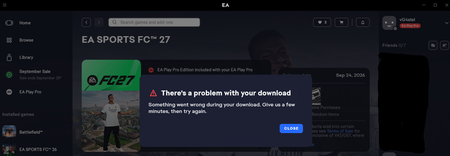
Yesterday i upgraded to EA Play Pro, some bug mustve taken place since of course EA was able to take my payment (the status on my app/account also changed to EA play Pro, my account says order completed) but i can't download any Pro titles. See attachments for extra info I've spoken to 4 customer service employees who all say the same thing: Reinstall the app, and post on the forums. I've personally tried everything from clearing cache registers to even making an ingame purchase ( which of course goes through) some on my end ive done everything to ensure the problem is not on my end but somewhere in EA's back-end entitlement The thing is, i posted this exact same problem in januari this year. Yesterday i tried again because i want early access to EA FC 27 which launches in about 12 hours and my account stays bugged. Below you can see that Madden 27 (which is already out now) does not even download, it does start the 'installing' process for a minute and then gives the 'you don't have access' message. Im at a loss for words, im a loyal customer since 2009 and customer service refuses to solve this issue. Now im not only unable to play some Madden 27 or college Football 27 on my days off but also about to miss the early release of FC 27 which i was hyped about. I need this fixed EA, at this point im sure some senior with technical proficiency can fix this but customer service keeps beating around the bush disrespecting my time. My patience is used up140Views1like3Comments