Services 2.0 is coming!
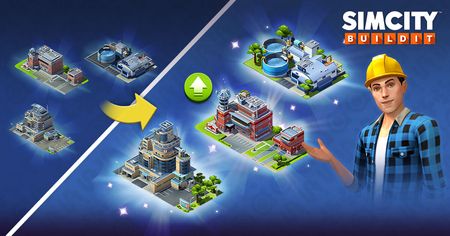
Greetings, Mayors, and welcome to Services 2.0! Here’s everything you need to know about the new update. Services 2.0 brings upgradeable Service buildings to SimCity BuildIt! This new system makes managing your city’s services more strategic, interactive, and rewarding. ℹ️ Notice: This will be gradually activated for all players. If you don’t see the new features yet, don’t worry—they will be available to everyone soon! The rollout is happening in stages, so keep an eye out for updates in your game. This ensures a smooth experience for all Mayors as the new system goes live. During the rollout, any negative effects from service coverage—like abandoned buildings or unhappy citizens—will be temporarily paused, so you can explore Services 2.0 without worry. Plus, we’ll be sending out special gifts to help you get started and make the transition even sweeter! Here’s a step-by-step guide to how it works: 1. Unlocking Service Buildings As you level up your city, you’ll unlock different types of service buildings—like Fire, Police, Health, Water, Power, and more. Each service type starts with the smallest building, and bigger, more powerful buildings become available as your city grows. This means you’ll always have new options to keep your citizens happy and safe. 2. Placing Service Buildings When you place a service building, it starts at upgrade level 1. Each Area Service Building has a coverage area (the part of your city it can serve). Capacity Service Buildings tell you how many Residential Zones (RZs) the building can support within its coverage area. If you have more homes than your building’s capacity, some won’t be fully served! 3. Upgrading Service Buildings Now, you can upgrade most service buildings! Upgrading increases their capacity, so they can serve more homes. Upgrades cost Simoleons for standard service buildings, and other in-game currencies for special service buildings. You’ll see upgrade stats in the building’s info panel and tooltips, so you can plan ahead. 4. Managing Coverage and Capacity Here’s the trick: every home in your city needs to be covered by a service building with enough capacity. If a service building’s capacity is maxed out, extra homes in its area won’t be served, which can lead to problems like abandonment. One home can be serviced by multiple service buildings —so make sure your upgrades and placements are strategic! 5. Bulldozing and Refunds If you need to reorganize your city, you can bulldoze the standard service buildings. You’ll get a partial refund based on the building’s level. Special service buildings can be stored but not bulldozed. 6. UI Feedback and Service Demand The game’s UI will help you manage your services. You’ll see icons and stats showing the service demand, so you know when it’s time to upgrade or add new buildings. In addition, use your city's Report Card to spot any issues! If something's wrong—such as homes not being served—you’ll see problem icons and receive guidance through the Report Card, making it easy to identify and resolve problems quickly. 7. Progression and Strategy As your city grows, service demand increases. You’ll need to keep upgrading and adding service buildings to keep up. This new system adds more depth and goals, making city management more interesting and challenging.Solved95KViews16likes56Comments🏙️ [Update] Services 2.0 is now here for Everyone 🏙️
The ultimate guide for Mayors Hello Mayors! Finally your city is about to run smarter — Services 2.0 is now live for all players! After a gradual rollout and lots of anticipation, every Mayor will be able to experience the upgraded Services system. You’ll find new ways to optimize your city, upgrade your Service buildings, and enjoy a smoother, more strategic city-building experience. This guide will walk you through everything you need to know to make the most of Services 2.0 and keep your citizens happy and thriving. 🏆 Some quick tips before diving into the details Use your gifted upgraded Services first! Check the Report Card for a city-wide overview and to fix issues quickly. No need to rush, Mayor—during the Services Season, Services won’t cause any happiness or population problems for your city, so you have plenty of time to make improvements! Upgrades help you serve more citizens with fewer buildings—freeing up space for your creative vision. 🚩 “Services in red” issue is now fixed You can play confidently, knowing that your Service status indicators are accurate and reliable. Previously, some players experienced issues where Services would incorrectly appear in red. We’re happy to confirm that these issues have now been fully fixed. 🏗️ Rearranging Your City: A Worthwhile Investment All bigger city development initiatives require some time and resources, but it all becomes worthwhile when you see the long-term benefits: Upgraded Services occupy less space, freeing up valuable land for your creative vision. You’ll reduce clutter and have more room for the buildings you love. The new system is more engaging and strategic, giving you more ways to optimize your city and keep your citizens happy. 🔎 Watch Out for Abandoned Buildings and Road Connections Any city-wide construction projects can make your citizens unhappy and even move elsewhere, especially if their house might have lost a road connection. Your City Report Card will tell you if there's an issue to be fixed, so keep an eye out for any abandoned buildings or buildings that are missing a road connection. Sometimes, it can take a little while for these buildings to become abandoned, but even one abandoned or disconnected building can cause your Services to show up in red. Make sure all your buildings are properly connected to roads and services to keep your city running smoothly and your citizens happy. 🎁 Migration Gifts for Existing Players You are not left alone to handle this big undertaking! Every existing player who was migrated to Services 2.0 has been gifted Service buildings, land deeds and currency. The type and amount of your gifts were carefully selected based on your city’s progress and needs, so you should be well on your way to successfully complete the city optimisation with the new and improved Services! Check your in-game messages and the Services menu to see what you’ve received. Some of your gifted buildings are already upgraded! You can use these free Services first before spending Simoleons on new Service buildings. This is our way of saying thank you for being a dedicated Mayor and making the transition as smooth as possible. 🛠️ How Services 2.0 Works: The Basics 1. Service Building Types Capacity Services: Power, Water, Sewage, Waste, Omega Control Net, Omega Drones Area Services: Fire, Police, Health 2. Upgrading Service Buildings All Service buildings now have upgrade levels. Upgrading increases their capacity (how many Residential Zones, or RZs, they can serve). For Area Services, upgrades do NOT increase the coverage area, only the capacity. The area covered by the building remains the same, but you can serve more RZs within that area as you upgrade. Upgrades require Simoleons in your main city and Design Simoleons in the City Design Challenge. Upgrades apply to all Service buildings except Maxis buildings. Bulldozing a Service building refunds a percentage of the base price plus the price of upgrades done, based on the currency it was purchased with. 3. A City Awakens: The Step-by-Step Arrival of Modern Services With Services 2.0, your city enters a golden window of opportunity—during the entire Services Season, even if some services are struggling, your citizens won’t feel the negative effects. This special period lasts as long as the Services Season, giving you the freedom to plan, upgrade, and organize each service at your own pace, ensuring your city thrives as you prepare for the future. 🏗️ Why Did We Make This Change? Many Mayors found it challenging to fit all the necessary Service buildings into their cities, especially as they scaled in population. Services 2.0 solves this by allowing you to upgrade existing buildings instead of placing more and more of them in the limited space of your cities. In the long run, you’ll save space, reduce clutter, and have more room for the buildings you love. Plus, the new system is giving you more ways to optimize your city and keep your citizens happy. 🖥️ Service Building UI & Tooltips Service buildings now display their current level and capacity in the building info panel. Tapping the "i" or "upgrade" icon switches to the service's data layer and expands the info element for that building. If a Service building cannot fully serve all residential zones within its area, a red service icon will appear, and tapping it will show you more details. You can also see valuable information in the City Report (the button in the upper left corner of the game screen, next to population and happiness). From here, you can identify and fix different Services issues. 🔄 Moving and Bulldozing Service Buildings Moving and bulldozing Service buildings works as before. Bulldozing refunds a percentage of the base price plus the price of upgrades, based on the currency used for purchase. 📈 More Gameplay Depth & Goals Upgradable Services add more depth to gameplay and introduce new mid-term goals for players. You’ll have more opportunities to solve the “service puzzle” as your city grows. Upgrades are also visualized by changing building models at certain levels. Thank you for being a part of the SimCity BuildIt community. We can’t wait to see the amazing cities you’ll build with Services 2.0!47KViews16likes1Comment
CFB 27: Worldwide Launch Community Update & What’s Next
Hey College Football 27 fans! Worldwide Launch is finally here! Since Early Access began, we’ve been reading your feedback, watching your streams and videos, and following conversations across the community. Over the past few days, you’ve highlighted several key topics, and today we want to share an update around the top issues we’re actively investigating. While this isn’t a complete list of everything we’re tracking, we wanted to provide additional context on some of the topics we’ve seen discussed most frequently. Gameplay On the gameplay front, we’re still collecting your feedback to help inform future tuning, but two topics have our immediate attention: pancake blocks and Switch Stick. We definitely see conversations around pancake blocks happening more than you would like, and we agree! We’re actively investigating the issue, and we’ll share more details once we’ve completed testing and have an update. For Switch Stick, we’ve seen reports of a slight delay when switching defenders. We’ve identified the issue and are targeting a fix in a future Title Update. We've been loving all of the gameplay clips you've been sharing, keep them coming! Dynasty We've seen a lot of discussion around Dynasty recruiting, particularly around higher-rated recruits going without offers during the recruiting cycle. After investigating, we've identified several contributing factors and are actively working on improvements, including: Adjusting recruiting tuning to improve how CPU teams compete for highly rated recruits. Improving how CPU teams prioritize and retain recruits after extending offers. Addressing late-cycle recruiting scenarios that can leave recruits without viable offers. Adjusting recruit generation and recruiting balance to better reflect expected recruiting distributions. These improvements are a top priority for us, and we’re working to get them into your hands as quickly as possible. We’re targeting next week for these improvements to be available. Keep sharing what you’re seeing as more players jump into Dynasty. Most importantly, our goal is always to keep you playing your current Dynasty whenever possible. For this upcoming Title Update, you will not need to start a new Dynasty. Once the update is installed, these recruiting improvements will take effect as you advance into your next season. Dynasty Progression We've also seen a lot of conversations and feedback around our coach progression and Dynasty difficulty. Coach progression in College Football 27 is built as a long-term career arc. Coach XP requirements remain the same as College Football 26, and growth still comes from your Coach archetype, perks, and coaching staff over the course of your Dynasty. Dynasty Blueprint deepens that progression by putting more weight on the decisions that build and sustain a program across multiple seasons. To give players more control over progression pace, we are adding new Coach XP speed settings in the upcoming Title Update. That said, we’ve heard your feedback. We know many players want more control over the pace of coach progression, and we’re adding that flexibility back in our upcoming Title Update. The three new Coach XP Speed Settings are: Casual: Fastest coach progression (1.5x XP), equivalent to the Faster setting from College Football 26. Best for players who want to unlock abilities quickly and accelerate coach growth. Simulation: Balanced coach progression (1.25x XP). Best for players looking for a realistic pace while still progressing faster than the default experience. Career: Authentic long-term coach progression. (1.0x XP), equivalent to the College Football 27 default setting. Best for players who want the full Dynasty Blueprint experience, where every Coach Point and coaching decision carries more weight over the course of a Dynasty. If you’re looking for a challenging rebuild with a smaller program, we recommend playing on Career to experience Dynasty Blueprint as it was designed. If you’d rather progress through your coach’s abilities more quickly, Casual and Simulation provide faster progression while preserving the overall Dynasty experience. No matter which setting you choose, your coach archetype, abilities, and coaching staff remains the most effective way to maximize your coach’s development. Note: Coach XP Speed Settings are available in both Online and Offline Dynasty. In Online Dynasty, League commissioners control the Coach XP Speed setting for the entire league. Coach XP Accelerators are an optional feature available only in Online Dynasty. Commissioners can enable or disable the Coach Level purchases setting for their league, and they are not available in Offline Dynasty. After this update hits, let us know how the new settings feel! We’ll be looking closely at your feedback on this one. Expect to see this update in our Campus Huddle next week! Road to Glory Position Battles We've seen reports from players who selected EDGE in Road to Glory not triggering position battles to move you up on the depth chart. The team has identified the issue, and are planning a fix for our next Title Update. Thanks for continuing to send us your reports and feedback, they've helped us track this one down! Progression We've also seen questions around Road to Glory progression. Progression has been redesigned around earning weekly XP through gameplay and upgrading individual ratings and abilities throughout your career. As part of this redesign with progression being tied to gameplay performance, players are rewarded more XP by playing on higher difficulty settings. Depending on your starting recruit level and performance on the field, you can generally expect to reach the mid-to-high 90s by your junior year. You can still reach 99 OVR through gameplay alone. Your chosen recruit path affects how quickly you get there, a 5-star Elite recruit will progress faster than a 2-star Underdog, but your performance on the field is ultimately the biggest factor in your overall progression. Your Weekly Agenda also plays an important role in player development! Focusing your energy in areas like Leadership and Fitness can help boost your progression over the course of your career. Wear & Tear also plays an important role in Road to Glory, because it’s a core part of the weekly player management, progression is balanced around Wear & Tear being enabled. Wear & Tear can be disabled, but doing so reduces XP gained to offset the gameplay advantage of no longer needing to manage your player’s health. We’ll continue to monitor feedback on Road to Glory as more players are jumping in for worldwide launch. We want to reiterate that these are just some of the topics our teams have been tracking and actively working on. Be on the lookout next week for our Campus Huddle, where we'll share the full details on the next Title Update for EA SPORTS College Football 27! Thank you for your passion, your feedback, and for being part of the College Football community. We'll see you on the field! -EA SPORTS COLLEGE FOOTBALL TEAMCollege Football 26 Launch & Updates
Hey College Football 26 fans! Finally everyone gets to enjoy our labor of love. We’re reading a ton of feedback, checking into streams, and watching your content. You might even see us drop some codes in streams over the weekend! We're here to share some info around some of the gameplay discussions we’re seeing so far. This may not be every little thing, but stick with us - there’s a lot of people playing the game now! First up, kicking some field goals! We have seen some players encounter a rare issue with being unable to kick a field goal. We have confirmed this rare issue only happens if your kicker is left-footed and if the kick was going to be blocked. We’ll get this one addressed for you in a future Title Update. Next up, we’re seeing conversation around two specific gameplay topics: stiff arms being overly effective and pass protection. As the game just hit worldwide launch for a ton of players, we are currently gathering more data on effectiveness of the stiff arm. We always want ball carrier moves to be fun and effective and for the stiff arm in particular, you can always flick the right stick down to counter with a “Cut Stick” which takes out the ball carrier's legs. While we see the sweet highlights and conversation - in the background we’re gathering the data, but there is a built-in counter to the stiff arm, so try that out for us. Head into practice mode and hit one hundred cut sticks before bed! Pass protection received a major overhaul in College Football 26 and we wanted to focus on a few key reminders about how our pass pro now works: Authenticity: All pass plays now come set up with unique pass protections on a per play basis. If you’re calling plays and feeling like your line is sliding to a side without you doing any inputs, that is intended. That is how pass protection would be set by default for that specific play call. Lets roll through some examples: Under Center: Set to base protection by default. Gun: ‘Empty’ protection if all pass eligible targets are out on a route. HB on a Check & Release: Default is set to half-slide away from HB PA Pass: Half-slide away from play fake Responsiveness: Protection on the Fly Protection on the Fly lets you quickly set your pass pro with a flick of the right-stick. Flick left once for a half-slide left and double flick left for a full slide. Control: Un-Target Defender With our pass protection mechanics, you can also just flick up on the right-stick to un-target a defender. Why would you ever do this? It’ll allow you to strategically leave a defender unblocked that’s optimal for your play call vs the formation front. Maybe you’re playing against another user and they’re mugging the gap or maybe you find a gnarly screen play and don’t want your line to chip a specific player. After all, you are the shot caller of your pass protection scheme. So lets say you call Z Spot out of Gun Doubles Y Off. This is a 2x2 formation with the HB on a swing route. By default, your protection is set to ‘Empty’ - even if you block your HB, your pass protection is still set to ‘Empty’, so you'll potentially want to think about making an additional adjustment with your pass protection depending on the defensive look or flow of the game. Of course you can always call a play, pull up the pass protection (L1/LB) and then set the protection to base protection - which may be what you’re used to if you played last year, that was primarily our default protection. Y’all know ball, we trust you. Just be sure to check your pass pro for us via Coach Cam (R2/RT) before snapping the ball. One last thing since we mentioned snapping the ball. We’re seeing some players encounter a rare issue where they are unable to snap the ball occasionally. We have investigated this issue and are working to address it as soon as possible. In our investigation, you can hit this rare issue when you’re at the line of scrimmage and hit RT/R2 + Up on the right-stick and then release them both simultaneously. If you happen to hit this, we are seeing a successful workaround with repeatedly pressing B/Circle several times or attempting another Pass Protection adjustment with LB/L1. This one is for sure on our radar and is a top priority to address. As mentioned earlier, this isn’t everything we are tracking just some of the key gameplay topics. Keep playing, keep enjoying, and keep sharing with us. Thank you all for being incredibly passionate about our game and the wonderful world of college football!
College Football 26 Roster Update
A slate of new freshmen headline the 1,000+ players being added in tomorrow’s College Football 26 Roster Update! Full ratings database > https://www.ea.com/games/ea-sports-college-football/ratings?utm_campaign=cf26_hd_ww_ic_soco_twt_cfb26-player-ratings-x&utm_source=twitter&utm_medium=social&cid=85576&ts=1755723052117SimCity BuildIt - How to Report Cheating
Hi Mayors, We want acknowledge the great feedback we've received on the EA Forums say thank you for sharing with us! Your love for Simcity BuildIt and fair play is great to see. ❤️ We'll continue to work in the background to detect and tackle cheating activity and as always, your efforts to help us with that through reporting is very much appreciated. Reports are a great way to help flag potential cheaters and cheating activities to us. If you're seeing suspicious activity, cheating in-game or even hacks/exploits on shady websites, then we absolutely want to know about it. However, it's important the reports are sent through to the right channels. We are not equipped to receive these specific reports here on Answers HQ. Please keep this in mind when commenting on the EA forums and, please do not name and shame other players in your posts or links/screenshots/attachments (see EA Forum Rules). We have official channels in place dedicated to receiving your cheater/cheats reports and those details are great to include in any reports you send directly through to the team investigating them. How to send in reports: The best way to report a player is in-game because it automatically grabs the info we need to look into it Tap the Settings button. Select Help. Choose Report a Player (this will open the report form article). Scroll to the bottom of the article and select Submit a Request. Fill out all required info. Select Submit. Thanks, EA_Lanna4.4KViews5likes0CommentsTrains - FAQ
Heya Mayors, This is your guide to tracks, passengers, and everything trains. Click the links below to open the answers, or scroll down and keep reading. 🙂 Jump To: 👇 My stations are not working. What should I do? What kind of tracks should I build? Where do my passengers come from, and when do they arrive? Will I lose my passengers if I move my station or deprive it from service? How do I operate trains? What are Rail Simoleons What is the Railway Shop? I see Train items being asked in different locations. Where do I get them? How and where can I get more trains? My Rail Simoleon Wallet is full, now what? I'd like to use Train Stations in regions and in City Design Challenges. Is it possible? What is a Train Season? How does the theme affect the season? What is a Train Pass? What are Train Points and how do I get them? What are Train Deliveries, and how do I complete them? Why should I do Train Deliveries? I'm dispatching trains with the matching passengers & cargo. Why are my Train Deliveries not progressing? I received new train cars. What are they? How do I configure my trains? How do I get more train cars? Cargo Cars – What Are They? How do I progress through Mass Transit Ranks? How do I configure my trains? Why do my trains carry different amounts of passengers and cargo? What if I don’t like the delivery I was assigned? What if I did not complete delivery on time? What are the new Cargo Slots at the Station? Loading Cargo or Passengers – How It Works Missing Items? No Problem! Learn more about the update to Train Stations over here ---> Updates to Train Stations Check out our blog on Train Deliveries here ---> New Train Gameplay: Train Deliveries Happy Building, - EA_Lanna4.1KViews0likes29Comments
Services 2.0 - More updates from EA
Hello Mayors 👋 Thank you for being among the first to experience Services 2.0. We know it’s a big change, and we truly appreciate your time, feedback, and patience. 1. 🔍 Existing issue: “Services in Red” We’re aware that some players are seeing “services in red”, such as some Service icons displaying in red in the data layer, even when total capacity appears higher than demand. Before considering this a bug, please: Make sure all Residential Zones are properly connected to roads—disconnected roads can block service delivery. Check that there are no abandoned Residential Zones in your city. For Area Services (Fire, Police, Health, ControlNet), ensure each service building’s capacity covers all Residential Zones in its range. If you’ve reviewed these points and the issue persists, we want to hear from you. We are closely monitoring these reports and working to resolve confirmed issues. Please submit a detailed bug report as explained below (screenshots or video really help!). Every bit of detail you provide speeds up our solution. 2. 📝 Services 2.0: How It Works Services 2.0 introduces big changes: Upgradeable Area Services Area Services like Fire, Police, Health, and ControlNet now have a Capacity amount that you can upgrade. Each service building can only serve a certain number of Residential Zones. Covering too many, or high-level Residential Zones, with unupgraded service buildings may cause issues—including buildings losing services or getting abandoned. You can solve this by upgrading existing ones, adding more, or using higher-tier service buildings. Maxis Manor and Maxis HQ have infinite capacity within their area of effect. Upgradeable Capacity Services Power, Water, etc. are also upgradeable. These changes help you save city space over time, thanks to greater service capacity after upgrades. Service Rollout and Suppression Period When Services 2.0 arrives, there’s a short suppression period where services won’t affect your city. After this, one new Service unlocks every 24 hours, starting with Power. This pacing helps you adjust before each Service becomes active. 3. 🎁 Helping You Adjust: Gifts for Players All existing players who received Services 2.0 have also received gifts—free service buildings, with some already fully upgraded, as well as currency. We calculated these individually based on your city’s progress and needs. Please check which Services you have already received, which can help you out when deciding how to best serve your city’s needs. You can find your gifts stored under each Service category in the build menu. 4. 🛠️ Your Concerns: Upgrade Costs and Rearrangement We heard your concerns about upgrade costs and rearranging your city. It can feel tough, especially if it seems like you’re re-earning what you had. Don’t forget—much of the value you need might be in your free gifts, so check those out! 5. 🐛 How to Report Bugs If you run into problems, please post in our Services 2.0 Feedback Thread. The most helpful reports include: A clear description of the issue Steps to reproduce it What you expected would happen What actually happened Screenshots or videos The more details you share, the faster we can address issues. Thank You! 🙏 Please Keep the Feedback Coming Services 2.0 marks a major step forward for the game and continues the evolution of SimCity BuildIt and its Mayors. Every report, suggestion, and comment is seen and discussed by the team, and they shape how we improve Services 2.0. We’re listening closely and we are committed to making this feature better with your help. We know change can be difficult—thank you for sticking with us, sharing your thoughts, and helping make the game better for everyone. Our improvements are ongoing, and your voice is a vital part of the conversation. Thank you for playing! — The SCBI Team3.7KViews5likes0CommentsNew Train Gameplay: Train Deliveries
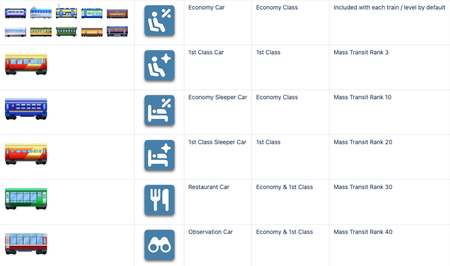
Hey Mayors, Train Deliveries introduce a brand-new progression system and expand train gameplay with deeper strategy, new rewards, and more ways to play. Players can now participate and grow their rail network like never before. Train Cars Train Cars are a new addition that expands how you manage your rail network. Train cars are unlocked through Mass Transit HQ (Transit ranks). Once unlocked, they can be purchased in the RailSimoleon Shop using: SimCash RailSimoleons Car Types There are 11 new train cars, divided into: Passenger Cars Cargo Cars Each car type plays a role in fulfilling deliveries and dispatches, adding more strategy to your gameplay. The number of cars player can configure to a train depends on a train and train level Car unlocks: Passenger Cars unlock at mass transit levels: 3, 10, 20, 30, 40 Cargo cars unlock at Mass Transit Levels: 2, 5, 15, 25, 35, 45 Once you unlock specific car, you receive one copy of it and then it becomes available in the Train Shop Each car is responsible for transporting specific types of passengers or cargo. You can have multiple train cars of same type Train Deliveries Train Deliveries are the new core feature of the Train gameplay Train Deliveries are the main source of progression for both: Mass Transit rank Train Pass Delivery requirements scale with your Mass Transit rank, after you unlock more train cars, becoming more complex over time. Deliveries, depending on the type require: Specific train cars Specific items Specific types of passengers Specific train type Required car type is indicated in the Train Delivery Don’t like the current delivery task? You can reroll it by watching an ad or with a simcash. Deliveries are time based. There is usually plenty of time to complete them. However if you run out of time you can extend the timer by watching ads or with simcash. Players can dispatch multiple trains towards the same Delivery as long as the Delivery criteria are met. (cargo or passenger type, car type etc) Delivery Slots The number of active deliveries you can run depends on your Mass Transit rank. All players must progress to unlock additional delivery slots. An extra delivery slot is always available via a small in-app purchase and it lasts until the end of the train pass. Train Deliveries vs. Train Dispatches Train gameplay now offers two complementary systems: Dispatches and Deliveries. Train Dispatches Players can continue dispatching trains as before. Even if there is a delivery active, players can decide to simply dispatch trains with different passengers and items. With dispatches players can earn Railsimoleons and Train Pass points but cannot progress in Mass Transit ranks Dispatching now includes transporting: Passenger types Cargo types (industrial and crafted items) To transport materials and passengers you must equip the correct train car Mass Transit Mass Transit is now available to all players, offering a shared progression system centered around train gameplay. All players begin at the same Mass Transit starting rank. Progression is driven by completing Train Deliveries (not regular dispatches) Your Mass Transit rank determines how many train delivery slots you have available and what train cars you have unlocked. As you progress, you’ll unlock additional delivery slots, allowing you to complete more deliveries at once. Progression tied slots remain unlocked permanently. Advancing through Mass Transit ranks unlocks valuable rewards, including: New train cars RailSimoleons Rail Tokens Extra delivery slots3.5KViews3likes0CommentsUpdates to Train Stations
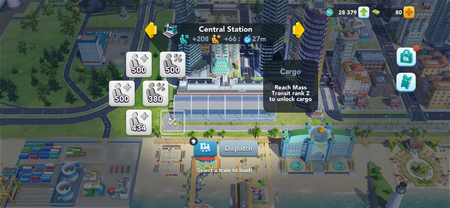
New Slot Types Slots are now divided into: Economy 1st Class Cargo They unlock in each station’s normal progression order. Passenger Changes Existing passengers will convert into the new passenger classes automatically Station passengers will be split between Economy and 1st Class Passengers already on trains will become Economy passengers Loading cargo and passengers Passenger slots remain greyed out until the player selects a train to load. After that, they will be directed to passengers who qualify for transport. Cargo Access Requirement You’ll need Mass Transit Rank 2 to use cargo slots—no matter how you got them. This will become available with the new Train Pass release (May 4th, 2026) Free Slots for Existing Stations All your current city stations will receive +2 extra slots (including cargo slots, which might be locked until meeting unlock criteria) New Stations Start Strong Any station built in a new update or later will begin with 3 unlocked slots. Slots also now have higher passenger capacity Max Slot Limit Applies If a station is already at its max slots, extra slots won’t be added. Slot limit now applies to each slot type: economy, 1st Class, and Cargo3.5KViews1like0Comments