не плавный игровой процесс в Battlefield 6
Проблема заключается в том, что картинка в игре по не понятным причинам не плавная, хотя фпс держится в среднем 160+, а по ощущениям будто в районе 90-100 кадров. Ради интереса глянул время кадра через RivaTuner Statistics Server (подозрения сперва были в нем) но на удивление график идеально ровный без единых скачков. Пробовал менять настройки графики от низких до самых высоких, но результата это не дало. Переустанавливал драйвера на видеокарту, так же нет результата. Ограничивал частоту кадров, включал и выключал вертикальную синхронизацию, результата так же не дало, но вот что заметил, если в настройках игры выставить обновление экрана 60гц, то в не зависимости ограничивал ты частоту кадров в игре или нет, частота кадров в игре станет 120 не меньше не больше, время кадра станет очень рваным, а плавность ужасной, на уровне 20-30 кадров. Если кто сталкивался с данной проблемой, прошу мне помочь, заранее всем спасибо! Моя конфигурация ПК: процессор: AMD Ryzen 7 9800x3d, Видеокарта: AMD Radeon RX 9070XT, оперативная память: 32ГБ На первом фото ровный график, с залоченным фпс под герцовку монитора, но плавности нет, по ощущениям 90-100 кадров. На втором фото стоит режим в 60гц, и независимый от меня лок в 120 кадров, так же видно "прыгучий" график времени кадра.
Game crash without any error message
For about 3-4 weeks now, my game has been crashing without giving any error message, no matter what map I'm playing. I've already tried uninstalling and reinstalling. My drivers are all up to date. I've already enabled the executables in Windows Defender/Exploit. I've repaired the game countless times. Absolutely nothing works; it's impossible to finish a match. Every time the game crashes, the error below appears in the Windows Events Log. Nome do aplicativo com falha: bf6.exe, versão: 1.0.397.20249, carimbo de data/hora: 0x6939931d Nome do módulo com falha: bf6.exe, versão: 1.0.397.20249, carimbo de data/hora: 0x6939931d Código de exceção: 0xc0000005 Deslocamento de falha: 0x0000000000587fe7 ID do processo com falha: 0x89A0 Hora de início do aplicativo com falha: 0x1DC711425C1FB48 Caminho do aplicativo com falha: E:\SteamLibrary\steamapps\common\Battlefield 6\bf6.exe Caminho do módulo com falha: E:\SteamLibrary\steamapps\common\Battlefield 6\bf6.exe ID do relatório: 6150f972-960e-4ac5-a2e1-0fc6422f22cc Nome completo do pacote com falha: ID do aplicativo relativo ao pacote com falha: Ryzen 5900x RTX 3800 32gb ram 2800mhz323Views5likes16Comments
Sims 4 keeps crashing no matter what I've tried
I've updated all the drivers I know of, turned my settings to low, made it so the game recognizes my graphics card properly, reinstalled, removed all mods and CC, played on a fresh folder, and nothing seems to work so far. I have no mods or CC installed at all, though I do have quite a few packs. I started playing again about 2 weeks ago, and it worked fine for about 4 hours before it started crashing every time I would load into a lot. I could play for maybe 30 seconds before it crashed. I thought maybe my save got corrupted, so I deleted all my saves and started a new one, just for it to crash during CAS. I've tried maybe 10 times now, most of the time it just crashes halfway through making a sim, but sometimes it freezes and gets stuck on a white screen. I'm wondering what to do next, I'm completely stumped. I appreciate any help you can give. I'll attach my dx.diag, I hope I did it right, let me know if you need anything else!Add-ons not appearing in Game for Sims 4 (Steam/EA)
Hey all, I recently bought 2 expansions and entered the codes in EA. They were successful redeemed and show in my managed add-ons. I launch the game via steam, which opens the EA app and launches the game. The game allows me to use the DLC I've purchased from Steam, but not the DLC I've redeemed through EA. I have tried everything per other threads to no avail (cleared cache, uninstalled and reinstalled The Sims 4, repaired game, made sure there were no duplicate files, no CAS demo file). Any and all help is appreciated!
MADDEN 26-27 IMPROVEMENT IDEAS
This is a thread I wanted to start so everyone on here can have their ideas seen and heard by EA_Shepard and other EA Staff while also having a single, organized place to share them. This in turn makes it easier to read and organize these thoughts in order to pass on to dev teams. Please be respectful and feel free to put down anything you would want to see in a coming update or in newer games to come. I'll start by adding these ideas: Downloadable Rosters & Draft Classes from past years for nostalgic Franchises. Customizable Divisions and Schedules like what is found in CFB (Great for Fantasy). Reincluding the option of Coaching Legends for Coach Mode (Also Great for Fantasy). Possibly reinclude custom facial uploads for custom coaches in Coach Mode. Revamped and reincluded Player/Owner Modes. - Ultimately to summarize this: For Owner Mode, I'd like to see Team Builder tied more exclusively to a new version of this where customization of everything from the ground up is key for the most customizable experience ever. For Player Mode, I'd like what little works well within Superstar to be tied to a new, revamped Player Mode, where the storylines and cutscenes are more included here, and less in other modes. This would include being able to choose an existing player within a franchise, and focus exclusively on their career; OR, create a new player and start as you would within Superstar. I'd like to see Team Builder weaved into relocation for all online modes and somehow introduced into offline. Inclusion of holding the L2/LT to Switch Stick to minimize switching by accident, especially while trying to pass rush. Include more cities and teams for Relocation. Cities where franchises already exist like Miami, LA, or Detroit, as well as new ones like Boston, Phoenix, or Birmingham. More Stadium options for Relocation. Reinclude Build a Stadium within Team Builder. I'm talking from scratch...not just editing the field. Reinclude the ability to edit and create more custom uniform combinations. Within the Edit Rosters section of the Creation Center, more flexibility to edit a player's contract, abilities, etc, would be nice. Better Training Camp - Introduce some ability to gain physical STR, SPD, AGI, COD, by introducing some of the game found in Superstar like the 3Cone, Weightlifting, 40YD, etc. - This is where mini-games shine. Make games open for more players to train and have them more focused on gaining skill points and less on XP and Rookie Reps. This is a great way to help maintain the physical ability of Vets, or take your high-level Superstars to the next level. Revamp Weekly Training - Make this less focused on mini-games and tie it more to Practice Mode and gaining XP/Rookie Reps. The way the have Wear & Tear worked into this is nice; Now just optimize it. Optimize Coach Central and Coaching Abilities. - It's a bit to type but my thoughts on this can be found in my "M26 Franchise Feedback thread" thread. I feel that's a pretty good start for now. Hopefully this is helpful for anyone that reads and I look forward to seeing more thoughts and ideas shared here!1.9KViews7likes104CommentsUnlink the unauthorized email (peribronml.ru) from my Steam ID
To EA Support Team, I am reporting a security breach on my EA account. After purchasing EA SPORTS FC via Steam, I discovered that my account has been linked to an unauthorized email: al***@peribronml.ru**. This is not my email. My account has been hacked and the primary email was changed without my consent. While the phone number shown (+6282248444180) is correctly mine, the email is fraudulent. My legitimate email, which is also used for my Steam account, is [edit: email address removed]. I have successfully secured my own email, but I cannot link it to my Steam profile because the hacker’s email is still attached. I urgently request that you: Unlink the unauthorized email (peribronml.ru) from my Steam ID. Restore my access so I can re-link my official email: [edit: email address removed]. Attached is proof of the verification screen. I am ready to provide Steam purchase receipts to verify ownership. Regards, IKhsan hamdani hamid6Views0likes1CommentCpu issues, crashing, extreme frame drops, high temps/usage
My system: ryzen 5900x, zotac 3060 12gb, 2x16gb gskil ripjaw ddr4 3200mhz, 1tb nvme, asrock b450m-hdv mobo, hyper 212 black ed, 4 corsair 120 daisy chain case fans, 650w psu, cooler master micro atc case From the day i upgraded from a ryzen 5500 to a 5900x i’ve had issues with this game. I’ts not mobo vrm’s or psu, i ran hwinfo64. For some reason, only this game maxes my cpu out all the time, causing extreme frame drops and crashes, without MAJOR tuning. I got rid of both in a bunch of ways and found the most efficient way to do it, while gaining fps instead of losing it. I was spiking up to 100% cpu usage, 90 degrees, and even idling the game at 82 degrees, at 70fps. Now i get 130 fps average (no frame gen) at 60 degrees max, never peaking 40% cpu usage. No more crashes. If you ran hardware monitors and saw similar problems, here are my optimal fixes. Disable “PBO” in bios. Install process lasso, set the game to run on the cores and threads windows doesn't use, if you have a powerful cpu. Induce performance mode and exclude it from pro balance. Set it to high priority on cpu, gpu, and io. Set your power plan to bitsum highest performance or ultimate performance, then under advanced power plan settings, set min and max processor state to 99%. Next make a user.cfg file on notepad and save it in your bf6 folder, look up a tutorial. Set it to your cores and threads minus however many windows uses, most likely 2. If you have a smaller cpu, try all cores. If its bigger, try one ccd. If your games still not smooth, lower your “VID” in .05 increments in bios. If it doesn’t get better after 2 of those, revert the “VID” to auto. This is to undervolt your cpu, making it maintain higher clock speeds at lower temps for longer periods of time. Try switching your “xmp” from auto to “xmp 2.0” in bios (ram overclock), or the other way around. If you're having cpu issues and this didn't fix it, i got nothingSplit Fiction Bug. P2 can't see P1's actions in co-op As of 1/10/2026
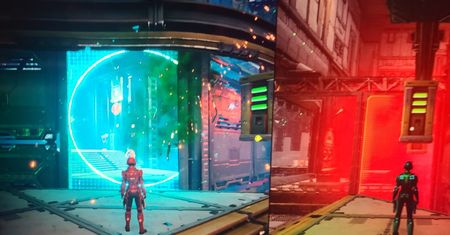
We're having an issue in one of the sci fi levels where P1 opening a hole in the barrier is not showing up on P2's screen, and nor is the hole itself working when P2 tries to jump or shoot through it. P1 view first image and P2 view second image. (both players on PC and P1 bought the game on steam).1View0likes0Comments