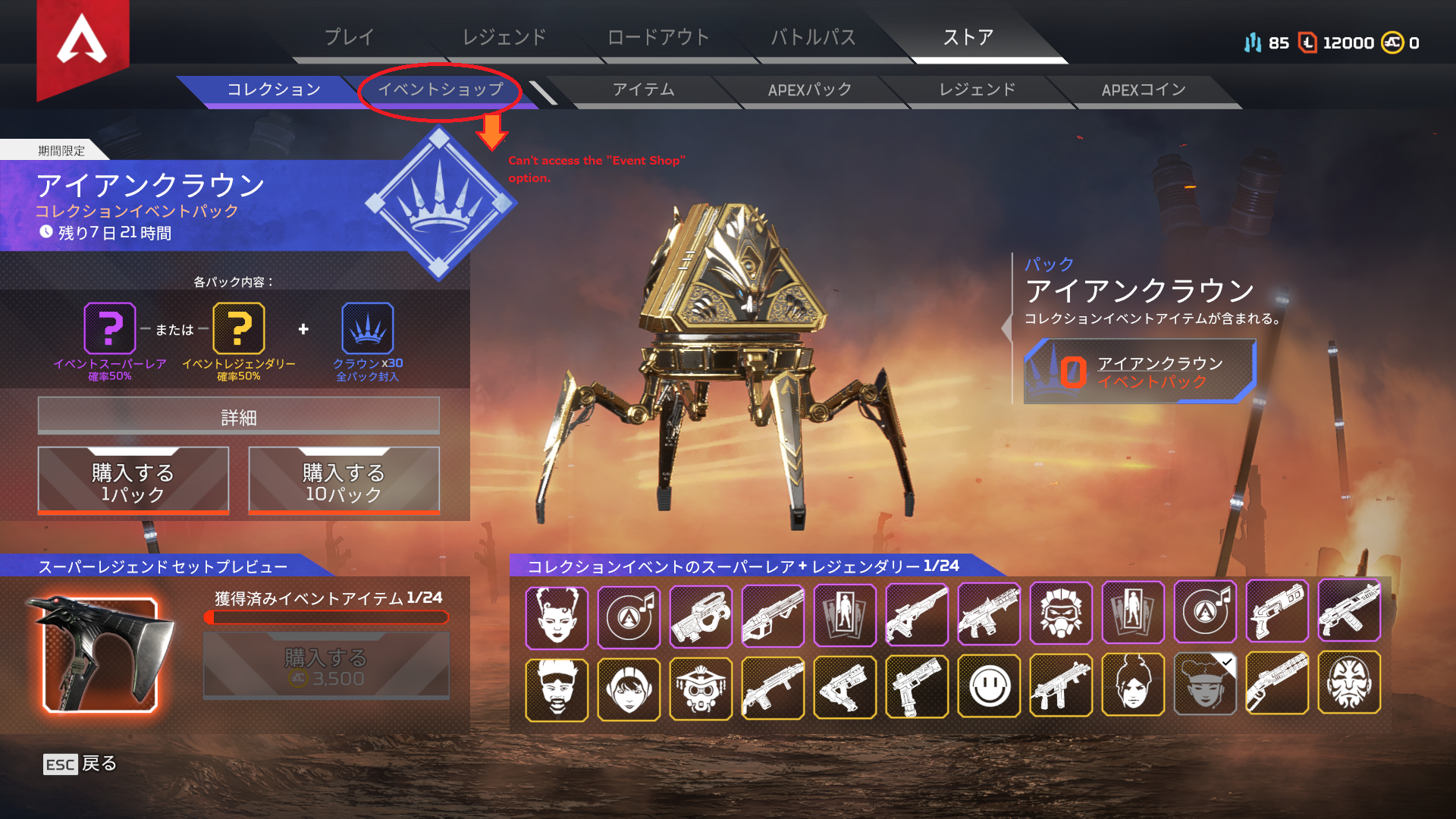
Can't access the "Crowns - Event Store" option. error : ui/ui_utility.gnut #419
Product: Apex Legends
Platform:PC
Please specify your platform model. PC
AMD or Nvidia Model Number NVIDIA GeForce GTX 1660 Ti
Enter RAM memory size in GB 16GB
What is your gamertag/PSN ID/EA Account name? edwe000
Please provide your squad mates' gamertag/PSN ID/EA Account name if possible. Aeonsphere , MarbMarzi
Are you using any software with an overlay? Yes
If yes, can you list them here? discord
If you disable this software, does that have any effect? No
Which Legend were you playing (if applicable)? Wraith
Which Legends were your squad mates using (if applicable)?
Where did the issue occur? In the lobby (waiting area before the match)
Which part of the map or menu were you in? If you don't remember the exact name, please describe the area or what you were trying to do in the menu. Iron Crown Event Store
What were you doing when the issue occurred? E.g. respawning a squad mate at a beacon, using an ability, a squad mate left the game. Just Clicked the "Iron Crown Event Store" Option in store bar. But Failed to Get into it.
Did your squad mates also experience the issue? No
How many matches had you played in a row before the issue occurred? Can't get into "Crown Event Store" from the beginning of lastest update (13th August 2019)
When did this happen? (dd.mm.yy hh:mm) 14.8.2019 19:44 GMT+7
How often does the bug occur? Every time (100%)
How severe is your issue? Major impacts to gameplay
What happens when the bug occurs? Can't get into the crown shop and eventually text-box popped up with this message inside : "There was a problem processing game logic. Please try again. _____ ui/ui_utility.gnut #419 [UI] Tried to set a string that is not a valid UTF-8 Strings."
What should be happening instead? be able to access the Iron Crown Event Store display.
Steps: How can we find the bug ourselves? please check up the latest notes coding or/and in my account info. if there is possible missing or corrupt codes. thank you,
__________________________________________________________________
Before the update, I used to set my Origins's game language to English. Then, I interested to turn it into Japanese. (after 13 August update).
when it's downloading the japanese in-game language, i paused it. (maybe at 78-80%). Then I delete my windows 10 admininistrator account for some reasons.
in new windows 10 administrator account, I opened up my origin, and load the progress of saved japanese language download data in-game data.
then it's been succeed on finalizing its data.
When I played apex, it is nothing seems to be error, the gameplay was fine, set up skins, open player data etc. was fine. Later, I opened up the "Store" option, "ストア" in japanese, Its able to display the Crown's Exclusive items (Epic and Legendary skins lists). Then, I decided to look up into "Event Store" or "イベントショップ”. Display suddenly become black, and then popped the message that I have listed before. *in what happens when the bug occurs? ⭐.
Although the event store is fine when I opened up in English-in-game-langguage setting.
Despite of that, I want to be able to play and access its game contents even it is in other languages.
so, please fix this problems. with as many as possible ways. thank you so much.
*NB : I have done changes the origins language setting to Japanese also, and tried to repair game files. but nothing changed. still error on accessing the Crown Store. Although, it's able to access it when I used Origin-language settings & in-game-apex-language settings to "English". thank you.
___________________________________________________________________________
*UPDATE : It was fixed when I installed the latest NVIDIA drivers update (20/8/2019). Thanks to ea and apex's admins, whoever solved this problem, and/or however it is fixed. - But it was on 21th august 2019
it is now error again when on 22th august 2019, wew, hahahaha