Forum Discussion
14 Replies
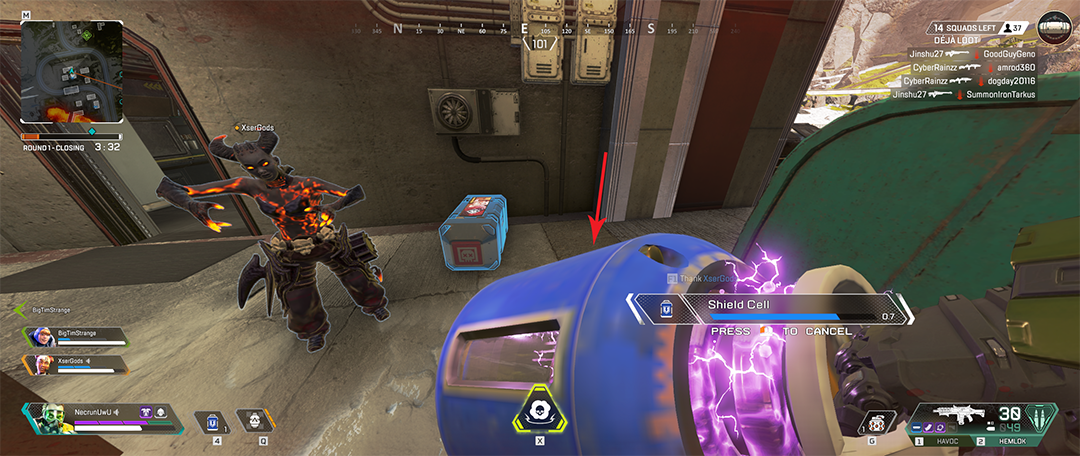
@Aerozolic yes something like that on legend selection screen every match but not only there during the match I can see texture reloading all the time specially textures that were already loaded start to reload again the pop-in texture gets so bad that sometimes can't see enemies because of this
 EA_Kent6 years ago
Community Manager
Thanks for following up!
When you have a chance could you grab a DxDiag so we can take a look? You can find more info on how to pull one up over at the EA Help website.
Once you have the file please attach it to this thread. Thanks!
/Kent
- EA_Kent6 years ago
Much appreciated!
When you have a chance can you try starting up your PC in a Clean Boot? I want to see if that makes a difference at all. If there's anything else running on your PC that could be causing this issue that might help us get around it.
For more info on how you can set up a Clean Boot check out the EA Help website. Let me know how it goes when you can.
Thanks!/Kent
nope the issue still persists after trying the clean boot.
@EA_Kent I have attached some examples of some of the issues with the texture pop-in.
- EA_Kent6 years ago
Thanks for giving that a shot.
I'll forward up these details for a look.
/Kent
 Aerozolic6 years agoNew Traveler
Yeah, I noticed today too that even in the world textures "pop in". At first some very basic texture is shown and then it loads/renders it. That happens in loading screen, and in the map as well.
I have the exact same problem!! And this is something that didn't happen in the past...all that changed was me having 16GBs of RAM instead of 8 and the driver version of the GPU. I literally formatted my PC last week because of Apex constantly crashing, so I have a clean install of windows, a clean install of Apex (which I already did repair at least 3 times since then) and almost no apps installed. One of the things that I also noticed is that some textures, especially bins, will be just a smudge, load in, then revert to the low quality version and just cycle between the intended texture and the very very low quality one...
I changed nothing, the settings are all the same since basically launch (medium high), my FPS are constant (I limited them to 80), my GPU is RX 480 with 8GBs of VRAM and my CPU is a Ryzen 2600. I should not be having these texture pop ins.Hi Kent,
Any updates on this issue? it's still very much there as of 8/23/2020
- Same problem, but it isn’t as bad sometimes, my memory never tops out for usage and only some character skins are blurry in the select screen?
Hello. I am just wondering is there a fix for that?
me and many others are still having this issue.
its not an "us" issue, it's an Apex issue, and one that they won't ever fix. This game has far too many issues and it'll be more of a headache for them to fix them than it is for them to deal with us complaining about said issues. They'd rather just ignore us and milk as much money out of this game until it dies so they can take what they learned from their mistakes and hopefully make a better game next time. They know they made an insane amount of non-correctable mistakes while developing the game with the modified source engine, but it's too late for them to go back and change it now unfortunately. They just have to make do with the * show that they created, all while charging $20 for legend skins in a FIRST PERSON GAME LOL. It's like being blind and getting a nice paint job for you whip.. Cool for other people to look at, but you're not seeing jack * when you're actually in it .🙂


Featured Places

Apex Legends Technical Issues
Having issues with Apex Legends? Join here to find help with connectivity, performance issues, crashes and more.Latest Activity: 30 minutes agoCommunity Highlights
- EA_Blueberry7 years ago