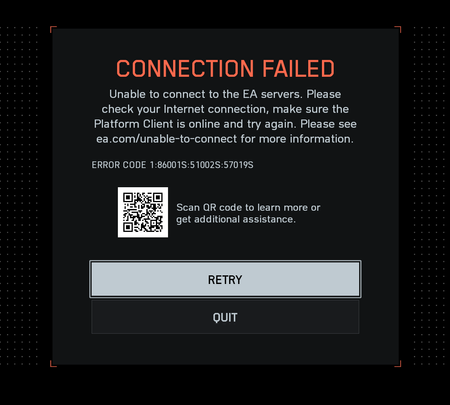
"Connection Failed" With Error Code 1:86001S:51002S:57019S


Hello, I bought the game in Steam and haven't been able to play it even once.
I don't use a VPN, and when I try to connect, I get the error "Connection Failed" with Error Code 1:86001S:51002S:57019S
Input information: I live in Rivne, Ukraine. I don't use a VPN.
What I did:
1) I changed my DNS to Google and Cloudflare - the game doesn't work
2) I called my ISP, they assigned me a different IP - the game doesn't work
3) I connected directly to the internet without a router (assuming the problem was with the router). A representative from my ISP helped me through the entire process - the game doesn't work
4) I tried connecting via mobile data - the game worked (but this isn't a solution, as mobile data isn't unlimited and it's impossible to play).
5) My ISP representative suggested running a WinMTR traceroute to the domains you mentioned in your post: Link
domains: "ext-3-40-130-7.blaze.ea.com", "qoscoordinator.gameservices.ea.com", "cdn.eaanticheat.ac.ea.com", and "EAAntiCheat.ac.ea.com"
and sending them a screenshot. Afterward, I received a response from the ISP stating that they 100% DO NOT block traffic from EA and definitely DO NOT block traffic from Battlefield 6.
I'm attaching screenshots of the WinMTR trace. Please help me resolve this issue, or I'll have to get a refund, as I still haven't been able to play the game. I've been trying to resolve the connection issue for over 5 days. If you need any further information, please let me know.
Best regards, Illia.

TheLyulik it sounds like your ISP might be using Carrier Grade NAT (CGNAT) to share IPv4 addresses.
When your PC is directly connected to the internet modem, what is your IP address if you type ipconfig into Windows command prompt.
Is your IP address in the 100.64.0.0 – 100.127.255.255 range? If so your ISP uses (CGNAT).
Hi OskooI_007, currently my PC connected to router, using ipconfig I see only my local IPV4 - 192.168.XX.XX, not in range.
Using 2ip service, my IP is 176.39.XX.XX also not in range
But anyways why using CGNAT can lead to this issue?
TheLyulik you'd need to plug your PC directly into the internet modem to see the IP address your ISP is assigning you.
You can also log into your router to see the IP address your ISP is assigning you.
192.168.XX.XX isn't the IP address I'm talking about. That's the IP address your home router is assigning your PC.
The IP address I'm talking about is the one your ISP is assigning to you.
CGNAT is when your ISP shares your public IPv4 address with other internet subscribers, instead of assigning you a dedicated IPv4 address. CGNAT blocks incoming internet connections to your computer.
There's multiple ways to overcome CGNAT. Such as using IPv6 instead of IPv4, asking your ISP to assign you a dedicated IPv4 address instead of a shared IPv4, or using a VPN such as Cloudflare Warp's free VPN to tunnel through CGNAT.
https://one.one.one.one/ Cloudflare Warp VPN download link

Спробуй завантажити застосунок WARP на свій пк, і ввімкнути його перед запуском гри. Мені це допомагає грати весь цей час, поки ця помилка існує. Зміна днс в налаштуваннях мені теж не допомагала, працює тільки з ввімкненим застосунком і ніяк інакше.
Пінга чи чогось такого не замітив, там також є підписка Warp+ за 25 грн на місяць, яка вроді щось там дає, але я різниці не замітив
Це тобі пощастило, в мене з WARP затримка в грі від 100-350ms. Грати зовсім не можливо

Доречі так, зміни днс, скидання мережі і купа маніпуляцій мені не допомогло :(
А вот застосунок WARP, допоміг!)
Але блін, хочеться без костилів грати в гру :( надіюсь...колись пофіксять цей баг)
Підтримка також пише, що поки не можуть вирішити це питання.
I have the same problem. I also live in Rivne. To solve the problem, I use Cloudflare WARP vpn.
Cool, but I do not buy game to play it with VPN 😊
I have already contacted my provider, and after a thorough diagnosis on their part, it was determined that the problem is on EA's side, and the company has not done anything about it for over a month






