EAFC24 Sluggish/unplayable [Clubs/Ultimate Team]
Product: EAFC24
Platform: PC
Please specify your platform model. CPU: Intel i5 8400, GPU: Radeon RX 6700 XT, 16GB Ram
What is your username? Coyneee
Do you only see this bug when you have cross-play activated? Yes
Which mode has this happened in? Ultimate Team, Clubs
Which part of the mode? UT: Rivals, Squad Battles. Clubs: League, drop in
Can you tell us the date (MM/DD/YYYY) that you saw the bug? Every day I play. For one e.g 23/10/23
What time did you see the bug? (HH:MM AM/PM) 12:00pm
What is your time zone?GMT +1 (UK, London)
How often does the bug occur? Every time (100%)*
Steps: How can we find the bug ourselves? Seems to be only happening to me when I play online. Or just completely sluggish and laggy offline.
1. Play Ultimate team > Play a rivals match vs a player > Game is unresponsive to controller or keyboard inputs.
2. Play Ultimate team > Play squad battles match > Game is sluggish and laggy locking under 60fps only
3. Play Clubs match or drop-in match > Player is completely unresponsive to inputs or is delayed by at least >=40 seconds
What happens when the bug occurs? In squad battles or other pve game modes the game runs incredibly sluggish even if it is + 60 fps, eventually this falls of and the game becomes very slow and painful to play. Symptoms get worse until restart, in online game modes this is 10x worse - Controls are completely unresponsive, LB button and joysticks do not work the shooting and passing buttons do work. After the bug occurs I tend to leave the match as it is not fun or playable, this then somehow proceeds to lag the entire game out as if it is constantly trying to catch up to normal speed. For example after leaving the game in the main menu the animations from the players is playing like 2x or 4x maybe even more as if it’s a live stream that is trying to catch up to live.
What should be happening instead? I should be able to play a smooth game of clubs, or another online game like UT Rivals and the player(s) responds to my inputs as normal or in Squad Battles my game should not be running at 60fps whilst lagging and feeling really choppy. Seen as my setup passes the recommended specification for playing the game I’d expect a lot more stability and higher fps.
The game is incredibly sluggish when in any offline mode mainly Ultimate Team Squad battles as well as this I literally cannot play any online mode as my player just stands still. There are no player responses to controller input or either unbearably delayed(at least a minute).. Weirdly the power bar is reactive to the press but nothing happens. This only seems to happen to me in PvP, the opponent can happily play while they have a massive advantage.
The game seems to be locked at 60fps or at least doesn't go above 60fps no matter what the settings I choose. FPS lock is disabled, I've lowered my monitor’s refresh rate, lowered all the settings including resolution, hair strand, rendering grass and crowd quality, turned off v-sync, and disabled visuals like playstyle indicators as suggested by others. I've tried reinstalling and playing on multiple devices (gaming PC and laptop). I’ve even tried disabling graphics tuning from AMD Adrenaline software as well as tinkering with settings to try to make it an optimal experience
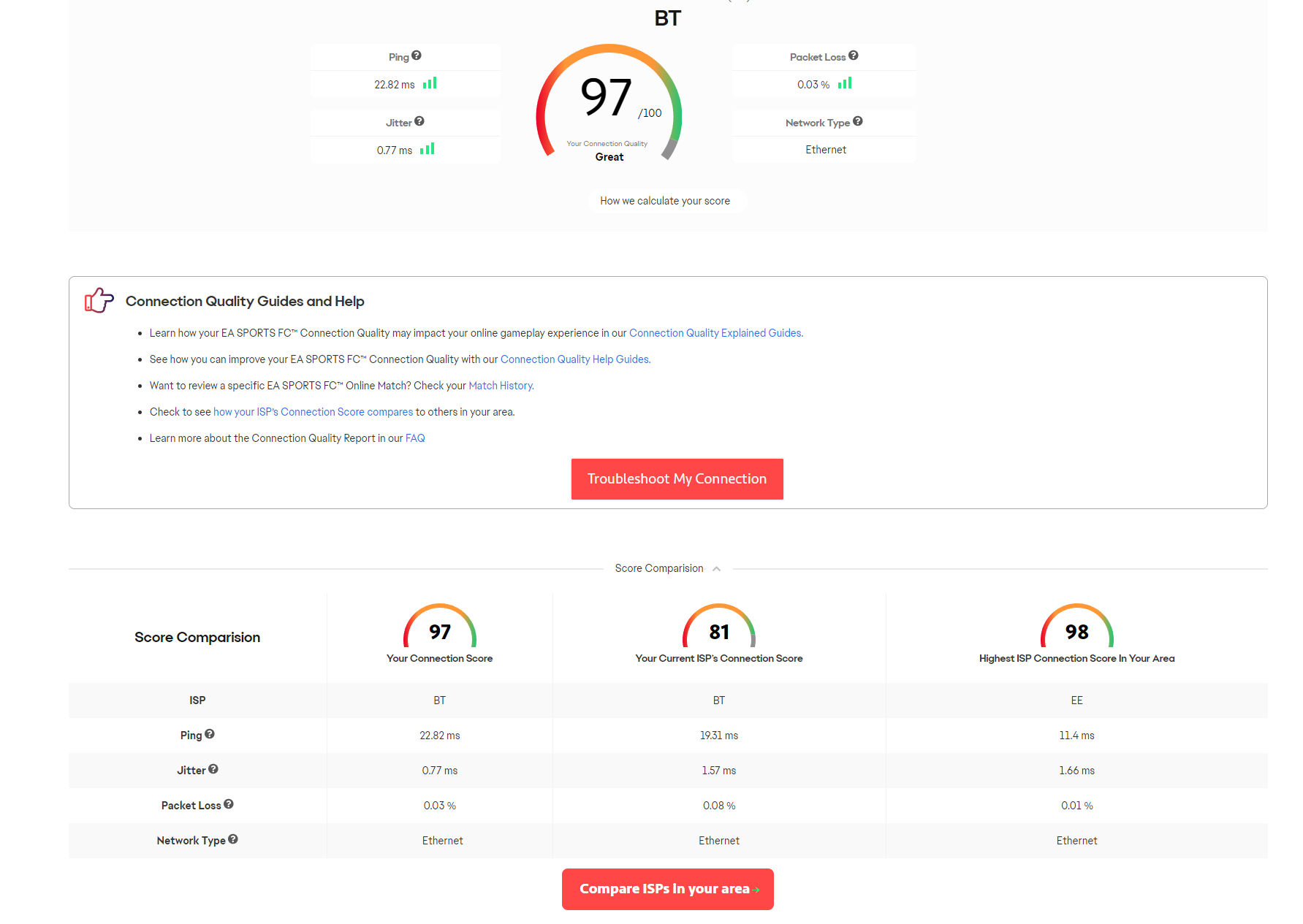
It looks to be a network issue but my internet is pretty decent with low ping and high speeds I have a 95+ connection score on the EA suggested test and the games I play online are showing <60ms ping before playing. Nothing else is running on the computer but EAFC at the time of playing except obviously EA Play and Steam.
I have tried to turn everything I can off and put all settings on the lowest they can be and it doesn’t seem to make any difference whatsoever.
When I first got the game this wasn't an issue, taking me past any boundaries for a refund. Currently, I really would like to play the game but it is unplayable. I have a decent gaming PC that can run the latest games but with EAFC24 I seem to be having lots of issues.
Apologies if there is any repeated waffle here but I'm trying to give as much information as possible. Please could someone help?