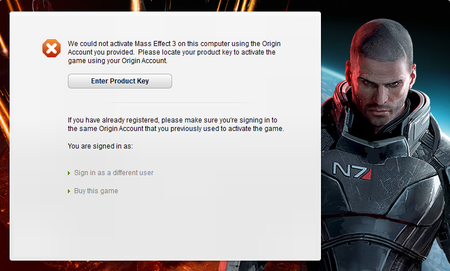
Could Not Avtivate Mass Effect 3 Error


 Community Manager
TermohryG It's good that you got it to run. So it depends. The online access error isn't a hardware error; it is an account error. If you were logged into two different accounts, it would give you that error. Not because you switched machines.
It is possible that your laptop is reading the wrong account or the wrong license key in the registry. At that point, what you would have to do is try to clean out every ME file and temp file for the laptop, and then make sure you log in with the same EA account. If you are playing on Steam, go to EA.com and make sure under connections, you are using the same Steam account that you can connect to.
EA_Shepard Thank for your reply. I renamed my account, to make sure that i only have one account, and i only have one. Yes, i bought the game on steam, and my account is connected to steam. I already deleted the game and everything ME3 or EA relatedd before, and also deleted temp files. What do you think what else sould i try to do?
Community ManagerTermohryG If you have completed all those steps, the next step is to find the key, chat with live support, and have them look it up. If it was purchased through Steam, you may not be able to find it unless you dig through the PC's registry. This error can be aggravating.
The error itself, though, basically says that the account you are logging in to doesn't match the account that bought it. That could be because of an account rename. It happens every so often. If all the steps listed did not work, the next step would be to find that key, contact live support, and see if it is, in fact, tied to the account you're using to log in if you're using one Steam account on both PCs.

