Ideas

394 Comments
 Jlexis2bad7 days agoNew Spectator
was having the same problem, saw this fix worked for someone else: Within the game, please open Marketplace > My Collection and see whether your other packs have been deactivated. If so, click Pack Selection and reenable them, then restart the game.
- SavageJessie947 days agoNew Spectator
Same thing was happening to me. I just spend a stupid amount on this game, I was getting mad Lol. This fix worked. THANK YOU!
- onigirizai7 days agoNew Spectator
THIS! just happened to me and im still figuring this out for 4 hours now
- tanquilsio7 days agoRising Novice
ive just downloaded the sims on my pc again after having given up on it in the past, and since i downloaded all the dlcs i have on the game they were first showing up were inacessible, and saying i needed to restart the ea app. that didnt work, so i searched it up on this forum and followed a tutorial. so then i deleted the dlc downloads from the steam download and downloaded them again from the ea app. when i finished downloading them all and started the game up again they werent showing up at all. help please i just want to play the game i hate ea
 Alk_Cosmos7 days agoNew Spectator
This has just happened to me thank you for this😊
 wuttheheckk7 days agoNew Spectator
How did you activate them? Mine all say deactivated in marketplace as well :(
 TheKrumptstien6 days agoNew Spectator
No help here, I'm sorry. Just replying to say that I'm having the exact same issue. I went as far as going into my program files and deleting the folders manually. I'm thinking there must be a bug. I'm going to post, too.
- TinyLadyTownUSA6 days agoNew Spectator
I may have figured it out! If you go to the in game marketplace, click the “my collection” tab. Here you can see all of your expansion packs, game packs, and stuff packs. Click on “pack selection” Find the ones that you are missing, they should say “deactivated”. Check the box on the deactivated packs and this should activate them. After this, you’ll be prompted to restart your game. After your game is restarted your packs should be ready to use in game! I hope this helps.
- TinyLadyTownUSA6 days agoNew Spectator
I may have figured it out! If you go to the in game marketplace, click the “my collection” tab. Here you can see all of your expansion packs, game packs, and stuff packs. Click on “pack selection” Find the ones that you are missing, they should say “deactivated”. Check the box on the deactivated packs and this should activate them. After this, you’ll be prompted to restart your game. After your game is restarted your packs should be ready to use in game! I hope this helps.
- TheKrumptstien6 days agoNew Spectator
I have been playing since the pre-release and own almost every EP for The Sims 4. This is the first time I've encountered this issue.
I recently purchased three more packs and downloaded them immediately. I made no changes. I don't use any CC or mods. I checked my PC and can see the packs listed there: EP18, EP19, & EP20. It all looks great.
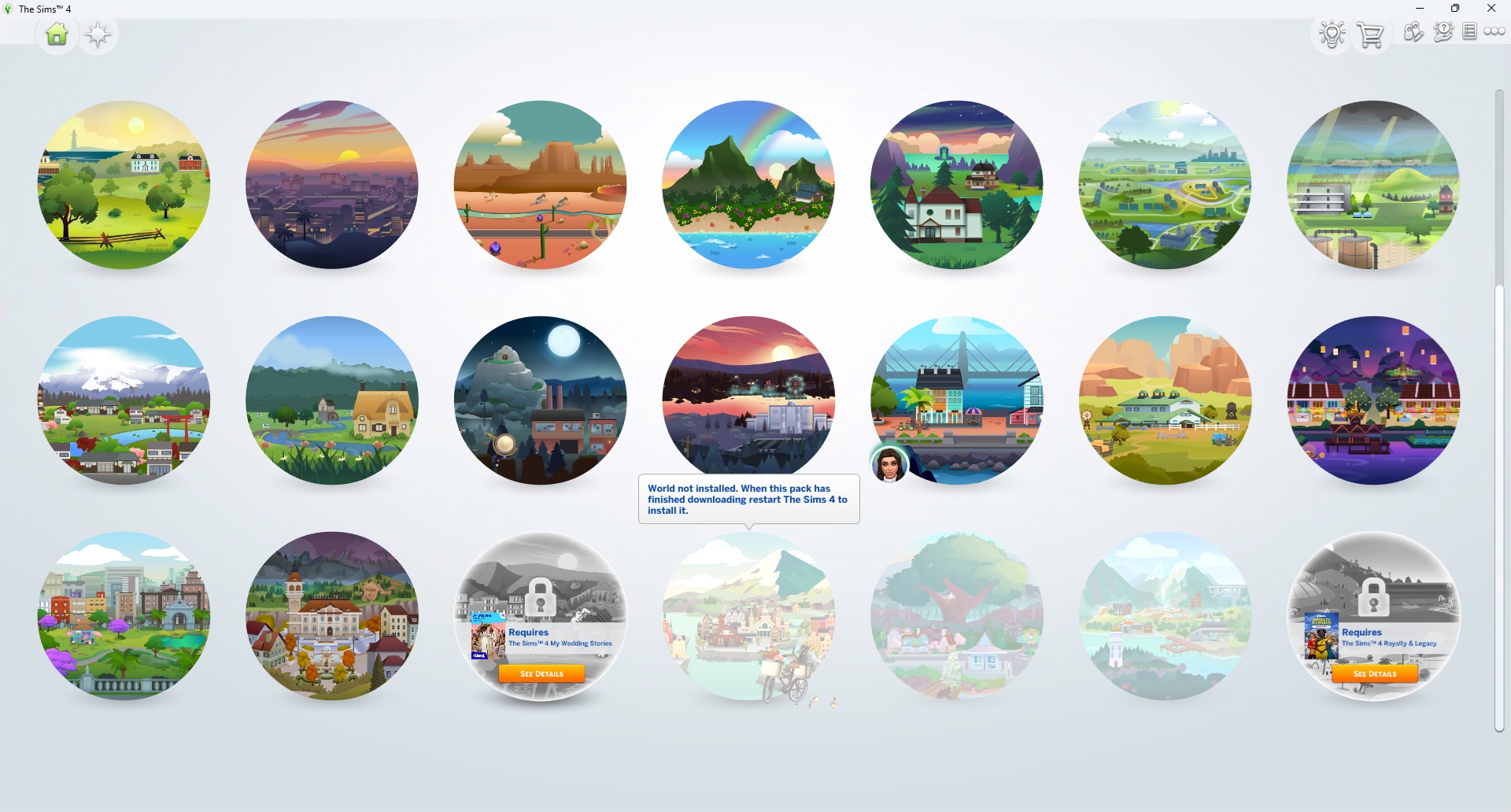
However, when I try to manage the worlds in my game, they're reflecting as "World not installed." Honestly, there could be other content from these packs not working as well, I just don't know. This is the most blatant example of an issue.
I've repaired my game three times. I've uninstalled and reinstalled everything. I manually deleted the new files from my file explorer on my PC and redownloaded them. I've cleared my cache. I've restarted numerous times.
I'm at a loss at this point. I don't know what else to try, aside from uninstalling and deleting everything an starting from scratch. I'd really rather not do that on on whim.
.png)
.png)
.png)


Featured Places

The Sims 4 Bug Reports
Report bugs for The Sims 4 on PC, Mac, Playstation, and Xbox.Latest Activity: 1 year agoRead First
- EA_Cade1 month ago
The Sims Team