Dragon Age Inquisition Crashing
Hello, I have an issue. I decided to replay the game recently and redownloaded it through steam. I managed to play for around 30 hours with no issues, reaching Skyhold. Once there I was trying to level up Cole and the game closed to desktop. There was no error message or anything and it didn't generate an event in event viewer, nor any dump file anywhere else. I figured it was just a random bug and went back to playing, but then it happened again, when I was walking through the Hinterlands. And then it kept happening in random places too. I thought, perhaps my save file got corrupted somehow? And tried creating a new character, which crashed right in the prologue, just before decide whether to take the mountain path or charge. Since then I have tried almost all the troubleshooting tips, but nothing worked for me and I do not know what to do anymore. My laptop is Asus Rog Strix G18 with the following specs: intel i9-14900HX CPU Nvidia rtx 4080 laptop GPU 32G of RAM Windows 11 I have tried: -Verifying game files through steam -Lowering my graphics settings -Playing in windowed borderless and windowed mode -Re-installing my drivers -DDU reinstalling both drivers for my integrated intel and nvidia gpu -DDU rolling back drivers for both my gpus -setting CPU affinity to different cores through process lasso (I have tried many configurations but none worked) -deleting the profile setting files and letting the game generate them again -setting exception for steam, ea app, dragon age.exe, the folder with dragon age.exe and save folder in windows defender -disabling turbo boost for CPU -clean boot -full re-install of the game, including the deletion of all shader caches (DX, Nvidia and Intel) None of these worked and I am at a loss now. The crashes are completely random and numerous I now have muscle memory for quicksaves, it's eating away at my sanity. Please help me somebody ;-;664Views0likes28Comments
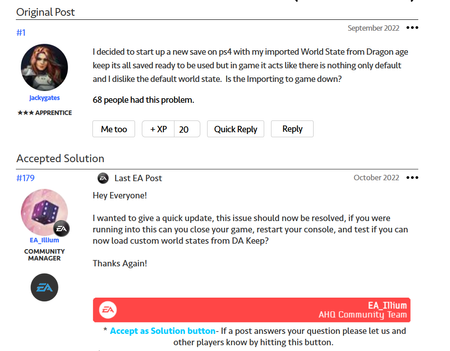
Inquisition world state import not working (PS4)
Playing through the franchise, Origins and 2 on PC, Inquisition on PS4 because my laptop can't run it. So far: PSN linked to EA no problems, double checked account names, it's all good All choices set in Keep No other world states, just this one Keep marks export as successful First time trying to play Inquisition, no other save files or anything, game and all DLC installed fine, all completely new Inquisition connects to servers no problem All account options enabled in game Now I know that what is SUPPOSED to happen is the moment I open a new game, on the race select screen, there's a little pop up that tells you the world state was successfully imported, and the world state select screen will display "default" no matter what, but I never got the import pop up when starting a new game. I did search older messages boards for help and many PS4 players had the same problem but the latest I could find was 2022, which claimed it had since been resolved. Again, everything else is working as intended, no account issues, no internet issues, no hardware issues and nothing wrong with Keep export, it is specifically Keep import that does not work, or maybe it is working fine I am just not getting the pop up for some reason? The game is currently reinstalling to see if that will do anything, any insights appreciated in the meantime.590Views0likes7Comments
Dragon Age: Inquisition missing DLCs when I try to load save
Exactly what the title says. I click continue on the menu screen and it says something along the lines of "this version of the game used DLCs, you don't have them" and lists the DLCs I "don't" have. I do have them, that's how I've been playing this entire time. My Xbox PC game pass subscription ran out and I renewed it, ever since then I can't continue my saved games. BTW I do use mods and I have the GOTY version of the game, which comes with all the DLCs because of my EA/Xbox game pass subscription Edit: I removed my mods for the time being, but the game still won't recognize the DLCs Update: The "missing DLC" issue has been solved, but a new problem has arisen. The error window at the start menu now says that my saved patch is a newer version and that I need to update to the latest patch. I found another post from five months ago detailing the same issue, and they were able to solve the issue. I tried the steps in one of the replies, but when I got to the Admin Command prompt and pasted the file path, it said it wasn't recognized as an internal or external command, operable program, or batch file. I then went to the Windows PowerShell, and it kept saying the term insert character is not recognized as the name of a cmdlet, function, script file, or operable program. But when I just type "C:\Program Files\EA Games\Dragon Age Inquisition\Update\Patch\" it doesn't give me a success message or an error message.Solved540Views0likes13Comments
Dragon Age Keep
After just finishing Veilguard, I want to access Inquisition and play with my custom world state in a new game. However Dragon Age Keep doesn’t seem to be importing world states at all. I’ve done the “uncheckmark” all Options under accounts directly in the game. I have imported my custom world countless times on the website but it still won’t access it in the game. It only shows default world state. Prior to Veilguard I was able to import my custom world state on Xbox series X but I’m trying to play it on my PS5 and now even Xbox series x can’t seem to find it. I know this discussion has already been dropped on here but it’s been about a week with no updates on twitter or on the forums. thank you!534Views2likes3Comments
Game I own not able to play after Gamepass subscription cancelled
I have owned Dragon Age Origins for years and after having Gamepass for a few months I can no longer access the game. I couldn't open it when it was installed, was advised to uninstall it by EA Help, this didn't fix it and the EA app now thinks I don't own the game. But the game is in my Library. I don't even have a purchase option in the EA Store because you can't buy games that are already on your account! Please fix this ASAP so I can access a game that I own. Thanks.480Views0likes10CommentsPC DA: Origins Not Launching Saves and Missing Downloaded Add-on DA: Awakening
Hello, I've been having problems with PC Dragon Age: Origins for a couple of weeks now. First, I wasn't able to launch the game, and was getting the error on the PC EA App: Failed to launch game. An error on our end caused the launch to fail. Try again a little later. So after multiple attempts to launch a saved game, I followed suggested solutions on the EA Help Website, and I uninstalled the EA App and the game and reinstalled both. Now when I try to launch a saved game, it gives me the error: This saved game cannot be loaded. It requires the following content: Dragon Age: Awakening. So I tried to uninstall and reinstall DA:O again, but still getting the error. However, when I look at the list of downloaded content the EA App shows that Dragon Age: Awakening was downloaded/installed with 4.15GB.383Views1like16CommentsEA Launcher canceling DA Game Launch
I was playing Dragon Age II when the game crashed. At, first I wasn’t too bothered as old games crash all the time, but now I’m concerned as the EA launcher won’t let the steam game launch initialize. I keep getting the error message that says “there seems to be a problem on our end” (EA Launch app) without specifying said problem. Now I’m just frustrated because I would like to play DA2 but I can’t even get into the game because of the launcher issues.Solved
[DAI] camera flipping glitch when moving with mouse
while controlling the camera angle with a mouse, the camera will sometimes flip 180°. i’ve tried everything mentioned in some relevant EA forum threads, as well as whatever else i could think of: disable overlay (steam, discord, and nvidia for me) delete the “ProfileOptions_profile” file clean reinstall of the graphic and mouse drivers reduce camera movement speed/mouse sensitivity in game turn off “enhanced pointer precision” change graphic settings (texture quality and vsync etc) repair game via steam none fixes the problem. my pc isn’t connected to any controller at the moment. it has made exploration extremely tedious. to add more context, it didn’t happen in first playthrough, it only started halfway through my second playthrough. this issue persisted ever since across different saves. any suggestion on how to fix this problem will be appreciated:)315Views0likes10Comments
Dragon Age 2 Standard Edition-Ultimate Edition
I have Dragon Age 2 Standard on my account. A few years ago I picked up dlc packs for free because they were available. I noticed that in my library the game is listed as Standard Edition, not Ultimate Edition. To have the Ultimate version, the EA app asks you to purchase a new copy of the game. I checked the Ultimate Edition in and it has exactly the same add-ons and DLC as my Standard version, so why does it appear for me as a purchase of a new game ?Solved303Views0likes2Comments