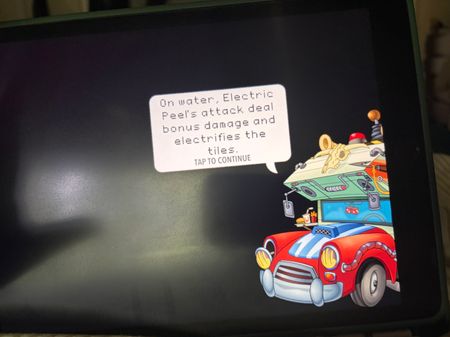
PvZ2 for iPad still broken after update 13.2.1
After weeks of this game being nonfunctional, I was hoping the latest update would help, but no such luck. Graphics still missing in many events (see screenshots), game crashes randomly, game still crashing on certain menu selections like plant almanac and daily event. Game crashes after watching ads to completion and still gives no daily quest credit for watching. No iPad specific instructions for troubleshooting have ever been shared. I’ve played this game for over a decade, and of course it’s just a game - but why keep trying to monetize a product when the core function is broken and fans clearly frustrated at lack of communication.42Views2likes1CommentFragments ERROR
I had 990 Nation 2 Story Fragment Tokens, but when I went to redeem the final 300 from Brazil, my total reset to 410, I don't know why. I didn't spend them on any players, and my fragments simply vanished. Has this happened to anyone else? I need help. Eu tinha 990 tokens de fragmentos de de uma história de nação 2 quando eu fui resgatar os últimos 300 do Brasil, meu número resetou para 410 não sei porquê. Não gastei em nenhum jogador e meus fragmentos simplesmente desapareceram. Mais alguém? Preciso de ajuda.6Views0likes0Comments
Time/Sim freezes while environment still moves
There is currently an issue in MCCC that is causing a freezing like this if you have auto-marriages turned on. If you encounter this is with ANY mods in your game, then this is not your thread. Please head over to the The Sims 4 Mods & Custom Content forum and post there for help or ask at the MCCC Discord. This is a very specific bug symptom so please only post here if you see all of the below in your game. There are many similar issues, so this should be kept to this issue only. This can either be an extreme lag or a total freeze. Symptoms in the game Time stand still although there can be a delay where time moves for a but when part of UI is frozen You can't click on anything Sims move but do interactions endlessly Environment moves If you have multiple household members, you can't switch between them. Going to the map in this state can lead to endless loading You can still switch to build mode but only delete one item. Not all households are affected. Unsure what causes it. Unsure/More info needed It start happening at a specific time Computer starts to use up a lot of the resources Not this issue Sims don't respond to commands, standing around doing nothing11KViews281likes212Comments[XB/PS] Can't interact with Gallery without force closing game after Patch 2.32
April 28th update promised a fix to the gallery freezing up issue. This has not been completely fixed. I clicked on 10 items in the gallery normally and then it froze up when I checked again and lost my progress. The curser also moves all over the place. This is unacceptable.6.2KViews178likes310Comments
Crash
Since the last update, the game closes without any error message a few seconds after opening the application. It's a very annoying error that persists even after verifying files and restarting the device. I hope this complaint receives some response, as it seems that this section of the forum only addresses problems related to payments and similar issues, since there are several error messages that are completely ignored by customer support.Xbox series x crashing issues
Everytime i boot up a match whether it be ranked or firing i get stuck into the loading screen and need to restart the game in order to get back into the match. Sometimes when loading the game back it gives me an error. And other matches the game freezes and crashes making me need to reload back into the match resulting me either losing a game or me only loading into the lobby. It doesn't happen to anyone else except me on xbox. Does anyone have a solution?53Views1like1CommentDNF penalties, YT rewards not received, and repeated disconnects
I have few ongoing issues: After linking my YT acc and completing the required eCL Final watch objective (more than the required duration), no any rewards received as of today. For 6 consecutive days, I have been experiencing repeated disconnects during any UT mode matches. In most cases, I am kicked back directly to the main menu (not UT menu), clearly indicating a server-side issue (messages : Connecting to UT is not possible at this moment etc.). Despite this, I continue to receive DNF warning messages and resulting in lost progress, objectives not counting, and unnecessary losses. This has made the game experience very frustrating instead of enjoyable, especially during my limited leisure time. P/S: While I understand compensation is subject to internal policy, I would like to highlight that high-end promo cards such as Touré (96 OVR) or E. Hazard (96 OVR) would be a fair and highly appreciated form of goodwill compensation given the duration of the issue.Solved31Views0likes3CommentsGame bug after the new update
Hello EA Support, I am using an iPhone X to play FC Mobile. Before the latest game update, the game ran smoothly without any issues. However, since the update, I have been experiencing several problems. When playing Manager Mode and Head-to-Head matches, the game frequently crashes and closes unexpectedly. In some cases, the game does not crash during the match, but after the match ends, it becomes stuck on the pitch screen and does not proceed to the rewards or results screen. As a result, I am often forced to manually close and relaunch the game after every match in order to continue playing. I would appreciate any assistance or guidance on how to resolve this issue. Thank you for your support.12Views0likes0CommentsNew fc mobile update bug
Hello EA Support, I am using an iPhone X to play FC Mobile. Before the latest game update, the game ran smoothly without any issues. However, since the update, I have been experiencing several problems. When playing Manager Mode and Head-to-Head matches, the game frequently crashes and closes unexpectedly. In some cases, the game does not crash during the match, but after the match ends, it becomes stuck on the pitch screen and does not proceed to the rewards or results screen. As a result, I am often forced to manually close and relaunch the game after every match in order to continue playing. I would appreciate if you maybe provide an update to fix the game’s bugs14Views0likes0Comments