Forum Discussion

zrzepka20's avatar
zrzepka20
Rising Newcomer
16 days ago

Error EC:201, cannot open the app

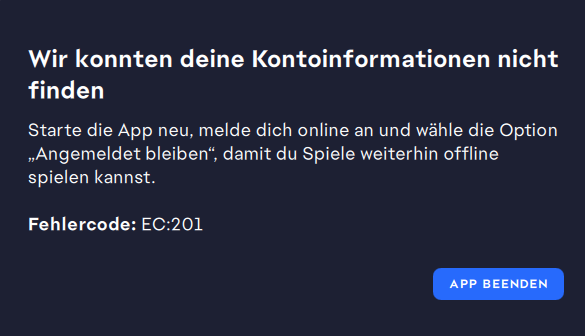
After a quite long time of not using the app I tried to open it, but the app won't open. First, it tells me the app cannot connect to EA servers and tells me to open app in offline mode, however when I open offline mode the EC:201 error appears and it says that they cannot find my account, even though on safari I log in easily. I cannot do anything except trying to go on offline mode and close the app. Also, any advice I find on the internet is to open something windows related, but I have a mcbook and the app downloaded on IOS. Please somebody help me :( 

Also, I don't know if somebody from Poland will read it since its my chosen language so just in case I'll write the same in polish

Po długim czasie nie używania aplikacji postanowiłam zagrać w coś ale aplikacja nie chce się otworzyć. Na początku jest napisane ze aplikacja nie morze się połączyć z serwerami EA i sugerują mi granie w trybie online, ale gdy klikam w ta opcje wyskakuje error EC:201 i mówią mi ze nie mogą znaleść mojego konta, mimo ze na przeglądarce z łatwością mogę się zalogować. Nie mogę nic zrobić prócz pójścia w rzekomy tryb offline albo zamknąć aplikacje. No i jeszcze każda rada powiązana z tematem jest o grzebaniu w Windowsie, a ja mam Macbooka a aplikacje pobrana na IOS. Proszę pomóżcie mi :(( 

5 Replies

  • SonGoshinShallot's avatar
    SonGoshinShallot
    New Novice
    54 seconds ago

    Thank you for the trouble shooting steps. If I remove the check from keeping me signed in wouldn't I be logged out every time I close the app anyhow?

  • EA_Claus's avatar
    EA_Claus
    Icon for Community Manager rankCommunity Manager
    7 hours ago

    Hey everyone, 

    I merged your reports of the EC:201 error here to let you know our teams are aware of a new active issue involving this error identified yesterday, and we are monitoring the situation.

    Please try to uncheck the Keep me signed in option on the login window; it seems to be causing this error for some players. 

    If you are on Windows, you could also check your network adapters following this guide, and make sure to disable any adapters you're not using; they might be causing a conflict.

    If you're on a Mac, you can find your active networks following this other guide.

    The following additional troubleshooting steps might also help you log in to the EA App again:

    • Fully close the EA app
      • Quit the App
      • Open Task Manager
      • End EA App and EABackgroundService.exe
    • Clear EA App cache
      • Press: Win + R
      • Paste: %localappdata%\Electronic Arts\EA Desktop
      • Delete everything inside (or keep UserData if cautious)
    • Restart EA App as Administrator
    • Reset network
      • Open Command Prompt as Administrator
        Run:
      • ipconfig /flushdns
      • ipconfig /release
      • ipconfig /renew
      • netsh winsock reset
    • Restart the PC
    • Disable VPN, custom DNS, and ad blockers (or switch DNS to automatic / 8.8.8.8)
    • Temporarily disable firewall/antivirus or whitelist EA App and EABackgroundService
    • Sync system time in Windows settings
    • Try logging in again (Test with a mobile hotspot to rule out network issues)
    • Uninstall EA App
      • Delete C:\Program Files\Electronic Arts\EA Desktop
      • Delete %localappdata%\Electronic Arts\
      • Install the EA App 


    Let us know how these initial troubleshooting steps work out for you.

  • Ashnarug's avatar
    Ashnarug
    Seasoned Rookie
    1 day ago

    This is my EA App, tried delete and reinstall, tried repair ... It either tells me EC:201 unable to locate account or give my an empty screen (after I login on my account online). I also deleted my temp file

  • Hey Folks I Keep getting a Error Message with EC:201 Showing up every time I open SWGoH.

    I Have tried a full Uninstall of the App and the EA Launcher Being only successful with the SWGoH app uninstall and not the Ea App Launcher. I even Attempted to use REVO Uninstaller and it just won't uninstall. I've tried removing it and still the same thing. Ending the background task that always open whenever I try to uninstall it doesn't help it as it will simply restart that process. I even tried manually deleting all of the data but that didn't work either.

    Attached is a Photo of the error message and one that shows what my Ea App looks like when this error pops up.

    If Anyone knows of a Solution that will work please let me know.

  • my ea app is starting but not loading and sometimes the error code appears i restarted my pc and reinstalled the app and its stil not working please help

Featured Places

Node avatar for EA app Technical Issues & Bugs

EA app Technical Issues & Bugs

Having issues with the EA app? Join us to report bugs, and find help with downloads, DLCs, purchases, and login errors.Latest Activity: 54 seconds ago
8,746 Posts