Jedi Survivor NEVER launches — Activation64.dll crash confirmed server side
I'm posting this because an EA support agent specifically asked me to bring this to the forums. I'm also posting because after 16 agents across 8 days, I'm exhausted by the refusal of EA support to even investigate a problem I've fully diagnosed for them.
I am not asking for a refund. I never asked for a refund. I just want to play the game I paid for.
The Problem
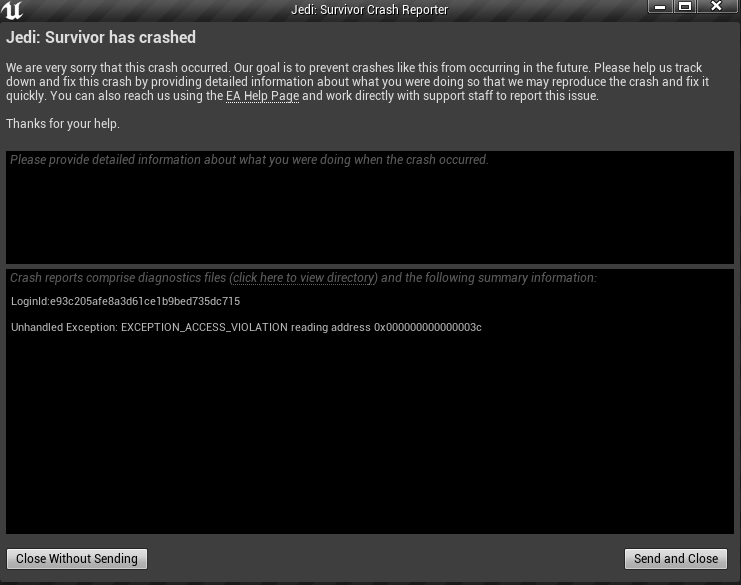
Star Wars Jedi: Survivor has never launched on my account. Not once. Every single launch attempt crashes instantly in Activation64.dll — EA's own DRM authentication module — at address 0x3c. The game never reaches a title screen, never loads a shader, never touches my GPU. It dies during EA's own authentication handshake before the game engine even initializes.
EA's own log file on my PC (EASteamProxyVerbose.log) confirms that a Statsig feature gate called "steam_auto_login" is disabled for my account on every launch attempt. Immediately after, the log shows authenticated:false, and the game exits with error code 3. Every time. Identically. Regardless of what I change on my end.
This means EA's feature flag system has a setting that controls whether Steam purchases are automatically authenticated. That setting is turned OFF for my account. Because the server refuses to authenticate me, the game's DRM module tries to read an authentication object that doesn't exist, hits a null pointer, and crashes.
This is not a hardware issue. This is not a driver issue. This is not a config issue. This is EA's server telling my copy of the game "you are not authenticated" despite owning it on Steam.
EA Agent Confirmed the Fix Exists
On March 19, an EA agent told me directly that "the Studio team has resolved it for all the players." The fix exists. It was deployed globally. But it was never applied to my account. When I asked why, I received a link to verify game files.
EA's own agent confirmed they fixed this exact issue for everyone else, but my account was missed, and instead of applying the fix, they sent me a generic troubleshooting link.
What I've Done — 27 Troubleshooting Steps
I have completed every single thing EA support and the community has ever suggested for this game:
Full EA App uninstall and clean reinstall, EA App cache cleared, license folder purged (license file regenerated but auth still fails), Steam account unlinked and relinked via EA portal, signed in via Steam OAuth, DNS changed to Google and Cloudflare, DNS cache flushed, IPv6 disabled, Steam Verify Integrity (passed every time), game config folder deleted, all EA processes killed before relaunch, EA password reset and fresh sign-in, Steam and EA App set to Run as Administrator, EASteamProxy.exe and EALocalHostSvc.exe set to Run as Admin, all overlays disabled, firewall rules added for EA executables, DxDiag generated and submitted to EA, EA Error Reporter crash report submitted, BIOS confirmed current, full 128GB game reinstall, mods disabled and removed, embedded EA cache searched, legacy Origin path checked, Origin installer repair attempted, and a complete EA registry and data purge.
None of it worked. None of it can work. The block is on EA's server, not my PC.
How EA Has Handled This
16 agents across 8 days. Here is what happened:
The first two agents sent generic crash/freeze help links without reading my case. The third asked for a DxDiag — I sent it — no follow-up. The fourth transferred me immediately. The fifth sent scripted steps I'd already done, then tried to close the chat. The sixth claimed to be Tier 2 but said "there's no such thing" as a manual entitlement reset and closed the chat. The seventh was the first to properly acknowledge the issue and promised a backend escalation — nothing ever came of it. The eighth told me to disable ray tracing for a game that crashes before graphics even load. The ninth transferred me. The tenth sent 6 generic links and said she "reported it." The eleventh transferred me to technical. The twelfth claimed to be the highest authority on live chat, said she'd report to the "game team," then disconnected with a canned message when I asked specific questions. The thirteenth asked me to explain the issue despite having the case number. The fourteenth suggested creating a new Windows admin account. The fifteenth confirmed the Studio team already fixed it globally — then sent a verify game files link. The sixteenth told me they'd share it internally, suggested I post here, and said to watch EA's social media for updates.
Two agents told me to contact Steam. Steam cannot fix this — every failing component (EASteamProxy, Statsig gates, PartnerLink API, Activation64.dll) is EA infrastructure. Steam's only job is to confirm I own the game, which it does correctly every time.
One agent told me updates would be communicated through in-game notifications. For a game I have never been able to launch. Not once.
When I asked one agent to confirm which team the escalation was going to, they said that information was "strictly internal and confidential." When I asked for a timeframe, they said they couldn't provide one and that I should monitor EA's social media for updates on my account-specific server-side issue.
What EA Needs to Do
I have provided EA support with every identifier they need — my EA ID, entitlement ID, the specific Statsig gate that's disabled, and a crash report ID. I am not posting those here for security reasons, but EA has all of them on file under my open case.
The fix is straightforward. Someone with access to EA's Statsig console needs to either add my account to the pass list for the steam_auto_login gate, resalt the gate, or revoke and re-grant my entitlement. This takes less than a minute for someone with the right access. Their own agent confirmed the Studio team already deployed a fix for this exact issue — it just needs to be applied to my account.
Why I'm Really Posting This
I have filed formal complaints through the BBB and the Texas Attorney General's Consumer Protection Division. I'm not doing this because I want a refund or because I want to cause problems. I am doing this because I am tired of gaming companies dismissing customers who are clearly in the right.
I handed EA the exact diagnosis, the exact root cause, and the exact fix — on a silver platter. In return, I got 16 agents cycling through scripts, two incorrect referrals to Steam, a suggestion to watch social media, and a promise of in-game updates for a game that has never launched.
I know Jedi Survivor is not a new game. But the age of the game doesn't change the fact that I paid for a product that EA's own systems are preventing me from using, and EA's own agent confirmed they have the fix but haven't applied it. This kind of treatment needs to stop — not just for me, but for every customer in the gaming community who gets trapped in an endless loop of Tier 1 scripts while the actual problem sits untouched on a server somewhere.
If any EA Community Manager or developer sees this — my open case number is on file. Everything you need is there. Please just apply the fix.