Hello, I need help changing my SWTOR email address
Hello, I need help changing the email address associated with my SWTOR account, which is XxXCorvoXxX. I'm no longer able to log in with the security code I can't use anymore, and when I try to log in with a different password (one-time password), I can't access it because I can't access the linked email address. I'd like to know if it would be possible to remove the duplicate login so I can change the email address associated with this account.. Thank you for your help if you are able to help me
Got the Sweet Tooth Town Freeze? Share What's Happening!
Okay, raise your hand if this sounds familiar: You're absolutely CRUSHING it in Sweet Tooth Town, feeling great, you make a satisfying move and then crickets. Nothing. The game just freezes as you stare at the screen .... Completely stuck. 😏 Unfortunately, the problem persists for players, and I know it's incredibly frustrating. Let's stop the freezing gremlins! To help identify exactly what is occurring, please answer these four questions: Which level is freezing for you? (very important) Where does the freeze occur? During Sweet Play (random level feature)? During regular play (selecting your own level)? Both? When exactly does the game freeze? After making the first move? During a specific animation or effect? At a different point in the level? What are you working with? What browser? (Chrome, Edge, Firefox, etc.) Operating System? (Windows, Mac, etc.) The more specific information we can provide to the team, the better chance they have of fixing this issue for everyone! Even if you've only experienced it once, your input matters. Thank you for taking the time to help improve the game for all of us! Friendly Reminder: Comments such as "me too!" or "please fix this" are understandable and valid 💫 Providing specifics to the team, makes moves!592Views3likes66Comments
Cannot purchase A Way Out because the app thinks I already own it.
Cannot purchase A Way Out because the app thinks I already own it. * On 2018, I added Friend Pass version of the game to my library. Origin app clearly listed it as Friend Pass. * Now on EA App, there is a "A Way Out" entry on my library. Inside of it, it says, "Standard Edition owned" * I install it and start the game. The game says it's Trial Version, and need to buy Full Version According to the EADesktopVerbose.log, it install the "Origin.OFR.50.0002412" offer. This offer is Friend Pass version. Possible solutions: 1- EA App should be updated to distinguish Friend Pass version, and allow to purhase full game. 2- Remove Friend Pass entitlement from my account. I tried this with chat agents, but they cannot do it. ------------ There is a similliar problem on "Kingdowms of Amalur: Reckoning" I only added Demo version to my library on 2014. EA App thinks that I own Standard Edition It installs DR:238385200 offer id The installed game says it is demo version.8Views0likes0Comments
Sims 3 launcher keeps crashing PC
I've tried everything including: clearing the cache new windows reinstalled the whole game checked all my drivers and windows updates repaired the game EA aren't interested in helping me so I thought I'd ask here it is doing my head in. I managed to open the game once and when I needed to restart the game surprise surprise it wouldn't open. It either opens but doesn't properly open and glitches and crashes or it flashes open then shuts itself down. I am on a gaming PC with more than enough specs to play this game so I am confused why it won't work. I've also tried removing all my mods and cc nothing makes a difference. Everything EA have told me to do I have done and nothing has worked. So does anyone have any ideas? Thank you in advance.[Current Issue] Sims 3 "serious error" when loading save
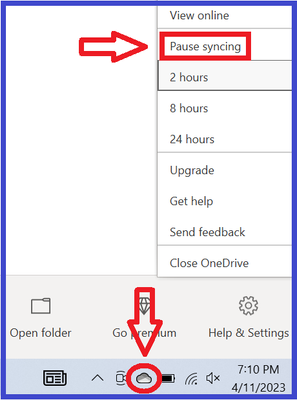
Overview "A serious error has occurred while loading [world name]. It is strongly recommended that you restart the application." This error happens when the game is unable to load the save. There are three known causes, the first more common than the others. The game can't write to the user folder The world the save takes place in isn't installed properly The save is too corrupt to load properly To distinguish among these types of errors, try to load a new save in the same world as the save that threw the error. If it works, you likely have the third issue. If the new save doesn't load, try starting a new save in Sunset Valley. If it works, you likely have the second issue. If it doesn't work, you likely have the first issue. The short version At the moment, this error is usually OneDrive-related, and pausing syncing doesn't help most players. So you may need to stop OneDrive from touching your files at all. Please see this section of the guide for further information, under the spoiler: How to get rid of OneDrive Workarounds 1. The game can't write to the user folder jump to: OneDrive-related issues jump to: antivirus-related issues jump to: other causes When loading a save, the game needs to copy the save data into Documents > Electronic Arts > The Sims 3 > CurrentGame. If it cannot, it typically throws the "serious error." Common causes of this block are OneDrive, an overly protective antivirus, and other assorted permissions issues. OneDrive Currently, the most common cause of the "serious error" is OneDrive blocking access to Documents and therefore preventing Sims 3 from writing to the user folder inside. This is only possible if your Windows account's Documents directory is inside the OneDrive folder. (Your computer will have several Documents folders, but only one is the directory.) To find the location, search in Windows for Command Prompt, open it, and enter this command: reg query "HKCU\Software\Microsoft\Windows\CurrentVersion\Explorer\Shell Folders" /v "Personal" If the file path includes OneDrive, that may be the problem. (Otherwise, see the Antivirus and Other sections below.) For possible OneDrive issues, try pausing syncing. This is not a proper fix, but it's a useful test and interim workaround. To see the option, right-click the cloud icon in the lower-right corner of the screen, or it may be hidden in the Tray (^ icon). If this doesn't help, or you'd like a permanent fix, you may need to move your Documents folder out of OneDrive. If you don't want to do this, or you'd rather test first, an alternative is to create a new admin Windows account and try playing there. Make it local—don't link it to your Microsoft account or any email address—and OneDrive will not be in the picture. If you can load a new save in the new account, it's fine to keep playing there. Or you can get rid of OneDrive entirely: If getting rid of OneDrive doesn't help, please create a new admin Windows account and try playing there, as described immediately above the spoiler. Antivirus An overly protective antivirus can block a program's access to Documents and everything inside. To find out whether this is the cause of the error, try disabling the antivirus, temporarily of course. If it fixes the issue, set an exception for TS3.exe (for an EA App install) or TS3W.exe (with the W, for a Steam install or a disc install that doesn't require the EA App). You may not see the .exe extension, but that's fine, it's the same file. The default location is one of these, depending on the install type: C:\Program Files\EA Games\The Sims 3\Game\Bin C:\Program Files (x86)\Steam\steamapps\common\The Sims 3\Game\Bin C:\Program Files (x86)\Electronic Arts\The Sims 3\Game\Bin If you don't know how to set an exception, google "set exception [antivirus name]" to find a guide. Or see this article for a few examples: https://crinrict.com/blog/2020/10/add-exceptions-to-anti-virus-programs.html Other Causes The Documents directory could be in an unusable location. Or permissions could be broken on the Documents directory, or a folder inside. For more information, expand the relevant spoiler below. Move Documents to a new location: Broken permissions: ↑ 2. The world the save uses isn't installed properly If you can load a new save in a different world, but not in the world in which your main save takes place, that world is probably not properly installed. For Sunset Valley or a world that comes with an expansion (e.g. Twinbrook, Bridgeport), please clear the EA App's cache: https://help.ea.com/en/help/faq/clear-cache-to-fix-problems-with-your-games/ and repair the game: open the EA App game library, and select Sims 3 > Manage > Repair. For a Store (e.g. Riverview, Dragon Valley) or custom (player-created) world, first uninstall it through the launcher's Installed Content tab. Then open Documents > Electronic Arts > The Sims 3 > InstalledWorlds and make sure the .world file for the world you removed is no longer present. If it is, delete it. Open Downloads, in the same Sims 3 folder, and delete the .Sims3Pack file for the world. You can reuse it if necessary, but installing with a new copy is more reliable. Finally, download a fresh copy of the world, install it, and try to start a new save in that world. If it works, the world is now installed correctly, and you can test your main save again. ↑ 3. The save is too corrupt to load properly If you can load a new save in the same world, but your main save throws the "serious error," that save may be too broken to use, but there are a couple of steps you can try. First, open Documents > Electronic Arts > The Sims 3 > Saves, and you'll see a folder with your save name plus another folder with the same name and a .backup extension. For example, you might see SunsetValley.sims3 and SunsetValley.sims3.backup. Rename the save and delete the .backup extension (e.g. SunsetValley1.sims3), and the save will be available to load from the Main Menu. If you can load the backup save, it could still be corrupt enough to be unusable later. So as soon as it loads, use "save as" to rename the save so that your backup is preserved in case you need it later. I would also strongly recommend seeking out mods, specifically NRaas ErrorTrap, Overwatch, and MasterController, to try to repair any corruption. ET and OW do their work in the background, with no need for player input; MC does nothing unless you use it to issue a command. Once the save loads, let the game clock run for a few sim-minutes, then click City Hall and select NRaas > MasterController > Town Options > Reset Everything. This may take a few minutes, depending on the speed of your computer and the complexity of the save. When it's done, wait a few more sim-minutes, then "save as," quit, reload the game, and continue playing. If you cannot load the backup save, start a new save in the same world, pick a premade household, play for a few sim-minutes, save your progress, and quit. Open the folder for your backup save, right-click the .nhd file for the world the save takes place in, and select Copy. Open the folder for the new save you just created and delete the .nhd file for that world. Right-click and Paste the .nhd file from your backup save. Then try to load the "new" save. The thumbnail at the Main Menu won't update, but if you can load the save, you'll see your previous save, not the new one. If your sims have traveled to other worlds in the previous save, and you would like to preserve that progress, you'll need to copy over the .nhd files from those worlds as well, and the TravelDB.package file. But please test first with only the homeworld's .nhd file. I would recommend the same mods as above in this case as well. Saves that are almost too corrupt to load won't last much longer without help. ↑ If you need further help with this issue, please post in this thread. State which of the three problems you have, from the list at the beginning of this guide, and what troubleshooting steps you've tried already. ↑10KViews8likes373Comments
Issue redeeming Sims 3 World codes
Hi, Not sure what’s going on, so hoping someone here can help. I bought the Sims 3 World Bundle today and got 2 active codes, but I can’t redeem either of them. I tried both codes on these two sites: store.thesims3 myaccount.ea Neither site works for me and the codes won’t go through. Has anyone had this problem before? Is there another place to redeem Sims 3 world bundle codes, or is this an EA or Sims 3 Store issue? Any help would be appreciated. Thanks!255Views2likes30CommentsUnable to launch game due to "not owning the game"
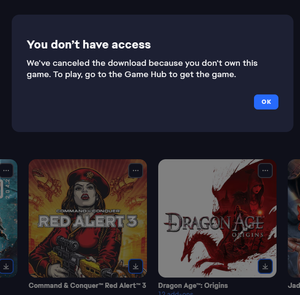
I've been working with the support to try and resolve this, but they directed me to the forums. I can't launch my Red Alert 3 from my library. I bought the game back when it came out on CD-Rom and added it on Origin as was required. After the update to the EA-app (and I think the launch of the C&C remastered collection). The game no longer is able to download as I get an error messages stating: Which is silly as I'm looking at the CD-Rom lying in front of me. The game doesn't have its own gamehub and the only option under the three dots is to download it, which gives this error. Having down the usual gamut of uninstalling, repairing, cache clearing, restarting etc. The service team couldn't help me further and directed me to post over here. Is there anyone who can help me out?204Views3likes8Comments