Forum Discussion

EbonySimmer's avatar
EbonySimmer
Seasoned Newcomer
4 days ago

Sims 3 Crashes When Loading A Save

Recently my game has been crashing when I try to load up my save. I thought it was my mods folder that was causing the issue. However, when I removed the mods folder then tried loading that save it would get stuck on the loading screen for over 30 mins. Another weird thing that I noticed is when I'd open the sims 3 launcher it'd say that I'm playing with no expansions or stuff packs.  Then when I'd close it and reopen it my expansions and stuff packs would be loaded. I'm not sure what's going on with my game. Pls HELP!

9 Replies

  • EbonySimmer​  Are you sure that your expansions and stuff packs were loading when you tried to load your save?  You could check during that play session by clicking the New Game button—you'd either see the worlds that came with EPs or you wouldn't.  You could then choose your main save instead.

    What mods are you using, and does it help to try to load the save with only NRaas mods present?  Please try this if you use any of them and if you haven't done this already.

    Please also let me know whether the backup save loads.  Ideally you'd have your own, but even if not, you can test with the automatic backup the game creates.  Open Documents > Electronic Arts > The Sims 3 > Saves, and you'll see a folder with your save name, plus another folder with the same name and a .backup extension.  Rename the save and delete the .backup, so the folder name ends in sims3 , and this version of the save will be available to load at the Main Menu.

  • EbonySimmer's avatar
    EbonySimmer
    Seasoned Newcomer
    3 days ago

    puzzlezaddict​ In the dashboard it says all my expansions and stuff packs are loaded but I'm not able to play in the worlds that come with them, just base game worlds. 

    I'm using a bunch of mods and CC. Nraas mods are some of what I use. I loaded the game with just Nraas mods and I was able to get in. 

    I also don't have a backup extension for that save.

  • EbonySimmer​  When you say you can't play in the EP worlds, are they unavailable, or can you choose them but not load them?  If they're unavailable, that means the EPs aren't loading.  In that case, please clear Edge's Internet Explorer-mode data, which is where the launcher stores your pack selection; this data can become corrupted.  Clearing the data will cause your packs to become unchecked in the launcher, so re-check them and see whether the EP-related content is available.

    If you can select one of these worlds at the Main Menu but can't load the new save, let me know what happens when you try.

    For any save that exists, the game will have made a backup copy unless you've only saved one time, or unless you always use "save as."  If you always use "save as," just use one of those manual backups.  If you always use "save as" and give the save the same name, that's bad, don't do that, and yes that would delete the previous save rather than pushing it to backup status.

  • EbonySimmer's avatar
    EbonySimmer
    Seasoned Newcomer
    3 days ago

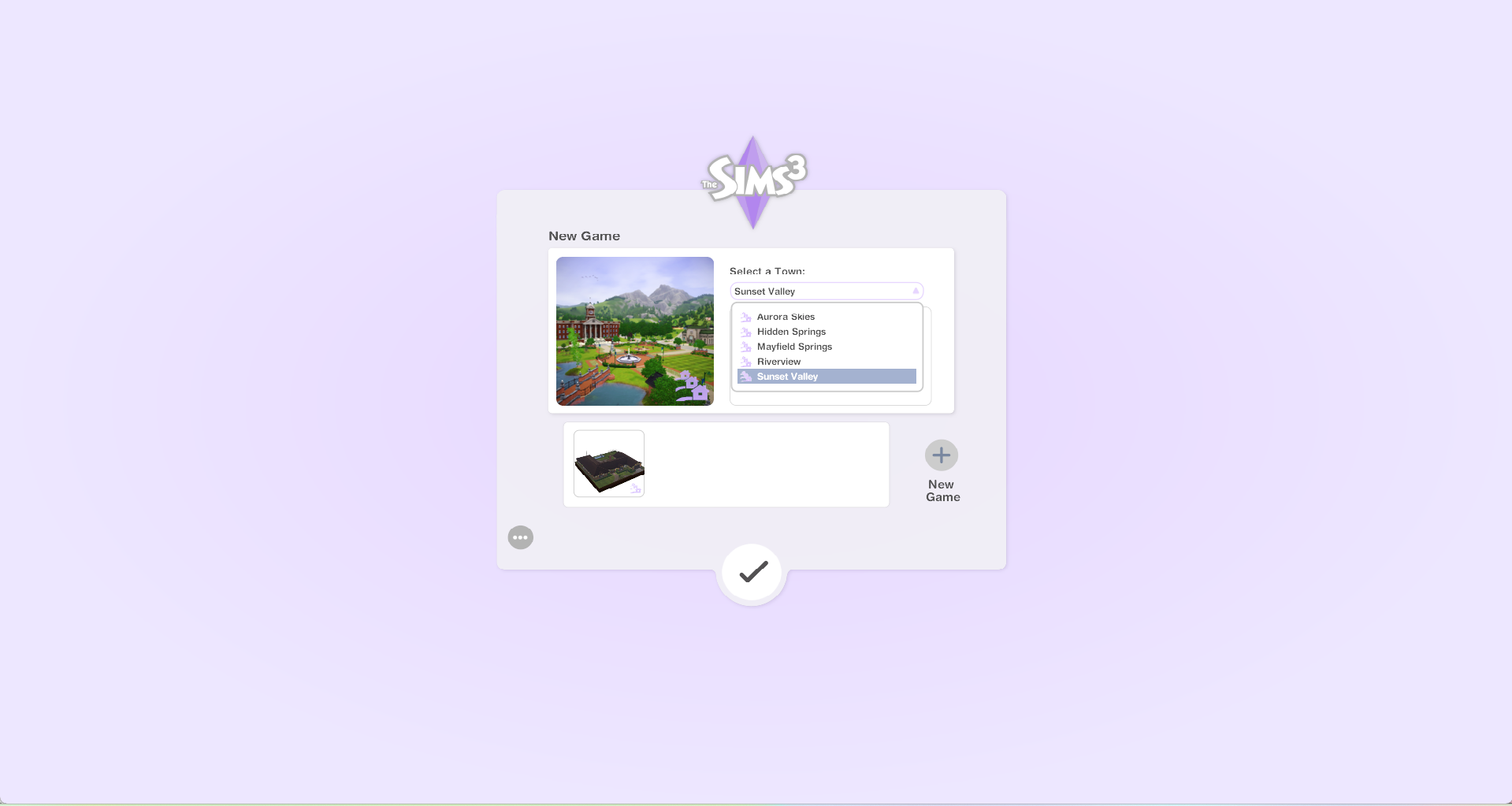
    puzzlezaddict​ I can't choose EP worlds in the dropdown menu. I attached a screenshot of the worlds I'm able to choose. 

    I also don't have any other saves but the one I am currently trying to play in. 

    I did used to save my game using "save as" under the same name which might by why I don't have a backup... (as you explained previously)

    Lastly, I cleared my internet explorer data and opened the game but I still don't see my EP's or SP's in game. I attached a screenshot of the launcher I opened while in game.


  • EbonySimmer​  Right, so the game isn't recognizing you own your EPs and SPs.  Clearing Edge's IE-mode data only clears the selection of those packs, as in, whether you've checked them off; it doesn't have anything to do with loading the list in the first place.

    I thought that you were talking about the launcher when you said the dashboard lists all your packs, but did you mean the EA App?  And regardless, if you clear the App's cache and repair the game (Sims 3 > Manage > Repair), do your packs show in the launcher again?

    https://help.ea.com/en-us/help/faq/clear-cache-to-fix-problems-with-your-games/

  • EbonySimmer's avatar
    EbonySimmer
    Seasoned Newcomer
    3 days ago

    puzzlezaddict​ That's the thing. When I open the launcher, it'll sometimes show none of my EP's or SP's. I usually have to close and open the launcher a few times for them to "show up". Once I check all of them then start the game up, I'm not able to see the EP worlds. I cleared the apps cache, and I am still having the same issue; where I can't choose EP worlds or load my save. I'm not sure what else to do :(


  • EbonySimmer​  I understand, but I would like to know whether clearing the EA App's cache and repairing the game improves things.  Clearly your packs aren't being recognized all the time, but the fact that they're being recognized sometimes means this is more likely an issue on your computer than on the account side (although it's not definitive).  So please try my suggestion.

    The next step would be to do a clean uninstall and reinstall of Sims 3 and the EA App, as described here:

    [Read First] Running Sims 3 in Windows | EA Forums - 8323446

  • EbonySimmer's avatar
    EbonySimmer
    Seasoned Newcomer
    2 days ago

    puzzlezaddict​ Clearing the EA apps cache and repairing the game did not work. Also, I’ve had this same issue on my other laptop and reinstalling the game did fix things temporarily but I need to know the long term solution for this issue.

  • EbonySimmer​  A clean uninstall and reinstall is not the same as a regular uninstall, which is why I wrote a guide for the clean uninstall process.  It can also be helpful to reinstall to a different location, whether a new folder on the same drive or a different drive.