Forum Discussion

erisardor's avatar
erisardor
Seasoned Novice
10 months ago
Solved

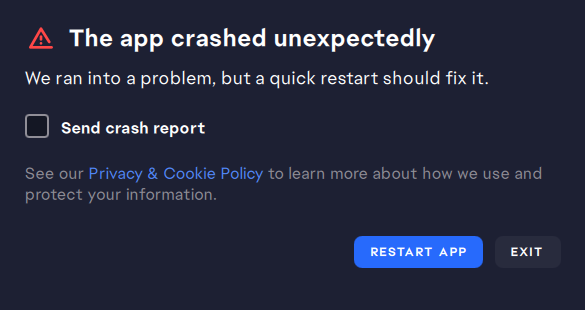
EA app closes itself/crashes when trying to open

Hi, 

Things I have tried:

  • Running as administrator
  • Uninstalling the EA app
  • Running the repair tool from the uninstaller
  • Running the 'recovery' tool when it's working (it just stops working again when i try to open it a second time after running it). 

Description of problem:

It takes around 20-50 tries to get the EA app not to crash when I try to open it so I can play Sims 4, or update games, etc. What happens is it starts to open, nothing loads, then it closes. Sometimes it's faster, sometimes it looks like it's working and then suddenly closes. I can't predict when it will decide to work or under what conditions because nothing is consistent, but it's really annoying. Please help. :(

I've attached a screenshot of how it looks before it crashes because that's all I really have. Every now and then it will say it crashed and ask me to send a crash report but almost every time it just crashes with nothing else. It also crashes when it lets me get into it occasionally and I try to run Sims 4. 

  •  erisardor​ sourworm01​ CHERN1KA_TRES​ v3o60o4u1hts​ 

    okay i went to best buy a couple weeks ago and they helped me find the fix for me it was something plugged into my pc stopping it from running correctly try EVERY port being unplugged and only your monitor mouse and keyboard for me it was my keyboard that was causing the issue whenever its plugged in it stops working so i unplug it and EA works perfectly fine now and no you don't have keep your keyboard unplugged once it loads in you can plug back in whatever you unplugged

32 Replies

  • EA_cuervo's avatar
    EA_cuervo
    Icon for Community Manager rankCommunity Manager
    10 months ago

    Hey erisardor​,

    I just discussed this further with our team, and it would be really helpful if you could also share an EA Error Report ID with us. If you can, please follow the steps below and post here the report ID: 

    On PC

    1. Go to Start or press the Windows key on your keyboard, and enter EA Error Reporter.
      • Alternatively, you can copy and paste the following path into the Windows Explorer address bar: C:\Program Files\Electronic Arts\EA Desktop\EA Desktop
      • Once you’re in the folder, select the ErrorReporter application.
    2. Choose the Type of problem you’re having.
    3. Tell us about the issue you’re having in the Description of problem field.
      • If you’re running the Error Reporter as part of your EA Help case, include your Case Number in the Support Ticket Number (Optional) field.
      • You can find your Case Number in your cases on EA Help or inside any support emails we sent you about this issue.
    4. Check the box next to By clicking this box, you agree to share diagnostic information with EA.
    5. Click Submit report and wait for it to complete.
    6. Write down your Report ID for safekeeping.

    Let me know if you have any questions! 

  • erisardor's avatar
    erisardor
    Seasoned Novice
    10 months ago

    As I said before it's impractical and even conflicts with the windows defender system tray being active so it makes no sense for me to disable all of these things. Is there no way to get some actual tech support help that can solve the problem without being an enormous inconvenience? I own almost all of the expansion and game packs, it would cost me probably close to a thousand dollars to switch to Steam. 

  • EA_cuervo's avatar
    EA_cuervo
    Icon for Community Manager rankCommunity Manager
    10 months ago

    Hey erisardor​,

    Thanks for sharing all the steps you've tried so far. It seems that one or more of the programs set to launch at startup are conflicting with the EA app. I see you mentioned that you identified four programs triggering the problem. If these programs are not essential to running in the background, you have the option to keep them disabled at startup, and you should still be able to run them without going through this process again (depending on what program it is). However, that's something for you to decide. 

  • erisardor's avatar
    erisardor
    Seasoned Novice
    10 months ago

    Hi again,

    I've done some messing around with clean boot. It will work, tentatively, if I have almost every service disabled and my windows defender startup disabled. That said, I have gone through and checked and at least four things are triggering this crash when enabling/disabling individually. It wouldn't really be realistic or practical for me to disable all of these services every time I want to run the EA app.

    Is there any other solution? I'm really wishing I had not bought my Sims games through EA now, if it was via Steam I'd be playing no problem. 

  • erisardor's avatar
    erisardor
    Seasoned Novice
    10 months ago

    I re-enabled the 'ea background services' from the msconfig services list so it would run. As of restarting, it is still crashing, but now it lets me get into the EA app for a moment before it crashes. 

  • erisardor's avatar
    erisardor
    Seasoned Novice
    10 months ago

    Hi,

    I did CCleaner but it still wasn't working. I started with a the clean boot and this error came up for the first time. When I hit 'run update' it says it is already up to date. 

  • EA_cuervo's avatar
    EA_cuervo
    Icon for Community Manager rankCommunity Manager
    10 months ago

    Hey there, 

    I'm sorry to hear your EA app is crashing. Thank you for sharing the steps you've already tried so far; that's very helpful. 

    There are some further steps you can try; I suggest starting with a Clean Boot: How to clean or safe boot your computer. If a Clean Boot doesn't fix the problem, you can try using CCleaner to uninstall the EA app and clear out issues and errors.

    I hope this helps.

    While we suggest using CCleaner, EA does not provide user support for this program–use it at your own risk. Please follow any installation guides straight from CCleaner when installing and performing program setup. You can find help on CCleaner’s support page.

    EA does not benefit in any way, monetarily or otherwise, from the promotion of this program.

Featured Places

Node avatar for EA app Technical Issues & Bugs

EA app Technical Issues & Bugs

Having issues with the EA app? Join us to report bugs, and find help with downloads, DLCs, purchases, and login errors.Latest Activity: 40 minutes ago
8,855 Posts