Forum Discussion

isadorak1's avatar
isadorak1
Seasoned Newcomer
13 hours ago

CC Concern/Need Advice

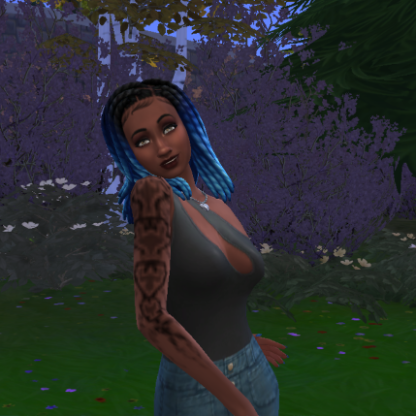
Hi all! I just started using CC on my Lenovo Windows 11 and this glitch started showing up. I removed a bunch of CC clothes, shoes and hair that I didn’t use and also after Mod checker said the mesh graphics had issues. I do use skin overlays such as “doe skin” by Twisted Cat, could that be the issue? I have Mod checker, better exceptions and Sims4Studio downloaded. The ONLY update Sims4Studio found was for lashes and makeup which got updated. This glitch has ONLY been seen on townies. Please let me know any next’s steps I should take or any other websites that could help! 

1 Reply

  • Often, the only solution is to do 50-50 testing on CC to find what's broken. There are no mod checkers at all that will identify all broken CC. You can start with the Previously Broken mods and CC list (it's updated at every patch) to find ones to delete outright. After you delete, also delete the file called localthumbcache to clear out remaining in-game cached info (it doesn't usually matter, but when it does, it matters a lot). Instructions on 50-50 testing are in How to Use Mods and CC under vanilla and 50-50 testing . All these resources are pinned in this forum to make them easy to re-find. 

    If you narrow down a cause, please do let me know so I can keep the Broken CC list up-to-date.

Featured Places

Node avatar for The Sims 4 Mods & Custom Content

The Sims 4 Mods & Custom Content

Find tips, tutorials and troubleshooting for mods and custom content, and The Sims 4 patch files here.Latest Activity: 3 hours ago
16,961 Posts