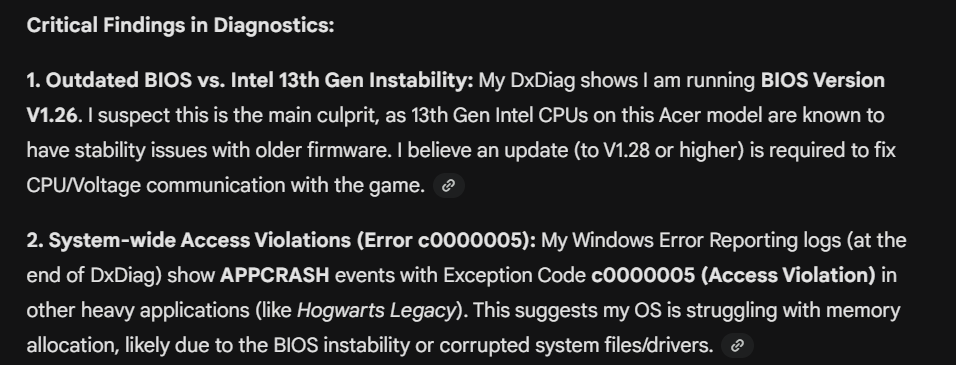
girlinyellow Wow, Gemini really has no idea what it's talking about. First, the issue with instability on 13th- and 14th-gen Intel processors either never happened on your particular CPU, or it was rare enough that I've never seen an example. The affected models skew towards the high end, e.g. 13700K or 13980HX.
Second, an access violation simply means that an application tried to access memory in a way that is not supported or permitted. Windows detects this and closes the program. Access violations are so generic that they're useless by themselves—you'd need more information, or a real-time debugging setup, to get anything out of them. Memory allocation is not usually the issue. A bad driver or outdated BIOS can certainly cause this type of error, with a driver being the more common culprit, but so can almost anything else: game bugs, bad mods or custom content, a conflict with other software, an overactive antivirus, even a hardware issue. I'm not saying you have a hardware issue, only that the error is truly that generic.
The access violations your dxdiag lists from Hogwarts Legacy crashes all point to the same component of Windows, one that programs interact with when using other Windows resources. So it's possible that your system has a corrupt Windows file, although that usually causes more problems than just game crashes. Still, it's worth running a couple of basic checks of your Windows system files:
- Click Windows key-X
- Choose either “PowerShell (Administrator)” or “Windows Terminal (Administrator),” whichever option is offered
- Inside the window that appears, copy and paste “DISM.exe /Online /Cleanup-image /Restorehealth” without quotes, and enter
- The system will start validating soon. If it throws an error, please list it here
- After it reaches 100%, click Windows key-X again
- Again, choose “PowerShell (Administrator)” or “Windows Terminal (Administrator)”
- Inside the window, copy and paste “sfc /scannow” without quotes, and enter
- Post the message you receive here
Restart your computer, open Windows Settings > Update & Security, and click the box to check for updates. If any install, restart again afterwards. This should also clear up the Edge update errors your new dxdiag lists.
If this doesn't help, did you try playing with your computer offline? I'd actually try it again after running DISM and sfc even if it didn't work the first time.